
If your car’s check engine light just came on, you might feel a bit lost. But what if you could instantly know what’s wrong without waiting for a mechanic?
That’s exactly what an OBD2 scanner lets you do. With this handy tool, you get the power to read your car’s health right from your driveway. You’ll learn how to use an OBD2 scanner step-by-step, so you can save time, avoid costly repairs, and feel confident about your vehicle’s condition.
Ready to take control of your car’s diagnostics? Keep reading!
Credit: www.triumphbobberforum.com
What Is An Obd2 Scanner
An OBD2 scanner is a tool used to read vehicle data. It connects to your car’s computer system.
This scanner helps find problems by showing error codes from the engine or other parts.
Basic Features
OBD2 scanners have several basic features that make them useful for car owners and mechanics.
- Read and clear diagnostic trouble codes
- Display live engine data and sensor readings
- Check engine light status
- Show freeze frame data for error conditions
- Help monitor vehicle emissions
Types Of Scanners
There are different types of OBD2 scanners. Each type fits different needs and budgets.
| Type | Description |
| Basic Code Readers | Read and clear simple codes, easy to use |
| Professional Scanners | Offer detailed data, support many car brands |
| Bluetooth/Wireless Scanners | Connect to phones or tablets for convenience |
| Handheld Devices | Portable scanners with built-in screens |
Locating The Obd2 Port
The OBD2 port is a small connector used to read vehicle data. Finding it is the first step to using an OBD2 scanner.
This port is usually easy to spot but can be hidden in some cars. Knowing common locations helps save time.
Common Port Locations
The OBD2 port is often under the dashboard on the driver’s side. Look near the steering column or pedals.
- Under the dashboard, near the steering wheel
- Below the driver’s side kick panel
- Near the center console or under the glove box
- Inside the fuse box cover
Some cars place the port in less obvious spots. Check your vehicle’s manual if you cannot find it.
Tips For Easy Access
| Tip | Why It Helps |
| Use a flashlight | Improves visibility under the dashboard |
| Look for a trapezoid-shaped connector | This shape is standard for OBD2 ports |
| Clear away loose items | Makes access easier and safer |
| Consult the car manual | Gives exact port location for your model |
Connecting The Scanner
Connecting an OBD2 scanner is an easy process that helps you read your vehicle’s diagnostic information. This guide explains how to connect the scanner properly to get accurate results.
Follow these steps carefully to prepare your vehicle and connect the scanner without issues.
Preparing Your Vehicle
Before connecting the OBD2 scanner, make sure your vehicle is ready. This helps ensure the scanner can communicate with your car’s computer system.
- Turn off the engine and remove the key from the ignition.
- Locate the OBD2 port, usually under the dashboard near the steering column.
- Clear any objects blocking access to the port.
- Ensure the vehicle’s battery is charged to avoid power interruptions.
- Keep your vehicle in park or neutral with the parking brake on.
Step-by-step Connection
After preparing your vehicle, follow these connection steps to link the scanner correctly.
- Plug the scanner’s connector into the OBD2 port securely.
- Turn the vehicle’s ignition to the ON position without starting the engine.
- Power on the OBD2 scanner; some models turn on automatically.
- Wait for the scanner to detect your vehicle’s system.
- Follow the scanner’s on-screen prompts to begin diagnostics.
| Connection Step | Details |
| Locate OBD2 Port | Under dashboard near steering wheel |
| Plug Scanner In | Firmly insert the connector into the port |
| Ignition On | Turn key to ON without starting engine |
| Power Scanner | Check for scanner’s power light or screen activation |
| Begin Scan | Follow instructions on scanner display |
Reading Diagnostic Codes
Using an OBD2 scanner is simple. It helps you understand your car’s health. Reading diagnostic codes is the first step.
These codes tell you what’s wrong with your car. They help you decide if you need a mechanic.
How To Scan For Codes
Plug the OBD2 scanner into the car’s port. This port is usually under the dashboard. Turn on the car’s ignition, but don’t start the engine.
The scanner will start reading the car’s computer. It shows a code on its screen. This code tells you what might be wrong.
- Connect scanner to the OBD2 port
- Turn ignition on
- Read the code on the scanner
Interpreting Results
Once you have the code, look it up in the scanner’s manual. The manual explains what each code means.
Some codes are simple, like a loose gas cap. Others might need a mechanic to fix. Knowing the code helps you decide the next steps.
| Code | Meaning |
| P0300 | Random/Multiple Cylinder Misfire Detected |
| P0171 | System Too Lean (Bank 1) |
Clearing Error Codes
An OBD2 scanner helps find problems in your car. It reads error codes from the car’s computer. Clearing these codes can turn off the check engine light.
Knowing when and how to clear error codes keeps your car running well. It also helps you check if repairs worked.
When To Clear Codes
Clear error codes only after fixing the problem. If you clear codes too soon, the issue may return.
Sometimes codes appear by mistake. Clearing codes can reset the system and turn off the warning light.
- After repairing a car problem
- If the code is old and not active
- To reset the check engine light
- When you want to test if a fix worked
Steps To Reset Codes
First, connect the OBD2 scanner to your car’s port. The port is usually under the dashboard.
Turn on your car’s ignition but do not start the engine. This powers the scanner.
- Turn on the scanner and wait for it to connect
- Select “Read Codes” to see current errors
- Note any codes if needed for repair
- Choose “Clear Codes” or “Erase Codes” option
- Confirm the action if the scanner asks
- Turn off the ignition and disconnect the scanner
- Start the car and check if the light is off

Credit: www.youtube.com
Using Live Data
An OBD2 scanner reads live data from your car’s engine. This data helps you see how your engine works in real time.
You can check many engine parts and find problems early. Live data shows what is happening inside your car.
Monitoring Engine Parameters
Live data lets you watch engine parts like speed, temperature, and fuel flow. These numbers change as you drive.
Watching these values helps you spot issues. For example, a high engine temperature means your car might be overheating.
- Engine RPM (Revolutions Per Minute)
- Coolant Temperature
- Fuel Trim Levels
- Oxygen Sensor Readings
- Throttle Position
Benefits Of Real-time Data
Real-time data helps you fix problems before they get worse. You can save money on repairs by acting fast.
It also helps mechanics understand your car’s condition better. They use live data to make accurate repairs.
- Quickly identify engine problems
- Improve car performance
- Save money on repair costs
- Reduce car breakdown risks
- Get clear information for mechanics
Advanced Scanner Features
An OBD2 scanner offers more than just reading error codes. It has advanced tools that help you understand your vehicle better.
These features give detailed data to diagnose issues and check the car’s health accurately.
Freeze Frame Data
Freeze frame data captures the vehicle’s status when a fault happens. It shows conditions like engine speed and temperature at that moment.
- Engine RPM
- Vehicle speed
- Fuel system status
- Engine coolant temperature
- Short-term fuel trim
This data helps you see what caused the error and fix the problem faster.
Emissions Testing
OBD2 scanners can check your car’s emissions system. They read codes related to pollution controls and monitor key sensors.
| Feature | Purpose | What It Checks |
| Read Emission Codes | Identify issues | Oxygen sensors, catalytic converter |
| Monitor Readiness | Check system status | EVAP system, fuel system, catalyst |
| Live Data | View emissions data | Exhaust gases, sensor outputs |
Common Troubleshooting Tips
An OBD2 scanner is a useful tool for diagnosing car problems. Sometimes, it may not work perfectly. Here are common troubleshooting tips to help.
These tips will guide you in solving issues such as connection problems or inaccurate readings.
Scanner Not Connecting
If your scanner does not connect, start by checking the OBD2 port. Make sure it is clean and secure.
- Inspect the OBD2 port for dust or damage.
- Ensure the ignition is on.
- Check the scanner’s cable for any cuts or breaks.
- Verify that the vehicle’s battery is charged.
Inaccurate Readings
Inaccurate readings can be confusing. Ensure you have the latest software updates for your scanner.
| Issue | Possible Solution |
| Scanner not responding | Reboot the scanner |
| Data mismatch | Update scanner software |
| Connection drop | Check cable stability |
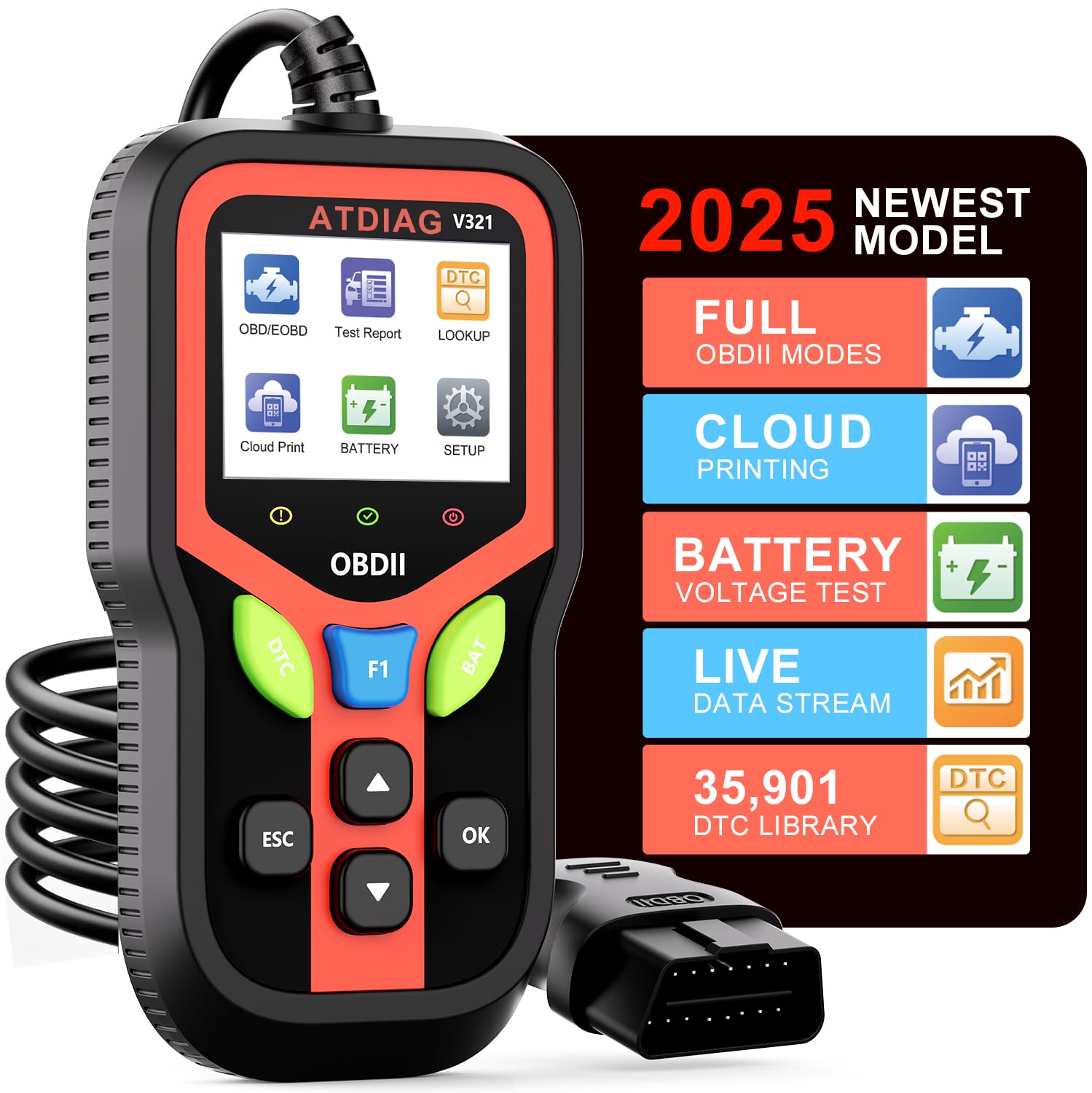
Choosing The Right Scanner
An OBD2 scanner helps you find car problems fast. Picking the right scanner makes scanning easier and more useful.
Think about your needs before buying. Some scanners fit small jobs, others fit big jobs and pros.
Budget Options
Budget scanners are good for basic checks. They show error codes and reset lights.
These scanners are simple to use and cost less. They work well for most everyday cars.
- Read and clear engine codes
- Small and portable design
- Easy to connect to the car
- Usually no extra apps needed
Professional Grade Tools
Professional scanners offer detailed reports. They support many car models and systems.
These tools help mechanics find complex issues. They often include software updates and extra features.
- Live data and sensor tests
- ABS, airbag, and transmission scans
- Software updates for new cars
- Advanced troubleshooting options
Credit: www.amazon.com
Frequently Asked Questions
What Is An Obd2 Scanner Used For?
An OBD2 scanner reads diagnostic trouble codes from your car’s computer. It helps identify engine and system issues quickly. This tool is essential for timely vehicle maintenance and repair.
How Do I Connect An Obd2 Scanner To My Car?
Locate the OBD2 port under your dashboard. Plug the scanner into the port securely. Turn on your car’s ignition without starting the engine to power the scanner.
Can An Obd2 Scanner Reset Check Engine Lights?
Yes, most OBD2 scanners can reset check engine lights. After fixing the issue, use the scanner to clear trouble codes. This turns off the warning light on your dashboard.
Are Obd2 Scanners Compatible With All Vehicles?
OBD2 scanners work with most cars made after 1996. However, some models or manufacturers may require specific scanners. Always check your vehicle’s compatibility before purchasing.
Conclusion
Using an OBD2 scanner helps you find car problems fast. It saves time and money on repairs. The tool is simple and works with most cars. Just plug it in, read the codes, and understand the issues. Regular checks keep your car healthy and safe.
Start using an OBD2 scanner today to stay in control. It makes car care easier for everyone.







