
Have you ever wished you could know exactly where your car is at any moment? Whether you want to protect your vehicle from theft, keep an eye on a teen driver, or simply track a rental, learning how to track a car using GPS can give you peace of mind.
You’ll discover simple steps and practical tips to start tracking your car easily and effectively. By the end, you’ll feel confident in using GPS technology to stay connected with your vehicle anytime, anywhere. Keep reading to unlock the secrets of smart car tracking!

Credit: blog.eyespysupply.com
Choosing The Right Gps Tracker
Tracking a car with GPS helps you know its exact location. Choosing the right tracker is important to get accurate results. You must consider the type, features, and cost.
This guide explains different GPS trackers, key features to look for, and how budget affects your choice.
Types Of Gps Trackers
There are several types of GPS trackers for cars. Each one has unique uses and benefits.
- Real-time Trackers:Send live location updates to your phone or computer.
- Passive Trackers:Store location data to review later. They do not send live updates.
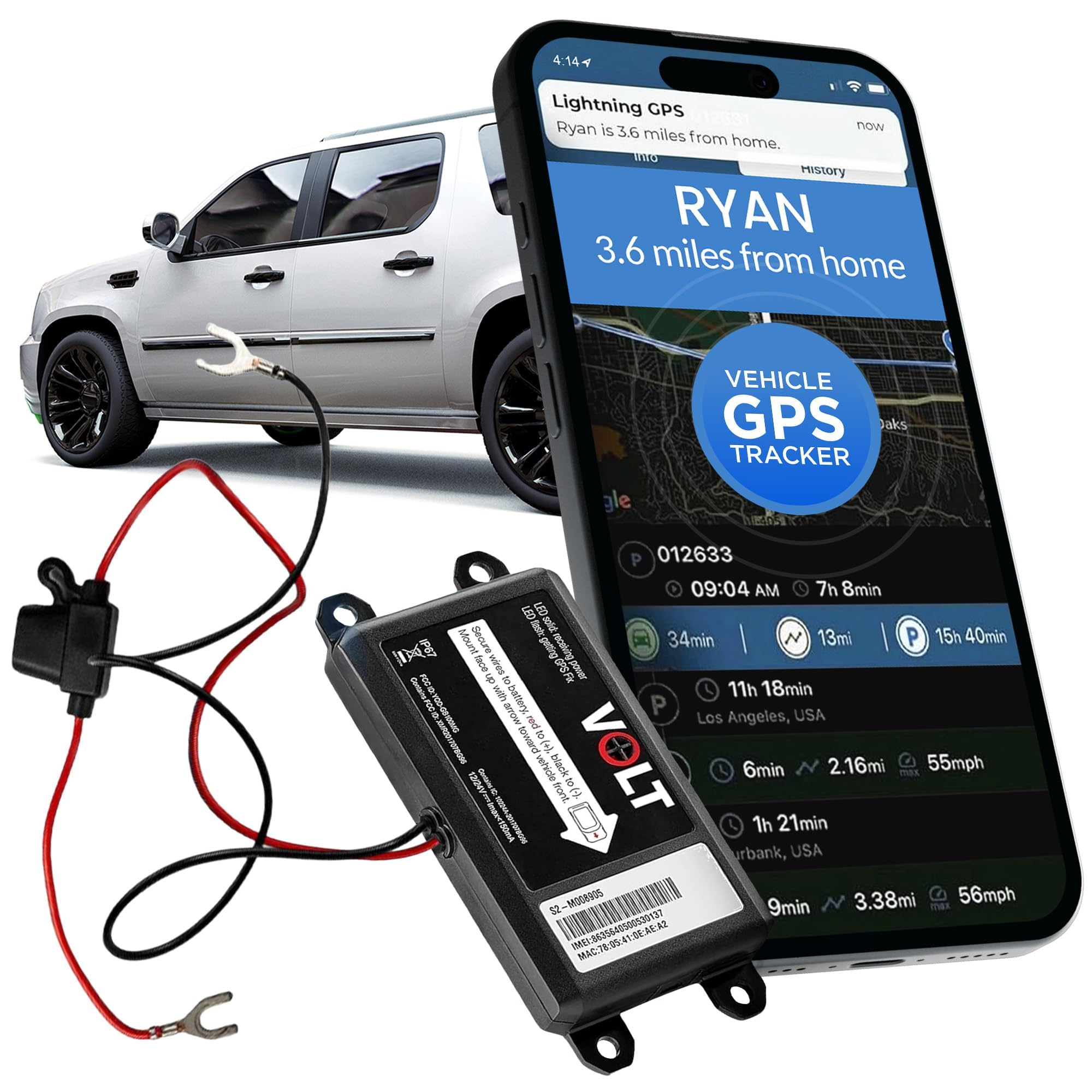
- OBD Trackers:Plug into the car’s OBD-II port. Easy to install and get power from the car.
- Hardwired Trackers:Connect directly to the car’s battery for constant power.
- Magnetic Trackers:Attach to the car’s metal parts with a strong magnet. Portable and hidden.
Key Features To Consider
Choosing the right GPS tracker means looking at features that match your needs.
| Feature | Why It Matters |
| Battery Life | Long battery means less charging and better tracking. |
| Real-Time Tracking | See the car’s location instantly on your device. |
| Geo-fencing | Get alerts if the car leaves or enters set areas. |
| Size and Installation | Small size helps hide the tracker; easy install saves time. |
| History Storage | Ability to view past routes and locations. |
| Alerts and Notifications | Receive warnings for speeding, movement, or tampering. |
Budget And Subscription Plans
GPS trackers vary in price. Some need monthly fees for data services. Choose one that fits your budget.
- Initial Cost: The price of buying the GPS tracker device.
- Subscription Fees: Monthly or yearly fees for tracking services and data.
- Data Limits: Some plans limit how much tracking data you can use.
- Contract Terms: Check if you must sign a long-term contract or pay as you go.
Installing Your Gps Device
Installing a GPS device in your car helps you track its location easily. Proper installation ensures the device works well and stays hidden.
This guide covers where to place the GPS, how to connect its power, and using special OBD-II port trackers.
Placement Options For Accuracy
Where you put the GPS affects how well it receives signals. Place it where the device can get a clear view of the sky.
Common places include under the dashboard or near the rear window. Avoid metal covers that block signals.
- Under the dashboard on the driver’s side
- Behind the rear window shelf
- Inside the glove compartment (if signal allows)
- Near the windshield but hidden from view
Wiring And Power Supply
Your GPS device needs power from the car’s electrical system. It can connect to the battery or fuse box for a steady supply.
Use proper wiring tools and follow safety rules. A loose wire can cause device failure or damage.
- Connect to constant power for 24/7 tracking
- Use a fuse tap to avoid damaging the fuse box
- Secure wires with tape or clips to prevent movement
- Disconnect the battery before starting installation
Using Obd-ii Port Trackers
OBD-II port trackers plug into your car’s diagnostic port. They draw power directly and do not need extra wiring.
This option is easy to install and remove. It works well for vehicles made after 1996 that have an OBD-II port.
- Find the OBD-II port under the dashboard
- Plug the GPS tracker firmly into the port
- Check if the device is working via its app or indicator light
- Remove easily when needed without tools
Setting Up Tracking Software
Tracking a car using GPS starts with installing the right software. This software connects your device to GPS satellites.
Once set up, you can watch the car’s location on your phone or computer in real time.
Compatible Apps And Platforms
Choose tracking apps that work with your device. Some apps run on phones, others on computers.
- Mobile apps for iOS and Android
- Web-based platforms for any browser
- Dedicated desktop software for Windows and Mac
- Cloud services with multi-device access
Configuring Alerts And Notifications
Set alerts to get notified about important events. Alerts help you act fast if the car moves unexpectedly.
| Alert Type | Purpose | Delivery Method |
| Speed Alert | Notify if car speeds | SMS or Email |
| Geofence Alert | Alert when car leaves an area | Push Notification |
| Battery Alert | Warn if GPS device loses power | |
| Movement Alert | Detect unexpected car movement | SMS |
Real-time Vs. Historical Data
Real-time data shows the car’s current location. Historical data records where the car has been.
- Real-time tracking updates every few seconds
- Historical reports show past routes and stops
- Use real-time for immediate actions
- Review historical data for long-term analysis

Credit: alfred.camera
Interpreting Gps Data
Tracking a car using GPS gives you information about its location. This data helps you understand where the car is and how it moves.
Learning to read GPS data is important. It lets you see maps, routes, and any unusual actions.
Reading Maps And Routes
GPS data shows the car’s position on a map. You can follow the path it took over time. This helps you see the start and end points of trips.
Maps often display roads and landmarks. Routes are lines that connect the places where the car moved. This makes it easy to track the journey.
- Look for the car’s current location marker
- Check the route line for the path traveled
- Note stops or pauses along the route
- Use zoom to see details or a bigger area
Identifying Unusual Activity
Unusual activity means the car is not moving as expected. It could be driving off-route or stopping in strange places. Spotting this can warn you of possible problems.
Look for sudden stops, long idle times, or routes that do not match normal patterns. These signs can help you react quickly.
- Unexpected detours or route changes
- Long stops in unknown areas
- Movement at odd hours
- Speed changes that seem unsafe
Using Geo-fencing Features
Geo-fencing sets virtual borders on a map. You get alerts if the car enters or leaves these areas. This helps you monitor car movements closely.
Use geo-fencing to watch important zones like home, work, or restricted places. It gives extra control over where the car goes.
- Create zones on the GPS map
- Receive alerts for entry or exit
- Set times for when zones are active
- Track how often the car crosses zones
Maintaining Your Gps Tracker
Keeping your GPS tracker in good condition is important. This ensures accurate tracking and long-lasting performance.
Proper maintenance can prevent issues and extend the lifespan of your device. Here are some tips to help you maintain your GPS tracker effectively.
Battery Life And Charging Tips
Battery life is crucial for your GPS tracker’s reliability. Check the battery status regularly to avoid losing signal.
Charge your GPS tracker using the provided charger. Avoid overcharging to prevent battery damage.
- Charge the device when the battery is low
- Avoid extreme temperatures when charging
- Use only the recommended charger
Regular Updates And Troubleshooting
Updating your GPS tracker software is important. Updates fix bugs and improve performance.
If the tracker is not working, try restarting it. Check the user manual for troubleshooting steps.
- Check for software updates monthly
- Restart the device if it malfunctions
- Consult the manual for error codes
Protecting Against Tampering
Securing your GPS tracker is vital to prevent tampering. Place it in a concealed location in the car.
Use tamper-proof features if available. Regularly check the device for signs of interference.
- Install the tracker in a hidden spot
- Enable tamper alerts if possible
- Inspect the device for tampering signs
Credit: www.amazon.ca
Legal And Privacy Considerations
Tracking a car using GPS is helpful but needs careful thought about laws and privacy. You must know the rules before using GPS tracking.
Using GPS without respecting rights can cause legal trouble. This guide explains key points to follow.
Laws On Vehicle Tracking
Many countries have laws about tracking vehicles. These laws protect people from being tracked without reason.
Some laws allow tracking only for specific reasons like theft recovery or company fleet management.
- Check local laws before using GPS trackers
- Use GPS tracking only for legal purposes
- Penalties may apply for illegal tracking
Respecting Privacy Rights
Privacy laws protect a person’s location and movement information. Tracking a car can reveal private details.
Respect privacy by limiting access to GPS data and using it only as needed.
- Keep GPS data secure and confidential
- Do not share tracking info without permission
- Use data only for the intended purpose
Obtaining Consent When Needed
Consent means getting permission from the car owner or driver before tracking. It is often required by law.
Always ask clearly and explain why you track the vehicle. Keep a record of the consent.
- Inform the person about the tracking purpose
- Get written or recorded permission
- Allow the person to withdraw consent anytime
Frequently Asked Questions
How Does Gps Tracking Work For Cars?
GPS tracking uses satellites to pinpoint your car’s location. A GPS device sends this data to your phone or computer. This helps you monitor the car in real-time and ensures its safety.
What Devices Are Needed To Track A Car Using Gps?
You need a GPS tracker installed in the car. It connects to satellites and transmits location data via cellular or satellite networks. A smartphone or computer app is also required to view the location.
Is Gps Car Tracking Legal And Safe?
Yes, GPS car tracking is legal if you own the vehicle or have permission. It is safe and helps prevent theft and monitor vehicle usage responsibly.
Can I Track A Car Without The Owner’s Consent?
Tracking a car without consent is illegal in most places. Always obtain permission before installing or using GPS tracking on any vehicle to avoid legal issues.
Conclusion
Tracking a car using GPS is simple and useful. It helps you find your vehicle quickly. Many devices and apps make tracking easy. Just choose one that fits your needs. Remember to keep your device charged and updated. Tracking adds safety and peace of mind.
Start tracking today to protect your car and yourself.







