
Are you tired of your car’s GPS tracking every move you make? Maybe you want more privacy or simply don’t need it anymore.
Whatever your reason, removing GPS from your car can feel confusing and overwhelming. But don’t worry—you’re in the right place. You’ll discover simple, clear steps to take control of your car’s location tracking. Keep reading, and you’ll learn how to protect your privacy and regain peace of mind with easy-to-follow tips.
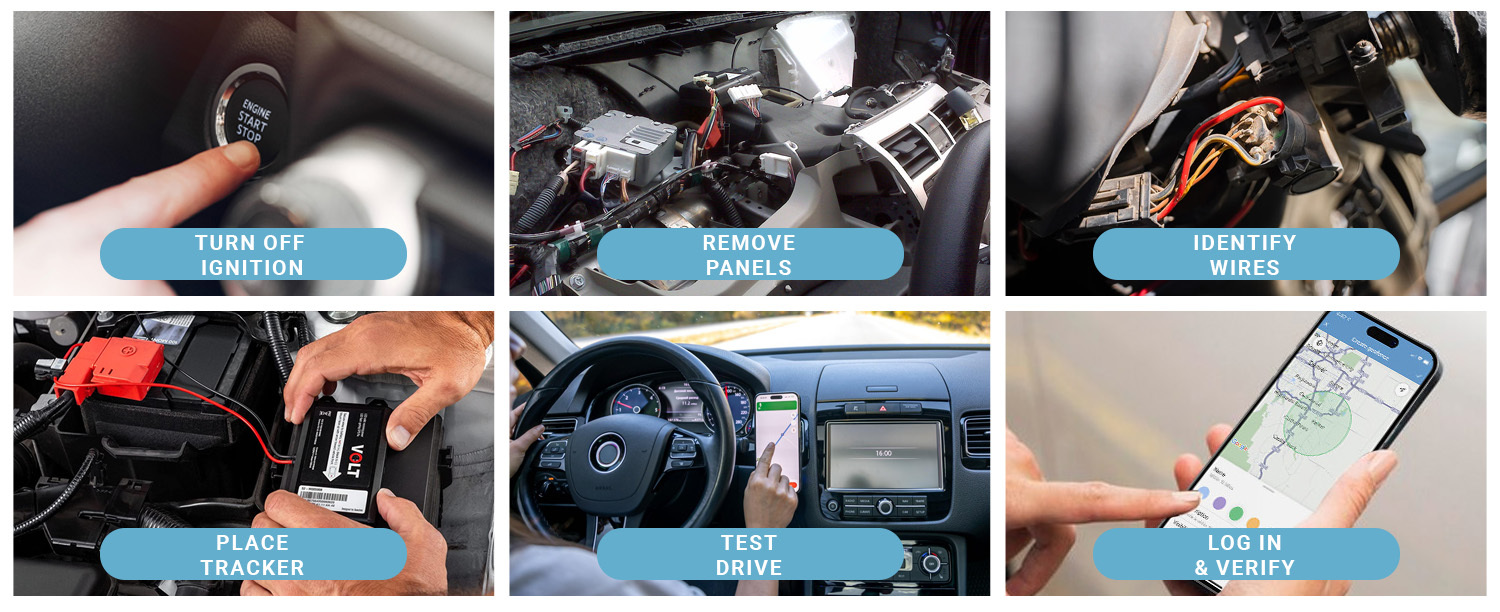
Credit: www.brickhousesecurity.com
Locate The Gps Device
Finding the GPS device in your car is the first step to removing it. These devices are often small and hidden well.
Use careful inspection and tools to help locate the tracker quickly and safely.
Check Common Installation Spots
GPS devices are usually placed where they are less likely to be found. Check these common spots:
- Under the dashboard near the steering column
- Inside the glove compartment
- Under the seats, especially the driver’s side
- Near the rear bumper or wheel wells
- Inside the trunk, under the carpet or panels
- Attached to the underside of the vehicle using magnets
Use A Gps Detector Tool
A GPS detector tool helps find signals from hidden trackers. It scans for radio frequencies used by GPS devices.
| Detector Feature | Purpose |
| Signal Strength Meter | Shows how strong the GPS signal is |
| Frequency Range | Detects common GPS frequencies like 1.2 GHz to 1.5 GHz |
| Audio Alert | Beep sounds when near a tracker |
| Display Screen | Visual guide to signal direction |
Move the detector slowly around the car. Pay attention to beeps or signal spikes to find the GPS device.
Disconnect Power Source
Removing a GPS device from your car starts with disconnecting its power source. This step stops the GPS from working and keeps you safe while working on your vehicle.
Always be careful when handling your car’s electrical system. Turning off power prevents damage to your car and the GPS device.
Access The Vehicle’s Fuse Box
The fuse box holds the fuses that protect your car’s electrical circuits. It is usually under the dashboard or in the engine compartment. Open the fuse box cover to find the fuses.
Look for a fuse labeled for the GPS or accessory power. This fuse controls the power to the GPS device. Removing this fuse can cut power to the GPS.
- Check your vehicle’s manual to find fuse box location.
- Use a fuse puller or pliers to remove the fuse safely.
- Keep the fuse in a safe place to reinstall later if needed.
Identify The Gps Power Wires
GPS devices get power from specific wires connected to the car’s electrical system. These wires usually run from the fuse box or battery to the GPS unit.
Look for wires colored red, black, or yellow. Red often means power, black is ground, and yellow may be ignition power. Use a wiring diagram for your car to be sure.
- Turn off the car before handling wires.
- Use a multimeter to test which wires have power.
- Disconnect or cut only the wires that feed power to the GPS.
Remove The Gps Hardware
Removing the GPS hardware from your car is a straightforward process. It involves detaching the device and disconnecting the wiring.
This guide will help you safely remove the GPS unit without damaging your vehicle.
Detach The Device From Mounts
First, locate the GPS device mounted on your dashboard or windshield. Most mounts use clips, suction cups, or screws.
Gently release or unscrew the mounts to free the GPS unit. Avoid using too much force to prevent damage.
- Check for clips and press to release
- Twist suction cups counterclockwise to remove
- Use a screwdriver if mounts are screwed in
Unplug Wiring Connectors
Next, find the wiring connectors attached to the GPS device. These usually connect power and data cables.
Carefully unplug each connector by pressing the release tabs or gently pulling. Do not yank the wires.
- Locate the wiring harness behind the device
- Press release tabs before pulling connectors
- Keep track of each connector for reinstallation
Disable Gps Via Software
Disabling the GPS in your car can improve your privacy. You can do this through the vehicle’s software.
Most modern cars have settings that let you turn off location tracking without any hardware changes.
Access The Vehicle’s Infotainment System
Start by turning on your car’s infotainment system. This system controls many vehicle settings, including GPS.
- Locate the main menu on the screen.
- Find the settings or setup option.
- Look for privacy or location settings.
- Enter the GPS or navigation section.
Turn Off Location Tracking Features
After accessing the GPS settings, you can disable location tracking features. This will stop your car from sending location data.
| Feature | How to Disable |
| GPS Navigation | Turn off or disable in GPS settings |
| Location Sharing | Set to off in privacy settings |
| Data Sync | Disable automatic data sharing |
Reset Vehicle Settings
Removing GPS data from your car is important for privacy. Resetting your vehicle settings helps clear stored location information. This guide explains how to reset GPS data safely.
Follow the steps to clear GPS records and restore the system to factory defaults. This process varies by car model but follows similar principles.
Clear Stored Gps Data
Most vehicles save GPS data in their navigation system memory. You can clear this data through the system settings menu.
- Turn on your car and access the main menu of the infotainment system.
- Find the navigation or GPS settings section.
- Look for options like “Clear History” or “Delete Stored Locations.”
- Select the option and confirm your choice to erase GPS data.
- Restart your vehicle system to ensure data is cleared.
Restore Factory Defaults
Restoring factory defaults resets all vehicle settings, including GPS and other saved preferences. This step ensures no personal data remains.
| Action | Description | Effect |
| Access Settings | Open the vehicle’s main settings menu | Prepare for reset process |
| Select Factory Reset | Choose the option to restore default settings | Erase all custom data including GPS |
| Confirm Reset | Agree to the system prompt to reset | System restarts with original settings |
| Verify Reset | Check that GPS history and preferences are cleared | Ensures privacy and fresh start |

Credit: gpstracker247.com
Check For Hidden Trackers
Hidden GPS trackers can be placed in various parts of your car. It’s important to check thoroughly to ensure your privacy.
Knowing where to look and what tools to use can help you find these devices efficiently.
Inspect Personal Items And Compartments
Sometimes, trackers are hidden in personal items or car compartments. These are places that are easily overlooked.
- Check under the seats and floor mats.
- Look inside the glove box and center console.
- Examine personal bags or items left in the car.
- Inspect the trunk and any tool compartments.
Use A Radio Frequency Scanner
A radio frequency scanner can detect signals from hidden GPS trackers. It scans for unusual frequencies emitted by tracking devices.
Always check areas with electronic components, as trackers may be placed near wiring.
Consider Professional Help
Removing a GPS from your car can be tricky. It involves wires and may affect other systems. Consider professional help to ensure it’s done safely and correctly.
Professionals have the right tools and experience. They can remove the GPS without damaging your car.
Hire A Car Security Expert
Car security experts know how GPS systems work. They can safely remove the device. They understand how to handle wiring and connections.
Experts also ensure other systems in your car remain functional. They minimize the risk of accidental damage during removal.
- Experts have the right training
- They use specialized tools
- They prevent potential electrical issues
Use Authorized Service Centers
Authorized service centers are equipped to handle GPS removal. They follow manufacturer guidelines for the best results.
These centers have trained technicians who know your car’s specific needs. They ensure the removal process is smooth and safe.
| Benefits of Authorized Centers | Explanation |
| Manufacturer Guidelines | Centers follow specific instructions from car makers. |
| Trained Technicians | Staff are trained to handle different car models. |
| Quality Assurance | Service centers provide warranties for their work. |
Maintain Privacy Post-removal
Removing a GPS tracker from your car is only the first step to protect your privacy. You need to stay alert and take extra actions to keep your location data safe.
After removal, your car could still be vulnerable to new tracking devices or software threats. Follow simple habits to maintain privacy and security.
Regularly Monitor For New Devices
New tracking devices can be small and hidden easily on your car. Check your vehicle regularly for any unusual devices or wires. Early detection helps stop tracking before it starts.
- Inspect the undercarriage and bumpers for strange objects
- Look inside wheel wells and behind panels
- Use a radio frequency detector to find hidden GPS units
- Ask a professional to scan your car for trackers
Update Software And Security Settings
Many cars have built-in systems that connect to the internet or your phone. These can share your location if not secured. Keep your software updated and adjust security settings to protect your data.
| Action | Reason | How Often |
| Update car’s software | Fix security flaws and bugs | Every 3-6 months or as notified |
| Change passwords and PINs | Prevent unauthorized access | Every 6 months |
| Disable unnecessary location sharing | Reduce data exposure | After removal and periodically |
| Review app permissions | Control what apps can access | Monthly |

Credit: www.reddit.com
Frequently Asked Questions
How Can I Disable Gps Tracking In My Car?
To disable GPS tracking, locate the GPS device and disconnect its power source. Alternatively, use the car’s settings menu to turn off location services if available.
Is It Legal To Remove Gps From A Car?
Yes, it is legal to remove GPS from your personal vehicle, but ensure it’s not required by lease or insurance agreements.
What Tools Are Needed To Remove A Car Gps Device?
Basic tools like screwdrivers, pliers, and a trim removal tool help safely access and remove the GPS device from your car.
Will Removing Gps Affect My Car’s Warranty?
Removing GPS might void parts of your warranty, especially if done improperly. Check your warranty terms before proceeding.
Conclusion
Removing GPS from your car is a simple process. Start by locating the device carefully. Use basic tools to disconnect it safely. Take your time to avoid any damage. Once removed, check if the system still works. This helps ensure you did it right.
You can always seek help if unsure. Remember, safety comes first in every step. Enjoy your car without unwanted tracking now.







