
Are you tired of getting lost or struggling to find your way in unfamiliar places? Putting a GPS on your car can be a game-changer.
It gives you real-time directions, helps you avoid traffic, and keeps you safe on the road. But how do you actually install one? Don’t worry—you’re about to discover simple steps that anyone can follow. Keep reading to learn how to put GPS on your car easily and start enjoying stress-free driving today.
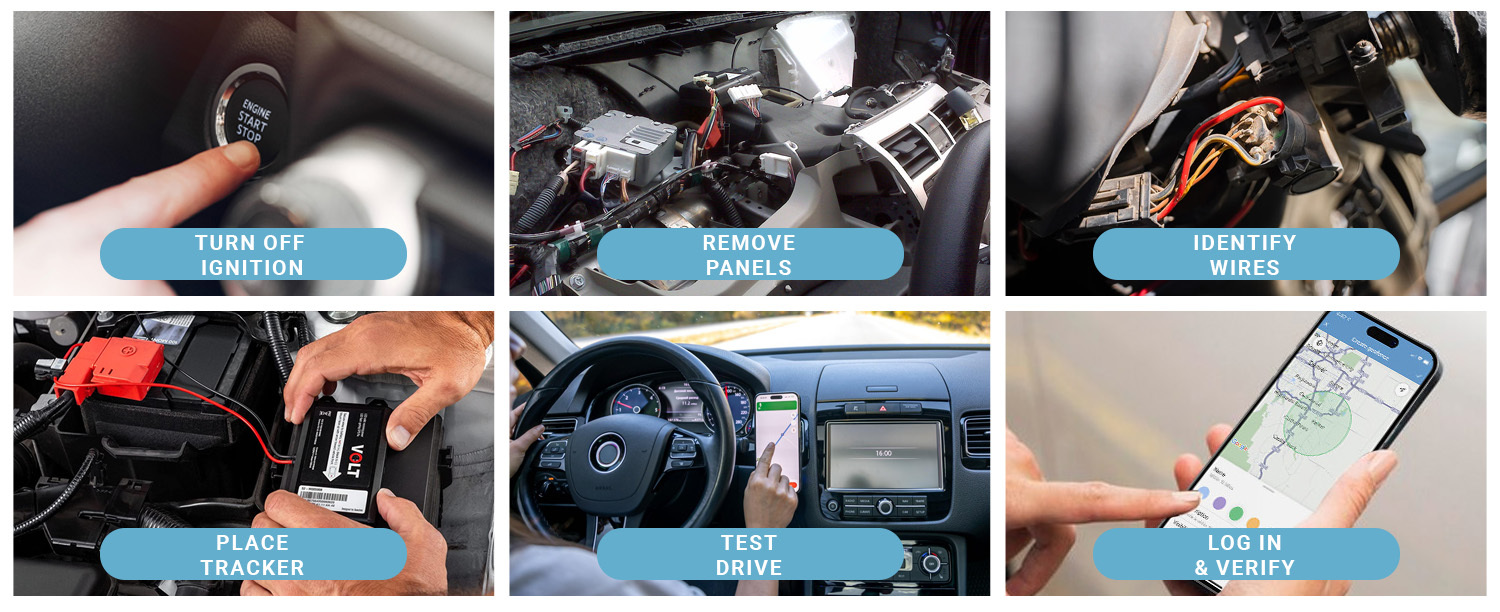
Credit: www.brickhousesecurity.com
Choosing The Right Gps Device
Adding a GPS to your car helps you find locations easily. Picking the right GPS device matters for good use.
Many GPS types and features are available. Knowing what fits your needs saves time and money.
Types Of Gps Systems
There are different GPS systems for cars. Each type offers unique benefits and ways to install.
- Portable GPS Units:Small devices you can move between cars. Easy to update maps.
- Built-in GPS:Installed in the car dashboard. Works without extra setup.
- Smartphone GPS Apps:Use your phone’s GPS with apps. No extra device needed.
- Tracker GPS Devices:Track your car’s location for safety. Often hidden in the vehicle.
Features To Consider
Look for features that suit your driving habits. Features affect ease of use and safety.
- Screen Size:Bigger screens are easier to read but may distract.
- Voice Guidance:Helps you keep eyes on the road while driving.
- Map Updates:Regular updates keep your device accurate.
- Traffic Alerts:Warn you of traffic jams and road work.
- Battery Life:Important for portable GPS devices.
- Mounting Options:Easy to install and remove mounts improve convenience.
Budgeting For Your Gps
GPS devices come in many price ranges. Set a budget before you start shopping.
Consider the cost of updates and accessories. Sometimes cheaper devices have extra costs.
- Basic portable GPS units are usually affordable.
- Built-in systems cost more but offer better integration.
- Apps on smartphones can be free or low cost.
- Trackers may require monthly service fees.

Credit: spytec.com
Preparing Your Car For Installation
Installing a GPS device in your car helps you track its location easily. Before starting, you must prepare your car for the installation process.
Preparation makes the installation safer and faster. It also helps avoid damage to your vehicle or the GPS device.
Gathering Necessary Tools
Collect all the tools you need before you start installing the GPS. This saves time and prevents interruptions.
- Screwdrivers (flathead and Phillips)
- Wire strippers and cutters
- Electrical tape or heat shrink tubing
- Multimeter to check electrical connections
- GPS device and user manual
- Cable ties to organize wires
Checking Vehicle Compatibility
Not all cars support every GPS device. Check if your vehicle works with the GPS model you have.
Look at your car’s manual or ask the GPS seller about compatibility. Some cars need special adapters or wiring.
- Confirm the GPS works with your car’s make and model
- Check power supply and wiring options
- Verify if your car has a suitable mounting place
Safety Precautions
Safety is very important when installing a GPS in your car. Follow simple rules to avoid injury or damage.
Always disconnect the car battery before working with electrical parts. Work in a well-lit and dry area.
- Wear safety gloves to protect your hands
- Use insulated tools for electrical work
- Keep the work area clean and free of clutter
- Do not force wires or parts into place
- Double-check all connections before reconnecting the battery
Installing The Gps Device
Installing a GPS device in your car helps you track its location easily. You need to place it where it works best and connect it properly.
This guide explains how to mount the GPS unit, connect power, and secure the wires safely.
Mounting The Gps Unit
Choose a spot in your car where the GPS has a clear view of the sky. This helps it get signals from satellites.
Common places include the dashboard or near the windshield. Use the mounting tools that come with the device.
- Clean the surface before mounting
- Use strong adhesive or brackets
- Avoid metal parts that block signals
- Place the GPS within easy reach for adjustments
Connecting Power Sources
The GPS needs power to work. You can connect it to your car’s battery or use the cigarette lighter socket.
Check your GPS manual for the correct power input. Make sure the connection is secure and safe to avoid power loss.
- Use the car battery for a constant power supply
- Plug into the cigarette lighter for easy setup
- Use fuse taps to connect safely to the fuse box
- Turn off the car before making electrical connections
Securing Wires And Cables
Keep wires neat and secure to prevent damage. Loose cables can cause problems or distract the driver.
Use clips or zip ties to hold wires in place. Avoid sharp edges or moving parts that can cut or wear cables.
- Route wires along existing wiring paths
- Use cable ties to bundle loose wires
- Check that wires do not block pedals or controls
- Inspect cables regularly for wear or damage

Credit: spytec.com
Setting Up The Gps Software
Installing GPS in your car is just the first step. You need to set up the GPS software for accurate navigation. This guide helps you configure your device properly.
Follow these simple sections to get your GPS ready. Each part covers important settings to improve your driving experience.
Initial Device Configuration
After powering on the GPS device, start the setup wizard. Choose your language and time zone to match your location.
- Connect the GPS to your car’s power source.
- Turn on the device and select your preferred language.
- Set the correct time zone for accurate time display.
- Allow the device to acquire satellite signals outdoors.
Updating Maps And Firmware
Keep your GPS updated to avoid wrong directions. Updates fix bugs and add new roads or places.
| Update Type | Purpose | Frequency |
| Map Updates | Add new routes and locations | Every 3-6 months |
| Firmware Updates | Improve device performance | As released by manufacturer |
Use the GPS software on your computer or Wi-Fi on the device to download updates. Follow on-screen instructions to install them.
Customizing Navigation Preferences
Set your navigation preferences to get the best routes and alerts. This makes your trips smoother.
- Route type (fastest, shortest, or avoid tolls)
- Voice guidance volume and language
- Units for distance (miles or kilometers)
- Alert settings for speed limits and cameras
Using Your Gps For Navigation
Using a GPS in your car helps you find places without getting lost. It shows maps and guides you step-by-step.
You can enter where you want to go, hear directions, and see traffic updates on your screen.
Entering Destinations
Start by typing the address or place name in the GPS search box. You can use street names, city, or zip code.
The GPS will show matching locations. Pick the correct one to set it as your destination.
- Use the on-screen keyboard to type the address
- Choose from saved favorites or recent places
- Check the destination on the map before starting
Utilizing Voice Commands
Many GPS devices let you use voice commands. This keeps your hands free and eyes on the road.
Say simple commands like “Navigate home” or “Find nearest gas station” to get quick help.
- Press the voice button to activate listening
- Speak clearly and slowly for better recognition
- Use command words like “Go to,” “Find,” or “Show”
Accessing Traffic And Route Options
Your GPS can show live traffic to help avoid delays. It offers different routes based on traffic conditions.
You can choose the fastest, shortest, or easiest route before you start driving.
- Check for traffic icons or alerts on the map
- Select route preferences in the settings menu
- Update your GPS for the latest traffic data
Maintaining Your Gps Device
Keeping your GPS device in good condition is important. This ensures it works well and lasts long.
Here are some tips to help you maintain your GPS device. Follow these steps to keep it functioning properly.
Regular Software Updates
GPS devices need regular software updates. Updates improve accuracy and add new features.
Check for updates every few months. Connect your device to your computer for easy updates.
Cleaning And Care Tips
Keep your GPS device clean. Dust and dirt can affect its performance.
Use a soft cloth to wipe the screen. Avoid using harsh chemicals or water.
- Store in a dry place
- Avoid direct sunlight
- Keep away from magnets
Troubleshooting Common Issues
Sometimes, GPS devices may face issues. Knowing how to troubleshoot can help you fix them quickly.
If the device does not turn on, check the battery. Make sure it’s charged and properly inserted.
- Reboot the device if it freezes
- Check satellite connection if navigation fails
- Contact support for unresolved issues
Frequently Asked Questions
How Do I Install A Gps Device In My Car?
To install a GPS device, choose a hidden location inside your car. Connect the device to a power source, usually the car’s battery or OBD-II port. Follow the manufacturer’s instructions for setup and activation. Test the device to ensure proper tracking before regular use.
Can I Use A Smartphone As A Gps Tracker For My Car?
Yes, smartphones can act as GPS trackers using apps. Install a reliable tracking app, enable location services, and grant necessary permissions. Keep the phone charged and connected to the internet for real-time tracking. This method is cost-effective but less discreet than dedicated devices.
What Are The Benefits Of Putting Gps On My Car?
GPS tracking improves vehicle security by enabling real-time location monitoring. It helps recover stolen vehicles quickly. GPS also aids in efficient route planning, saving time and fuel. Additionally, it allows parents and employers to monitor driving behavior and ensure safety.
Is Professional Gps Installation Necessary For Cars?
Professional installation is recommended for complex GPS systems requiring hardwiring. Experts ensure proper device placement and secure connections to avoid damage. However, many plug-and-play GPS trackers can be self-installed easily with minimal tools and instructions.
Conclusion
Adding GPS to your car helps you find places easily. It makes driving safer and less stressful. You can choose from many devices or apps. Installation usually takes just a few steps. Always check if the GPS fits your car model.
Keeping your GPS updated improves its accuracy. Try using it on short trips first. Enjoy the convenience and peace of mind it brings. Safe travels start with good directions.







