
Looking to add a GPS system to your car but not sure where to start? Installing a GPS can make your drives safer, easier, and stress-free.
Imagine never getting lost again or finding the fastest route without breaking a sweat. In this guide, you’ll discover simple steps to install a GPS system yourself, even if you’re not tech-savvy. By the end, you’ll feel confident and ready to upgrade your car with this must-have tool.
Keep reading to find out how easy it really is!

Credit: www.amazon.ca
Choosing The Right Gps System
Installing a GPS system in your car helps you find places easily. Picking the right GPS device is important for good use.
This guide will help you know what types of GPS devices exist. You will learn about features and budget options too.
Types Of Gps Devices
There are many GPS devices made for different needs. Some are simple, others have many functions.
- Portable GPS units you can move between cars
- Built-in GPS systems that come with the car
- Smartphone apps that use your phone’s GPS
- Hybrid systems with offline maps and live updates
Features To Consider
Look for features that make driving easier and safer. Some features are more useful than others.
- Clear and bright screen for easy reading
- Voice directions to keep your eyes on the road
- Real-time traffic updates to avoid delays
- Offline maps for areas without internet
- Speed limit alerts to avoid tickets
- Easy mounting options for your car
Budget And Brand Options
Set a budget before buying a GPS system. Prices vary based on brand and features.
Choose brands known for quality and support. Cheap devices may lack important features or updates.
- Low budget: Basic GPS with simple maps and directions
- Mid-range: Devices with traffic updates and good screens
- High-end: Advanced features like live updates and large displays
Preparing Your Car For Installation
Installing a GPS system in your car requires some preparation. Getting your car ready helps the process go smoothly.
This guide covers the tools you need, where to find power sources, and clearing the area for installation.
Gathering Necessary Tools
Before starting, collect all the tools needed for the GPS installation. Having everything ready saves time.
- Screwdrivers (flathead and Phillips)
- Wire strippers and cutters
- Electrical tape
- Multimeter for checking voltage
- Zip ties to secure wires
- Drill (if mounting is required)
- GPS unit and mounting hardware
Locating Power Sources
Your GPS system needs a power source inside your car. Locate the right wires to connect the device safely.
| Power Source | Description | Use |
| Car Battery | Direct power from the battery | Constant power for GPS |
| Fuse Box | Protected power circuits | Switched power when ignition is on |
| Cigarette Lighter Socket | Accessory power outlet | Easy access power source |
Clearing Installation Area
Clear the dashboard and interior area where you will place the GPS system. This helps avoid damage and eases installation.
Follow these steps to clear the area:
- Remove any objects on the dashboard.
- Clean the surface with a dry cloth.
- Check for vents or sensors nearby to avoid blocking.
- Plan the wire paths to keep them hidden and safe.
Step-by-step Installation Process
Installing a GPS system in your car helps you navigate easily. This guide shows you how to do it yourself. Follow simple steps to set up the device correctly.
Each part of the installation is important. Make sure to work carefully and check your connections as you go.
Mounting The Gps Unit
Choose a spot on your dashboard where the GPS screen is easy to see. Clean the area before mounting. Use the suction cup or adhesive pad to attach the GPS unit firmly.
Connecting To Power
Connect the GPS power cable to your car’s power source. Usually, this is the cigarette lighter socket or a USB port. Make sure the cable fits well and the connection is secure.
- Locate the power socket in your car.
- Plug the GPS power cable into the socket.
- Turn on the car to check if the GPS powers up.
- If the GPS does not turn on, check the fuse or try a different socket.
Securing Cables And Wires
Keep the cables neat to avoid distractions or damage. Use clips or cable ties to hold wires along the dashboard and under the seats.
| Tip | Reason |
| Use cable ties | Prevent wires from tangling |
| Hide wires under the trim | Keep the car interior clean |
| Check for loose ends | Avoid power loss or shorts |

Credit: spytec.com
Configuring The Gps System
Setting up your car’s GPS system correctly helps you drive safely and reach your destination easily. This guide covers important steps to configure the GPS system.
Follow the instructions below to complete the initial setup, keep your maps updated, and set your preferences for a better experience.
Initial Setup And Calibration
Turn on the GPS system and let it find your location. The device may ask you to calibrate the compass or adjust settings for accuracy.
- Place the car in an open area for better satellite reception.
- Follow on-screen instructions to calibrate the compass by slowly turning the car.
- Set the correct time zone and date to match your location.
- Test the system by entering a simple destination.
Updating Maps And Software
Keeping your GPS maps and software up to date ensures accurate directions and new features. Updates fix errors and add new roads.
| Update Type | How to Update | Frequency |
| Map Data | Connect GPS to computer or Wi-Fi and download updates | Every 3-6 months |
| Software | Check system settings for software updates and install | Once a year or as needed |
| Points of Interest | Download new POI files from provider websites | Every 6 months |
Setting Preferences
Adjust your GPS preferences to match your driving style and needs. Customize voice, route options, and display settings.
- Choose voice guidance volume and language.
- Select preferred route types such as fastest, shortest, or avoiding toll roads.
- Set display brightness for day and night driving.
- Enable or disable traffic alerts and rerouting options.
Troubleshooting Common Issues
Installing a GPS system in your car can sometimes lead to problems. These issues can affect how well the GPS works. Knowing how to fix them helps you use the system without trouble.
This guide covers common problems like signal issues, power connectivity, and software glitches. Each section explains causes and easy fixes.
Signal Problems
GPS needs a clear signal from satellites. Trees, tall buildings, or tunnels can block the signal. This causes the GPS to lose location or give wrong directions.
Check if your car is in an open area. Move to a place with fewer obstructions. Also, make sure the GPS antenna is clean and not damaged.
- Park in open spaces for better signal
- Keep GPS antenna free from dirt
- Avoid tall buildings and tunnels when possible
Power Connectivity
GPS systems need steady power from the car battery. Loose wires or blown fuses can stop the GPS from turning on. This causes the system to fail or restart often.
Check the power cable connection. Make sure it is tight and not broken. Inspect the fuse box for any blown fuses and replace them if needed.
- Secure power cable connections
- Inspect cables for damage
- Replace blown fuses in the car
Software Glitches
GPS software can freeze or crash. Old software or corrupted files cause these glitches. This can stop the GPS from working properly.
Restart the GPS system to clear minor bugs. Check for software updates regularly. Update the software to fix bugs and improve performance.
- Restart the GPS to fix freezes
- Check for software updates often
- Install updates to improve stability
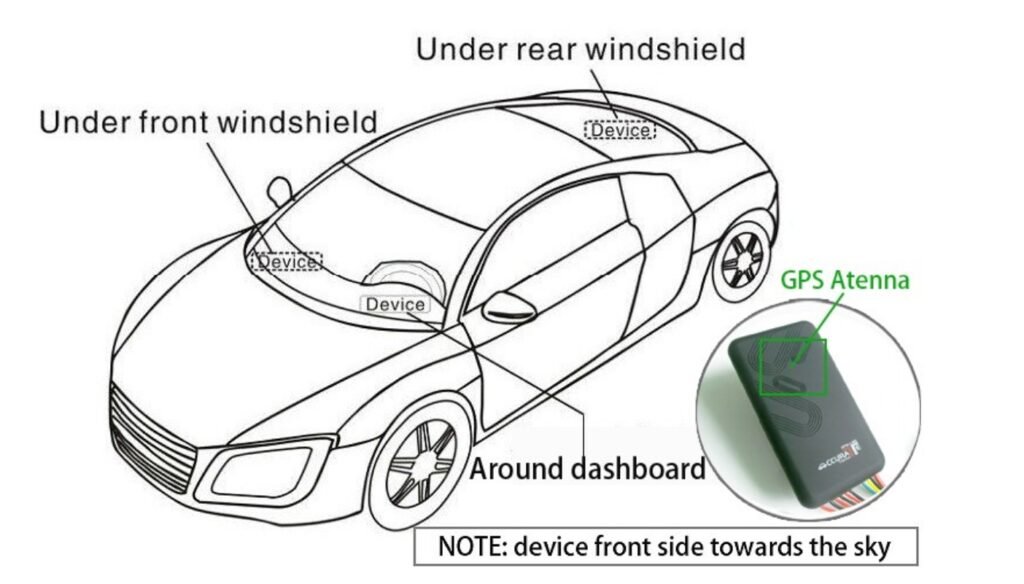
Credit: en.trkify.com
Maintaining Your Gps System
A GPS system in your car helps with navigation. To keep it working well, regular maintenance is important. Here are some tips on how to maintain your GPS system.
Follow these steps to ensure your GPS system remains reliable and accurate. Regular care can extend its life and improve its performance.
Regular Updates
GPS systems need regular updates to stay accurate. Maps change, and new roads are built. Updating ensures your GPS reflects these changes.
Manufacturers often provide update tools. Check their website for the latest software. Regular updates help avoid navigation errors.
- Check for updates monthly
- Use official update tools
- Ensure a stable internet connection during updates
Cleaning And Care
Keep your GPS screen clean for clear visibility. Dust and fingerprints can obscure the display. Regular cleaning helps maintain screen clarity.
Use a soft, lint-free cloth to clean the screen. Avoid harsh chemicals that may damage the surface. Proper care keeps the GPS looking new.
- Wipe with a soft cloth weekly
- Avoid direct sunlight to prevent overheating
- Store in a cool, dry place when not in use
Backup And Restore Settings
Backing up your GPS settings protects your data. If the system crashes, you can restore it easily. Backup ensures you do not lose saved locations.
Use a computer to save a copy of your settings. Follow the manufacturer’s instructions for backup and restoration. This process is simple and can save time.
- Backup settings monthly
- Use USB or cloud storage for backup
- Follow official guides for restoring settings
Frequently Asked Questions
How Do I Choose The Right Gps System For My Car?
Choosing the right GPS depends on features, budget, and compatibility. Look for real-time updates, ease of use, and map coverage. Ensure it fits your car’s dashboard or connects via smartphone. Reading reviews helps pick a reliable, user-friendly model.
What Tools Are Needed To Install A Car Gps System?
Basic tools include screwdrivers, wire strippers, and electrical tape. You may also need a multimeter for wiring checks. Some GPS units come with specific tools or mounting kits. Always consult the installation guide for required tools.
Can I Install A Gps System Myself Or Hire A Professional?
DIY installation is possible with basic skills and tools. However, professional installation ensures proper wiring and secure mounting. Professionals can also integrate the GPS with your car’s system, reducing errors and saving time.
How Do I Connect The Gps System To My Car’s Power Supply?
Connect the GPS to a 12V power source, usually the car’s fuse box or cigarette lighter. Use proper connectors and ensure a stable power supply. Follow the installation manual to avoid electrical issues or damage.
Conclusion
Installing a GPS system in your car is simpler than you think. Follow the steps carefully, and take your time. A good GPS helps you find places faster and safer. Make sure to test it well after installation. Regular updates keep the system working smoothly.
Enjoy easier trips and less stress on the road. This small addition can make a big difference. Start your installation today and drive with confidence.







