
Want to add a GPS to your car but don’t know where to start? Installing a GPS device can make your drives safer and stress-free.
Imagine never getting lost again or finding the fastest route with ease. In this guide, you’ll learn simple steps to install a GPS in your car quickly and correctly. Whether you’re tech-savvy or a beginner, this article will walk you through everything you need to know.
Keep reading to discover how easy it is to upgrade your car with a reliable GPS system.
Choosing The Right Gps Device
Installing a GPS device in your car can help you find routes easily. Choosing the right device makes sure you get the features you need.
Consider the types, features, and budget before buying a GPS unit for your vehicle.
Types Of Gps Units
There are several types of GPS devices for cars. Each type suits different needs and uses.
- Portable GPS: Easy to move between cars and take with you.
- Dashboard GPS: Fixed to the car dashboard for easy viewing.
- Smartphone GPS Apps: Use your phone for navigation without extra devices.
- Built-in GPS: Comes installed with the car for seamless use.
Features To Consider
Look for features that improve your driving and navigation experience.
| Feature | Benefit |
| Real-time Traffic Updates | Avoid traffic jams and save time |
| Voice Commands | Hands-free control for safety |
| Touchscreen Display | Easy to operate while driving |
| Map Updates | Keep maps current for accurate directions |
| Speed Limit Alerts | Helps avoid speeding tickets |
Budget And Brand Options
GPS devices come in many price ranges. Choose one that fits your budget and offers good quality.
- Low-cost brands: Basic features for simple navigation.
- Mid-range brands: Balanced features and price.
- High-end brands: Advanced features and longer support.
- Consider warranty and customer reviews before buying.
Preparing For Installation
Installing a GPS in your car needs some preparation. This helps to avoid mistakes and makes the process smooth.
Before starting, gather tools, read instructions, and follow safety steps.
Gathering Necessary Tools
Having the right tools ready saves time. You will need some basic items to install the GPS device.
- Screwdrivers (flathead and Phillips)
- Wire strippers
- Electrical tape
- Zip ties
- Multimeter for checking voltage
- Mounting brackets or adhesive pads
Reading The Manual
Every GPS device comes with a manual. It explains how to install it safely and correctly.
| Section | What to Look For |
|---|---|
| Installation Steps | Follow the order given to avoid errors |
| Wiring Diagram | Check how to connect power and ground wires |
| Device Features | Understand settings and uses before installation |
| Troubleshooting | Know common problems and fixes |
Safety Precautions
Safety is very important when working with car electronics. Take these steps to protect yourself and your vehicle.
- Disconnect the car battery before starting
- Work in a well-lit area
- Wear gloves to avoid cuts
- Keep tools away from moving parts
- Avoid loose clothing that can get caught
- Double-check all wire connections
Locating The Installation Spot
Choosing the right spot to install your GPS in the car is important. The location affects how well you can see and use the device.
Find a place that is safe and does not block your view while driving. The GPS should be easy to reach and see.
Ideal Dashboard Positions
Place the GPS where it does not distract you but stays visible. Many drivers choose spots near the windshield or on the dashboard.
The center of the dashboard near the windshield base is a good spot. It keeps the GPS in your line of sight without blocking the road view.
- Near the windshield base in the center
- On a flat dashboard surface
- Avoid areas with airbag covers
Avoiding Obstructions
Check that the GPS does not block your view of the road or mirrors. Avoid placing it behind steering parts or vents.
Do not place the GPS where sun glare or shadows make the screen hard to see. Keep it away from dashboard controls.
- Keep clear of window frames and mirrors
- Avoid air vents and steering wheel parts
- Do not block dashboard buttons or displays
Ensuring Visibility And Accessibility
Make sure the GPS screen is easy to read in all light conditions. Position it so you can reach it without stretching or moving too much.
Check that wires or mounts do not get in the way of your driving. The GPS should be steady and stay in place on bumps.
- Place screen at eye level or slightly below
- Keep controls within easy hand reach
- Use sturdy mounts for stability
- Arrange wires neatly to avoid interference

Credit: spytec.com
Installing The Gps Device
Installing a GPS device in your car helps you navigate easily. This guide covers the key steps to fit it properly and safely.
Follow each step carefully to ensure the device works well and looks neat inside your vehicle.
Mounting The Device
Choose a clear view spot on your windshield or dashboard for the GPS. The device needs a good signal to work correctly.
- Clean the area before mounting.
- Use the suction mount or adhesive provided.
- Position the device within easy reach.
- Adjust the angle for a clear screen view.
Connecting Power Supply
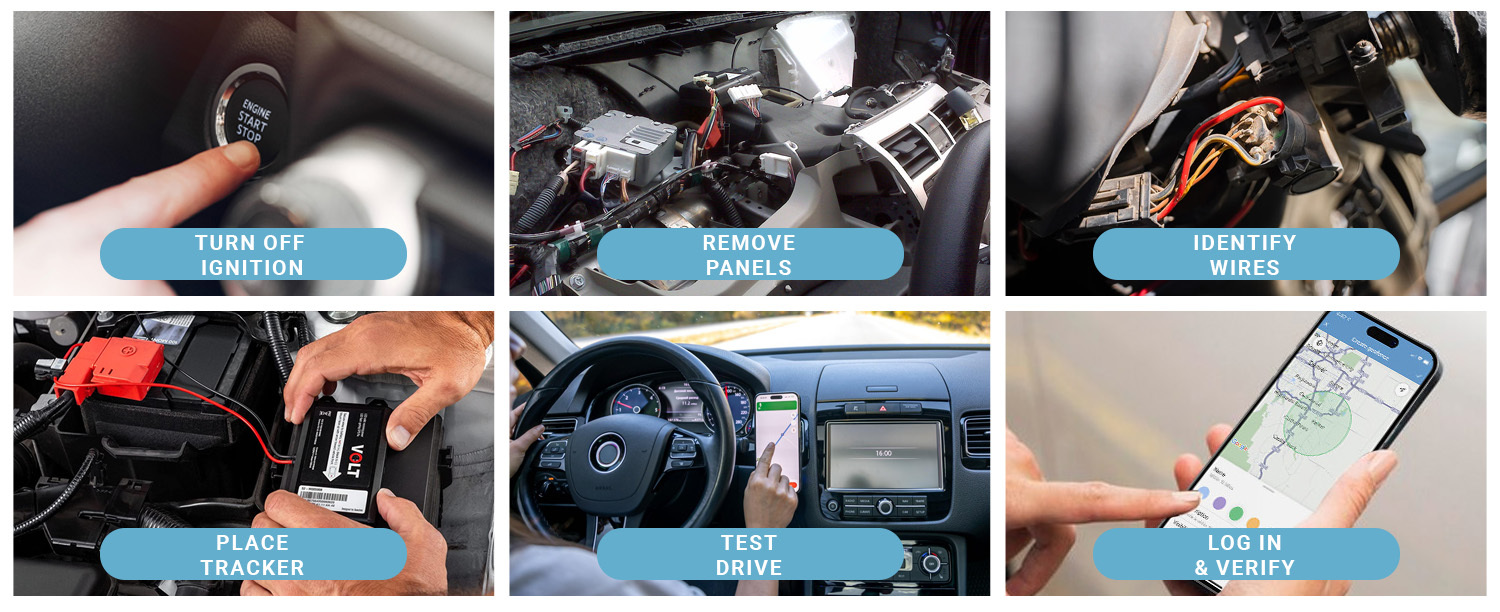
Power the GPS device using your car’s power outlet or hardwire it to the car battery for constant power.
| Power Source | Pros | Cons |
| Cigarette Lighter Socket | Easy to connect | May unplug accidentally |
| Hardwired to Battery | Always powered | Needs professional installation |
Securing Cables Neatly
Keep cables tidy to avoid distractions and damage. Use clips or ties to secure wires along the car’s interior.
- Route cables along door seals or under panels.
- Use cable clips to hold wires in place.
- Avoid sharp bends or pinching cables.
- Check that cables do not block pedals or controls.
Configuring The Gps System
After installing a GPS in your car, you need to set it up correctly. This helps the system give you the best directions and service.
Configuring the GPS includes choosing language, updating software, and adjusting accuracy settings. These steps make sure your GPS works well.
Setting Language And Units
Select the language you understand best. This changes the voice and text on the screen.
Choose the units for distance and speed. You can pick miles or kilometers based on your preference.
- Go to the settings menu on your GPS
- Find the language option and select your language
- Choose units like miles or kilometers
- Save changes before exiting the menu
Updating Maps And Software
Keep your GPS maps updated for new roads and places. Software updates fix bugs and improve features.
Use a USB cable or Wi-Fi to connect your GPS to a computer or network for updates.
- Check for updates regularly in the settings
- Download the latest maps and software
- Follow the on-screen instructions to install
- Restart the device after updating
Adjusting Settings For Accuracy
Set your GPS to use the best signal options. This helps it track your location well and give correct directions.
Enable features like GPS satellite use and traffic updates for more accuracy.
- Turn on GPS satellite mode in settings
- Enable live traffic updates if available
- Calibrate your GPS if the option is there
- Set your current location manually if needed

Credit: spytec.com
Testing And Troubleshooting
Testing and troubleshooting are key steps after installing a GPS in your car. You need to ensure everything is working correctly for accurate navigation.
Let’s explore how to verify the GPS signal, address common issues, and know when to seek professional help.
Verifying Gps Signal
After installing the GPS device, check if it’s receiving a signal. A strong signal is vital for accurate directions.
- Ensure the GPS antenna is placed correctly, away from obstructions.
- Test the GPS in an open area for a better signal.
- Check the device settings to confirm signal reception.
Common Issues And Fixes
Sometimes, GPS devices can have problems. These issues can often be solved with simple troubleshooting steps.
| Issue | Solution |
| No Signal | Reposition the antenna and ensure it’s not blocked. |
| Inaccurate Location | Calibrate the GPS settings and update the maps. |
| Device Not Powering On | Check the power connections and battery status. |
When To Seek Professional Help
If issues persist after troubleshooting, it might be time to consult a professional. They can diagnose and fix complex problems.
Maintaining Your Gps Device
Taking care of your car’s GPS ensures it works properly. Regular maintenance can extend its life and improve performance.
Here are some tips to keep your GPS device in top condition. Follow these to enjoy a reliable navigation experience.
Regular Software Updates
Software updates improve your GPS’s performance. They fix bugs and enhance features.
- Check for updates monthly
- Use the official website for downloads
- Install updates in a stable internet environment
Cleaning And Care Tips
Keep your GPS clean for better visibility. Dirt and dust can affect the screen’s sensitivity.
- Use a soft cloth to wipe the screen
- Avoid harsh chemicals or abrasive materials
- Clean the device weekly to prevent buildup
Battery Maintenance
Proper battery care keeps your GPS ready for long trips. It also helps prevent unexpected shutdowns.
- Charge your GPS before long journeys
- Do not overcharge the battery
- Store in a cool place when not in use
Credit: www.brickhousesecurity.com
Frequently Asked Questions
What Tools Are Needed To Install A Gps In A Car?
You need a screwdriver, wire stripper, electrical tape, and a multimeter. A GPS unit and mounting kit are essential. A vehicle-specific wiring diagram helps for precise connections. These tools make the installation safe and efficient.
How To Connect Gps Power Supply In A Car?
Connect the GPS power wire to the car’s fuse box or battery. Use a fuse tap for safety. Ensure the ground wire is attached to a metal part of the car. Proper power connection ensures reliable GPS operation.
Can I Install A Gps System Without Professional Help?
Yes, many GPS units come with clear instructions and mounting kits. Basic knowledge of car electronics helps. Follow steps carefully to avoid damage. DIY installation saves money and is manageable for most car owners.
Where Is The Best Place To Mount A Car Gps?
Mount the GPS on the dashboard or windshield within clear view. Avoid blocking your sight or airbags. Use the provided adhesive or suction mount. Proper placement ensures easy visibility and safe driving.
Conclusion
Installing a GPS in your car is simple and useful. It helps you find places quickly and avoid getting lost. Follow the steps carefully for the best results. Make sure the device is secure and works well before driving. Regular updates keep your GPS accurate and reliable.
Enjoy safer and easier trips with your new GPS system.







