
Have you ever wondered what happens when your car is parked and turned off? Imagine catching important moments like someone bumping into your vehicle or suspicious activity around it—even when you’re not inside.
Your dash cam can be your silent guardian, recording events even after you’ve left. But how does it work? And can your dash cam really keep an eye on your car when it’s off? Keep reading to discover how this feature can protect your car and give you peace of mind like never before.

Credit: www.redtigercam.com
How Dash Cams Work
Dash cams are small cameras that record video while you drive. They help capture events on the road.
Some dash cams can even record when your car is off. This feature keeps your car protected at all times.
Basic Functions
Dash cams record video in a loop. They save recent footage and delete old files to save space.
Most dash cams start recording when the car is on. They capture video from the front or inside the car.
- Continuous loop recording
- Automatic start and stop with the car
- Video storage on memory cards
- Some have motion detection
Power Sources Explained
Dash cams need power to record. Most use the car’s battery through the cigarette lighter socket.
Some dash cams have a built-in battery. This battery lets them record for a short time after the car is off.
- Car battery via cigarette lighter or fuse box
- Built-in rechargeable battery for short recording
- Hardwiring kits connect dash cams directly to the car’s fuse box
- External battery packs for longer off-car recording
Credit: wolfbox.com
Parking Mode Features
Dash cams with parking mode protect your car when it is parked. They keep recording even if the car is off.
This feature helps capture events like accidents or theft while you are away. It uses special sensors to save power and record only when needed.
Motion Detection
Motion detection allows the dash cam to start recording if it senses movement near the car. This helps catch suspicious activity without wasting storage.
- Saves storage by recording only when there is motion
- Alerts you to events happening around your parked car
- Helps protect against vandalism and theft
Impact Sensors
Impact sensors detect sudden shocks or hits to your vehicle. The dash cam saves footage before and after the impact automatically.
| Impact Type | What Happens |
| Minor Hit | Recording locks to avoid overwrite |
| Major Collision | Emergency video saved and alert sent |
| Parking Lot Bump | Footage stored for review |
Time-lapse Recording
Time-lapse recording captures long periods in short video clips. It uses less storage and still shows all important events.
Benefits of Time-Lapse Recording:
- Reduces video file size
- Shows parking lot activity over hours
- Easy to watch long events quickly
Power Solutions For Off-state Recording
Dash cams usually need power to record. When the car is off, they still can record if they have a power source. This needs special power solutions.
These power options keep your dash cam running safely without draining your car battery. Let’s explore the common choices.
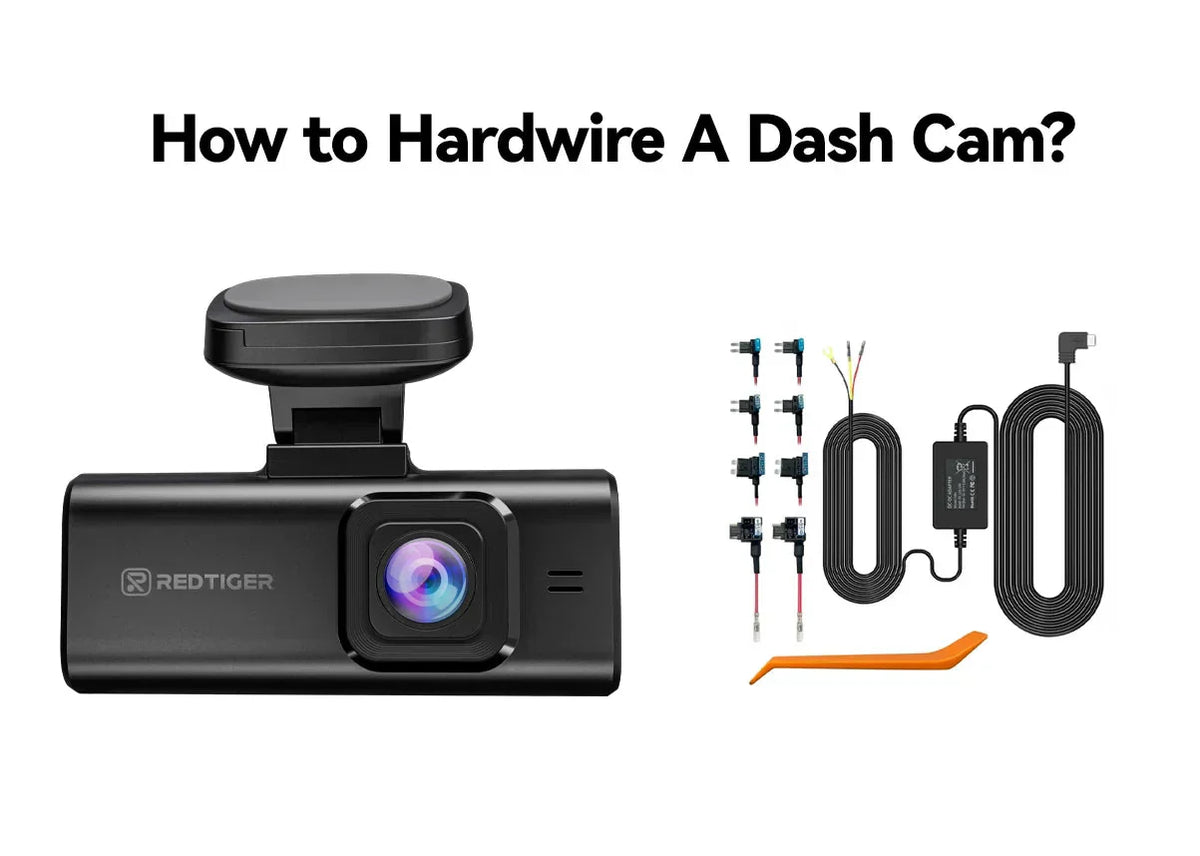
Hardwiring Kits
Hardwiring kits connect the dash cam directly to the car’s fuse box. This lets the camera get power even when the engine is off.
The kit usually includes a fuse tap and cables. It can protect the car battery from draining by cutting power if voltage gets low.
- Connects to car’s fuse box
- Provides constant power
- Protects car battery
- Requires professional or careful installation
External Battery Packs
External battery packs are separate power sources for dash cams. They charge while the car runs and power the camera when it is off.
These packs avoid draining the car’s main battery. They are easy to install and can last several hours depending on capacity.
- Separate power source
- Charges while driving
- Prevents car battery drain
- Can power dash cam for hours
Capacitor Vs Battery
Dash cams use either capacitors or batteries for power backup. Both store energy but work differently.
Capacitors charge quickly and last longer in heat. Batteries store more power but can wear out faster.
| Feature | Capacitor | Battery |
|---|---|---|
| Heat resistance | High | Lower |
| Power storage | Less | More |
| Life span | Longer | Shorter |
| Charging speed | Fast | Slower |
Choosing The Right Dash Cam
Dash cams help record your car’s surroundings while you drive. Some models also record when the car is off.
Choosing the right dash cam ensures your car is protected even when parked. Look for features that support parking mode.
Top Models With Parking Mode
Dash cams with parking mode watch your car when it is parked. They start recording if they detect motion or impact.
- Thinkware F800 Pro: Has motion detection and impact sensors.
- Viofo A129 Pro Duo: Records front and rear with parking surveillance.
- BlackVue DR900X-2CH: Offers cloud access and buffered parking recording.
- Nextbase 622GW: Features intelligent parking mode and emergency SOS.
Key Specifications To Consider
Check specs that affect parking mode and overall performance. These help you pick the best dash cam for your needs.
- Power Source: Some dash cams need a hardwire kit for parking mode.
- Motion Detection: Detects movement around your parked car.
- Impact Sensors: Records when your car is hit or shaken.
- Video Quality: Look for at least 1080p for clear footage.
- Loop Recording: Saves space by overwriting old videos.
- Battery Life or Capacitor: Capacitors last longer in heat than batteries.
- Storage Capacity: Bigger storage keeps more video files.
Installation Tips
Installing a dash cam that records when your car is off needs careful planning. Proper setup helps capture events even when the engine is not running.
Focus on wiring and camera placement to get the best results from your dash cam system.
Wiring For 24/7 Power
To enable dash cam recording while the car is off, connect the power wire to a constant power source. This usually means wiring to the car battery or a fuse that is always live.
- Locate a fuse that provides constant power using a fuse box diagram.
- Use a hardwire kit with a low-voltage cutoff to protect the car battery.
- Connect the dash cam’s power cable to the constant power fuse with a fuse tap.
- Ground the dash cam to a metal part of the car chassis.
- Secure all wires neatly to avoid damage or interference.
Positioning For Maximum Coverage
Place the dash cam to cover the front view fully and capture as much detail as possible. Proper positioning improves the quality of recorded footage.
| Position | Recommended Height | Notes |
| Center of windshield | Behind rearview mirror | Minimizes obstruction |
| Passenger side | Higher on windshield | Captures side traffic |
| Rear window | Center or side | Records rear events |
Legal And Safety Considerations
Dash cams can record even when the car is off. This feature raises legal and safety questions. It’s important to know the rules and how to stay safe.
Understanding privacy laws and battery safety can help you use dash cams wisely. Here are some key points to consider.
Privacy Laws
Privacy laws vary by country and state. Recording someone without permission can be illegal in some places. Always check local laws before using a dash cam.
Respecting privacy is important. Inform passengers if the dash cam records when the car is off. This helps maintain trust and legal compliance.
- Check local recording laws
- Inform passengers about recording
- Avoid posting recordings without consent
Battery Safety
Dash cams can drain the car battery if left on. Make sure the battery can handle this extra load. An external battery pack is a safer option.
Battery safety is crucial to prevent car issues. Always monitor the car’s battery health. Disconnect the dash cam if the battery gets too low.
- Use an external battery pack
- Monitor car battery health
- Disconnect if battery is low
Troubleshooting Common Issues
Dash cams that record while the car is off can face some common problems. These issues can affect the device’s performance and battery life.
This guide helps you find simple fixes for power drain and recording failures.
Power Drain Solutions
Power drain happens when the dash cam uses too much battery while the car is off. This can cause the car battery to die quickly.
- Check if parking mode is set correctly to avoid constant recording.
- Use a hardwire kit with low-voltage cutoff to protect your car battery.
- Turn off features like Wi-Fi or GPS when not needed.
- Make sure firmware is up to date for better power management.
- Use a separate battery pack if power drain is still high.
Recording Failures
Recording failures can happen if the dash cam does not save videos correctly or stops recording unexpectedly.
| Cause | Solution |
|---|---|
| Full or corrupted memory card | Format the card regularly and use high-quality cards |
| Incorrect parking mode settings | Adjust sensitivity and recording time in the settings |
| Power interruptions | Check connections and use a stable power source |
| Outdated firmware | Update to the latest version from the manufacturer |
Enhancing Security With Dash Cams
Dash cams are essential for recording events around your car. They work even when the car is off.
These devices help in capturing vital evidence. This enhances security and peace of mind.
Integrating With Car Alarms
Integrating dash cams with car alarms adds another layer of protection. It ensures that any disturbance is recorded instantly.
- Connect dash cam to the car’s alarm system
- Automatically start recording when alarm is triggered
- Capture video evidence of potential threats
Using Cloud Storage
Cloud storage helps in saving and accessing footage remotely. It is useful if the dash cam is damaged or stolen.
| Benefit | Description |
| Remote Access | View footage from anywhere |
| Data Safety | Footage is safe from theft |
| Space Saving | No need for physical storage |
Credit: www.redtigercam.com
Frequently Asked Questions
Does A Dash Cam Record When The Car Is Off?
Some dash cams record when the car is off if they have parking mode. Parking mode activates motion or impact detection to save footage. However, this requires a constant power source, like a hardwire kit or external battery.
How Long Can Dash Cams Record With Car Off?
Recording time depends on the dash cam’s battery and storage capacity. With parking mode, recording may last a few hours to days. Using a hardwire kit can extend recording time significantly by drawing power from the car battery.
Can Dash Cams Drain Car Battery When Off?
Yes, dash cams can drain the car battery if they record when the car is off. Using a hardwire kit with a voltage cutoff feature helps prevent battery drain by shutting off power below a set voltage.
What Powers A Dash Cam When The Car Is Off?
Dash cams use a hardwire kit connected to the car battery or an internal battery pack for power when the car is off. This allows continuous recording and parking mode functionality without the engine running.
Conclusion
Dash cams that record when your car is off offer extra safety. They catch events like hit-and-runs or vandalism. Choosing the right dash cam with parking mode is key. Make sure it has good battery life and clear video quality.
Always check local laws about recording in parking areas. This simple tool helps protect your car and your peace of mind. Stay safe, and keep your car monitored even when you are away.







