
If you want to save time and money on car repairs, the Ancel Bd310 OBD2 Scanner could be your new best friend. Imagine being able to diagnose your car’s problems instantly, without relying on a mechanic’s guesswork.
With this handy tool, you get clear, accurate information right at your fingertips. Curious how it works and why it’s worth having? Keep reading to discover how the Ancel Bd310 can make understanding your vehicle easier than ever before.
Features Of Ancel Bd310
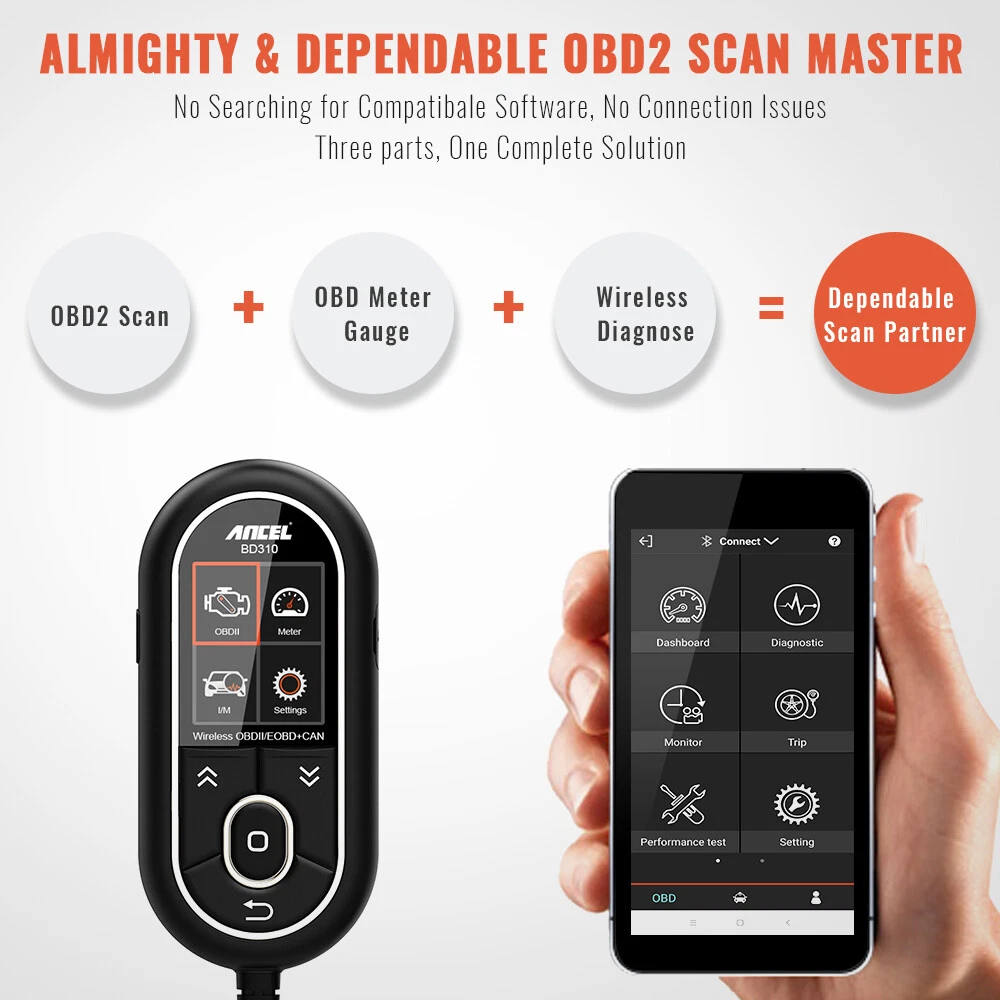
The Ancel BD310 OBD2 scanner is a device used to diagnose car problems. It reads trouble codes from the vehicle’s computer system. This helps users understand what needs fixing.
This scanner offers several features that make it easy to use. It supports many car models and shows clear information on its screen.
Design And Build
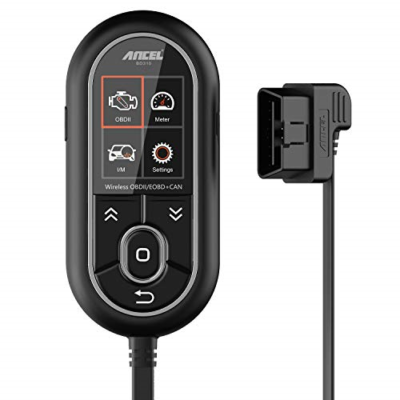
The Ancel BD310 has a compact and sturdy design. It fits well in your hand and is easy to carry. The buttons are large and simple to press.
The device has a durable plastic shell. It can handle everyday use without damage. The design keeps the screen protected when not in use.
Compatibility
This scanner works with most cars made after 1996. It supports many brands and models from different countries. It can connect to both gasoline and diesel engines.
It is suitable for use on cars in the US, Europe, and Asia. The device helps diagnose many common vehicles on the road today.
Supported Protocols
The Ancel BD310 supports various communication protocols. These protocols allow it to read data from different car systems. It covers all OBD2 standard protocols.
- ISO9141
- ISO14230-4 (KWP2000)
- ISO15765-4 (CAN)
- SAE J1850 PWM
- SAE J1850 VPW
These protocols ensure the scanner can work with many car models and brands worldwide.
Display And Interface
The device has a clear LCD screen. It shows codes and data in a readable format. The screen has backlight for use in dark places.
The interface uses simple buttons for navigation. Users can scroll through menus and select options easily. The display shows live data and trouble codes clearly.
Battery And Power
The Ancel BD310 does not need separate batteries. It gets power directly from the car’s OBD2 port. This makes it convenient and ready to use anytime.
The device powers off automatically when unplugged. This helps save energy and protects the unit from damage.
Setting Up The Scanner
Setting up the Ancel Bd310 OBD2 Scanner is simple and quick. This guide helps you get started with the basic setup steps. You will learn how to unbox, connect, and use the scanner.
Follow these instructions to ensure your scanner works properly with your vehicle. Each part of the setup process is explained clearly for easy understanding.
Unboxing And Initial Inspection
When you receive your Ancel Bd310, check all parts carefully. Make sure nothing is damaged or missing. This will help avoid problems later on.
- Take out the scanner and accessories from the box
- Check the scanner body for cracks or scratches
- Verify the OBD2 connector is intact and clean
- Look for the user manual and warranty card
- Keep the packaging for future use
Connecting To Your Vehicle
Locate your vehicle’s OBD2 port to connect the scanner. The port is usually under the dashboard on the driver’s side. Plug the scanner firmly into the port.
- Turn off your vehicle’s ignition
- Find the OBD2 port below the dashboard
- Insert the scanner connector into the port
- Turn on the vehicle ignition without starting the engine
- Wait for the scanner to power on and connect
Navigating The Menu
The scanner menu is easy to use. Use the buttons to move through options and select commands. This helps you read codes and view live data.
| Button | Function |
|---|---|
| Up/Down Arrows | Move through menu items |
| OK/Enter | Select highlighted option |
| Back | Return to previous menu |
| Power | Turn the scanner on or off |
Firmware Updates
Keep your scanner updated to improve performance. Connect it to a computer to download the latest firmware. Follow the update instructions carefully.
To update firmware:
- Download the update software from Ancel’s website
- Connect the scanner to your PC using the USB cable
- Run the update software and follow on-screen prompts
- Do not disconnect until the update finishes
Performing Diagnostics
The Ancel BD310 OBD2 Scanner helps check your car’s health quickly. It connects to your vehicle to find any problems.
This tool makes it easy to understand what needs fixing. You can read codes, clear faults, and see live data from your car.
Reading Error Codes
Use the scanner to read trouble codes stored in your car’s system. These codes tell you what part has a problem.
The codes come with a short description to help you understand the issue. This saves time before taking your car to a mechanic.
Clearing Fault Codes
After fixing the problem, you can clear the fault codes with the scanner. This resets the check engine light on your dashboard.
Clearing codes helps verify if the repair was successful and if the issue is gone.
Live Data Monitoring
The scanner shows live data from your car’s sensors in real-time. You can watch engine speed, temperature, and fuel status.
- Engine RPM
- Coolant temperature
- Fuel system status
- Vehicle speed
- Oxygen sensor data
Freeze Frame Data
Freeze frame data captures vehicle conditions when an error happens. This helps find the cause of the fault.
| Parameter | Example Value |
| Engine Load | 45% |
| Coolant Temp | 90°C |
| Fuel Trim | +3% |
| Vehicle Speed | 60 km/h |
Emission Test
The scanner checks if your car meets emission standards. It shows if the emission system is working correctly.
Emission test results include:
- Oxygen sensor status
- Catalytic converter efficiency
- Evaporative emission control
- Readiness monitors status
Credit: www.ebay.com
Benefits For Car Owners
The Ancel Bd310 OBD2 Scanner helps car owners check their vehicle’s health easily. It reads error codes and shows what needs fixing.
This tool is useful for anyone who wants to save money and time on car repairs. It also helps keep the car in good condition.
Cost Savings
The scanner lets car owners find problems before they get worse. This can stop expensive repairs later.
By diagnosing issues at home, users avoid unnecessary trips to the mechanic. This reduces repair bills.
- Detect issues early to avoid big repairs
- Skip mechanic visits for minor problems
- Save money by fixing small faults yourself
Time Efficiency
The Ancel Bd310 scanner provides quick results. Car owners get instant information on what needs attention.
It saves time by avoiding long waits at repair shops. Users can check their car anytime, anywhere.
- Fast error code reading
- Immediate diagnosis at home
- Less time spent at the mechanic
Preventive Maintenance
The scanner helps spot small problems before they cause damage. This keeps the car running smoothly.
Regular checks with the scanner support good vehicle care. It helps maintain safety and performance over time.
- Identify issues early
- Keep car parts working well
- Improve vehicle safety and life
User-friendly Operation
The Ancel Bd310 is easy to use. It connects to the car and shows results on a clear screen.
No special skills are needed. Simple buttons and clear codes make it good for all car owners.
- Plug and play design
- Clear display of error codes
- Simple instructions for all users
Comparing With Other Scanners
The Ancel BD310 OBD2 Scanner is a popular choice for car diagnostics. It stands out in some areas but also shares features with other scanners.
We will compare the BD310 with other scanners on price, features, ease of use, and support.
Price Comparison
The Ancel BD310 is usually priced lower than many advanced OBD2 scanners. It offers a budget-friendly option for basic diagnostics.
- BD310: Affordable for most users
- Mid-range scanners: Higher cost with more features
- High-end scanners: Expensive with advanced tools
Feature Differences
The BD310 covers essential functions like reading and clearing codes. It supports ABS and SRS diagnostics on many vehicles.
More expensive scanners may offer live data streaming, Bluetooth connectivity, and wider vehicle coverage.
- BD310: Basic code reading and clearing
- Others: Live data and advanced diagnostics
- Some include updates for new car models
Ease Of Use
The BD310 is simple to use with a clear screen and easy buttons. It does not require a smartphone or app.
Other scanners may need apps or complex menus, which can be harder for beginners.
- BD310: Plug and play with simple interface
- Others: May require app installation
- Some have touchscreens or many menu options
Support And Updates
The BD310 comes with basic customer support and occasional software updates. Updates help with new vehicle compatibility.
Higher-end scanners often offer frequent updates and better support services.
- BD310: Basic updates and support
- Others: Frequent updates and extensive help
- Some include online forums and tutorials
Credit: www.ebay.com
Troubleshooting Tips
The Ancel Bd310 Obd2 Scanner is a handy tool for diagnosing car problems. Sometimes, users encounter issues that need troubleshooting. This guide provides tips to help you solve common problems.
Understanding error messages and knowing how to reach support can save time. Let’s explore common issues and their fixes.
Common Issues And Fixes
Sometimes the scanner may not connect to your car. Check the OBD2 port for dust or damage. Make sure the ignition is on.
- Ensure the scanner is properly plugged in
- Verify the car’s battery is charged
- Try restarting the scanner and the car
Error Messages Explained
The scanner may display error messages that are confusing. Each message indicates a specific issue. Refer to the user manual for a detailed explanation.
Common error messages include connection errors and data reading errors. Understanding these helps resolve issues faster.
Contacting Support
If troubleshooting does not solve the problem, contact Ancel support. They provide expert assistance for scanner issues.
Where To Buy
The Ancel Bd310 Obd2 Scanner is a valuable tool for car diagnostics. Knowing where to buy ensures you get a genuine product.
You can purchase it from various places. Below are options to consider for a reliable purchase.
Authorized Retailers
Authorized retailers guarantee authenticity. They often offer additional customer support.
- Visit your local auto parts store.
- Check with electronics stores that carry car accessories.
- Look for authorized dealers on the Ancel website.
Online Platforms
Online platforms provide convenience and variety. Ensure you choose reputable websites.
| Platform | Features |
| Amazon | Fast shipping, customer reviews |
| eBay | Auction options, diverse sellers |
| Official Ancel Store | Direct purchase from manufacturer |
Warranty And Return Policy
Understanding warranty and return policies is crucial. It helps in case of product issues.
Credit: www.walmart.com
Frequently Asked Questions
What Is The Ancel Bd310 Obd2 Scanner Used For?
The Ancel Bd310 OBD2 Scanner diagnoses vehicle engine issues. It reads and clears error codes, helping maintain car health. It supports most OBD2 vehicles and provides live data for accurate troubleshooting.
How Does The Ancel Bd310 Scanner Improve Car Maintenance?
This scanner offers real-time data and error code reading. It helps identify engine problems early, reducing repair costs. Its easy interface allows quick diagnostics, making car maintenance efficient and user-friendly.
Is The Ancel Bd310 Compatible With All Vehicles?
The Ancel Bd310 works with most OBD2 compliant vehicles made after 1996. It supports multiple car models and brands, ensuring broad compatibility for effective diagnostics.
Can Beginners Use The Ancel Bd310 Obd2 Scanner Easily?
Yes, the Ancel Bd310 features a simple interface and clear instructions. It’s designed for both beginners and professionals, making vehicle diagnostics accessible to all users.
Conclusion
The Ancel BD310 OBD2 scanner helps you check your car’s health easily. It shows error codes clearly and guides you to fix problems. This tool saves time and money by spotting issues early. Its simple design makes it good for all drivers.
Trust this scanner to keep your car running smooth. A smart choice for quick vehicle checks.







