
If you want to protect yourself on the road and capture every important moment while driving your 2017 Ford Focus, installing a dash cam is a smart move. Imagine having clear video evidence in case of an accident or unexpected event.
You might think it’s complicated or time-consuming, but it’s easier than you expect. This guide will walk you through the simple steps to install a dash cam in your Ford Focus, helping you boost your safety and peace of mind.
Keep reading to learn how you can do it yourself quickly and confidently.
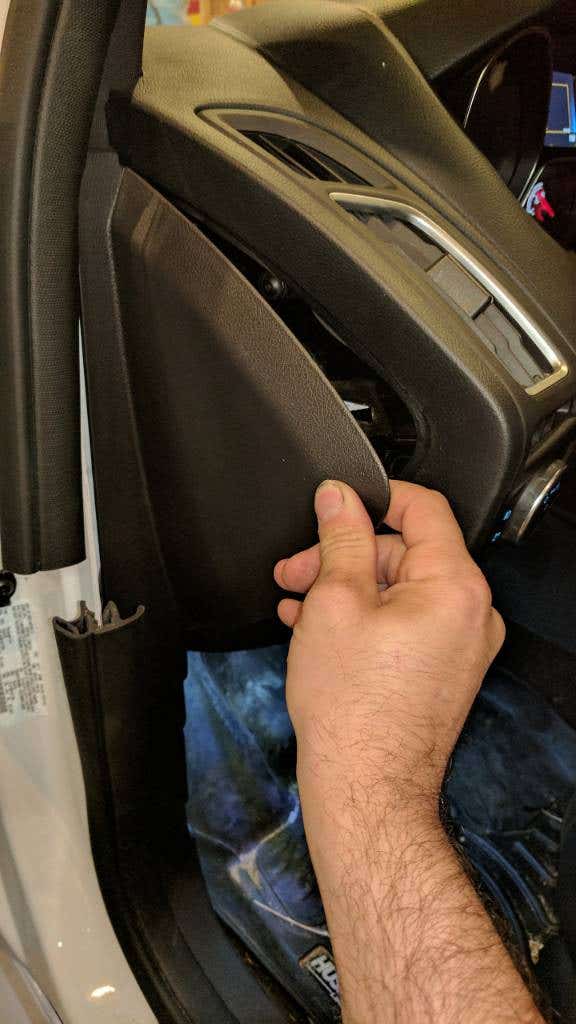
Credit: www.focusst.org
Choosing The Right Dash Cam
Installing a dash cam in your 2017 Ford Focus helps record your drives and protect you. Picking the right dash cam is important for clear videos and easy use.
Consider what features you need, which models fit your car, and what fits your budget. This guide will help you choose well.
Features To Consider
Look for dash cams with good video quality and reliable performance. Clear images help in case of accidents.
Other features to check include night vision, loop recording, and easy mounting options. These make the dash cam useful day and night.
- 1080p or higher video resolution
- Wide viewing angle for full road coverage
- Loop recording to save storage space
- G-sensor to detect sudden impacts
- Night vision for clear footage in the dark
- Compact size for easy installation
Best Models For Ford Focus
Some dash cams fit well in a Ford Focus and provide good features. These models are popular for their reliability and size.
Choose a model that does not block your view and is easy to reach for controls.
- Vantrue N2 Pro for dual cameras and clear video
- Nextbase 322GW for good video and easy use
- Thinkware F800 Pro for advanced safety features
- Rexing V1 for discreet design and solid performance
Budget-friendly Options
You can find dash cams that cost less but still work well. These options cover basic needs without extra features.
Budget models are good for simple recording and easy setup in your Ford Focus.
- Apeman C450 for clear 1080p video
- AUKEY Dash Cam for simple installation
- YI Smart Dash Cam for good video quality
- Campark R1 for compact size and ease
Preparing Your Ford Focus
Installing a dash cam in your 2017 Ford Focus requires some preparation. Getting your car ready helps the installation go smoothly.
Focus on gathering the right tools, finding power sources, and cleaning areas where the camera will be mounted.
Gathering Necessary Tools
Before starting, collect all tools needed for the dash cam installation. This saves time and avoids interruptions.
- Dash cam kit with mount and cables
- Trim removal tools
- Wire cutters and strippers
- Electrical tape
- Fuse tap or add-a-circuit adapter
- Multimeter to test power sources
- Microfiber cloth for cleaning
Locating Power Sources
Your dash cam needs a steady power supply. Find suitable power sources in your Ford Focus for a clean and safe setup.
| Power Source | Location | Notes |
| 12V Accessory Outlet | Center console or dashboard | Easy to use but may turn off with ignition |
| Fuse Box | Driver side under dashboard | Provides constant or switched power |
| OBD-II Port | Under steering column | Optional for power via adapter |
Cleaning The Windshield
Clean the windshield where the dash cam will attach. Dirt or dust can reduce mount strength and camera view.
Follow these tips for a clear, clean surface:
- Use a glass cleaner and microfiber cloth
- Wipe the area in circular motions
- Dry completely before mounting
- Avoid touching the cleaned spot afterward
Step-by-step Installation
Installing a dash cam in your 2017 Ford Focus helps record your drives. It can provide important video evidence if needed.
This guide shows how to install your dash cam in three clear parts. Follow each part carefully for a neat setup.
Mounting The Dash Cam
Find a good spot on your windshield behind the rearview mirror. This place gives a wide view and does not block your sight.
- Clean the windshield area with rubbing alcohol.
- Peel off the adhesive cover on the dash cam mount.
- Press the mount firmly onto the glass.
- Attach the dash cam to the mount securely.
Connecting To Power
Your dash cam needs power from your car. Use the 12V socket or hardwire it to the fuse box for a cleaner look.
| Power Source | Pros | Cons |
| 12V Socket | Easy to connect, no tools needed | Visible wires, socket occupied |
| Hardwire to Fuse Box | Clean installation, always on power | Needs tools and knowledge |
Routing The Cables Neatly
Hide the cables so they do not distract you or hang loose. Use these tips to route the wires neatly inside your car.
- Tuck the cable into the headliner trim above the windshield.
- Run the wire along the A-pillar trim on the driver side.
- Use plastic clips or adhesive strips to secure cables.
- Hide excess cable under the dashboard or carpet.
Configuring The Dash Cam
After installing a dash cam in your 17 Ford Focus, you need to set it up. Proper configuration helps the dash cam work well every time you drive.
This guide covers how to set the date and time, adjust video quality, and enable safety features.
Setting Date And Time
Set the date and time so your dash cam records accurate timestamps. This is important for reviewing footage later.
Use the dash cam menu to find the date and time settings. Choose the correct time zone for your location.
- Turn on the dash cam and access the settings menu
- Find the date and time option
- Set the current date using year, month, and day
- Set the current time using hours and minutes
- Save your settings and exit the menu
Adjusting Video Quality
Video quality affects how clear your recordings are and how much storage they use. Choose a setting that balances clarity and space.
Higher quality means better video but uses more memory. Lower quality saves space but may be harder to see details.
- Open the video settings in your dash cam menu
- Select video resolution (e.g., 1080p, 720p)
- Choose frame rate (30fps is common)
- Confirm and save your choices
Enabling Safety Features
Many dash cams have safety features like motion detection and collision alerts. Turn these on to improve security and recording accuracy.
Safety features help record important events automatically. Set them up through your dash cam’s settings menu.
- Go to the safety or event detection menu
- Enable features like G-sensor and motion detection
- Adjust sensitivity settings if available
- Save the settings and test to ensure they work
Testing And Troubleshooting
Installing a dash cam in your 2017 Ford Focus is only the first step. It’s important to ensure everything works correctly. Testing and troubleshooting can help you avoid issues on the road.
This guide will help you verify the camera angle, check the power connection, and resolve common issues.
Verifying Camera Angle
Proper camera angle ensures clear footage. It is essential for capturing everything in front of the vehicle.
- Check that the horizon is centered in the frame.
- Ensure the lens is not obstructed by the rearview mirror.
- Adjust the angle to cover the entire windshield view.
Checking Power Connection
Power connection is crucial for continuous recording. Ensure that the dash cam is receiving power from the car.
| Connection | Check |
| USB Cable | Firmly plugged into the camera and power source. |
| Fuse Box | Ensure the correct fuse is used. |
| Battery | Verify the car battery is not drained. |
Resolving Common Issues
Even with careful installation, issues can arise. Here are some common problems and solutions.
- Camera not turning on: Check power cable and fuse.
- Blurry footage: Clean the camera lens.
- Footage not saving: Check memory card capacity and format.

Credit: www.reddit.com
Maintaining Your Dash Cam
Keeping your dash cam in good shape helps it work well. Proper care ensures clear recordings and long life.
Here are some tips to maintain the dash cam installed in your 17 Ford Focus.
Regular Cleaning Tips
Clean your dash cam often to avoid dust and dirt buildup. Use a soft cloth to wipe the lens and screen gently.
Do not use harsh chemicals or water directly on the device. Keep it dry and free from fingerprints for clear video quality.
- Use a microfiber cloth for cleaning
- Remove dust from the lens carefully
- Avoid spraying liquid on the dash cam
- Clean the screen to keep controls visible
Updating Firmware
Firmware updates improve the dash cam’s performance and fix bugs. Check for updates from the manufacturer regularly.
Download updates to a computer or USB drive, then install them on the dash cam. Follow the instructions carefully to avoid errors.
- Visit the official dash cam website
- Download the latest firmware version
- Transfer update files to the dash cam
- Follow update steps shown on screen
Storage Management
Manage your dash cam storage to prevent full memory. Delete old videos or transfer them to a safe place.
Use a high-quality memory card with enough space. Format the card regularly to keep it working properly.
- Check available storage often
- Remove unwanted videos to free space
- Use a memory card recommended by the maker
- Format the card every few weeks
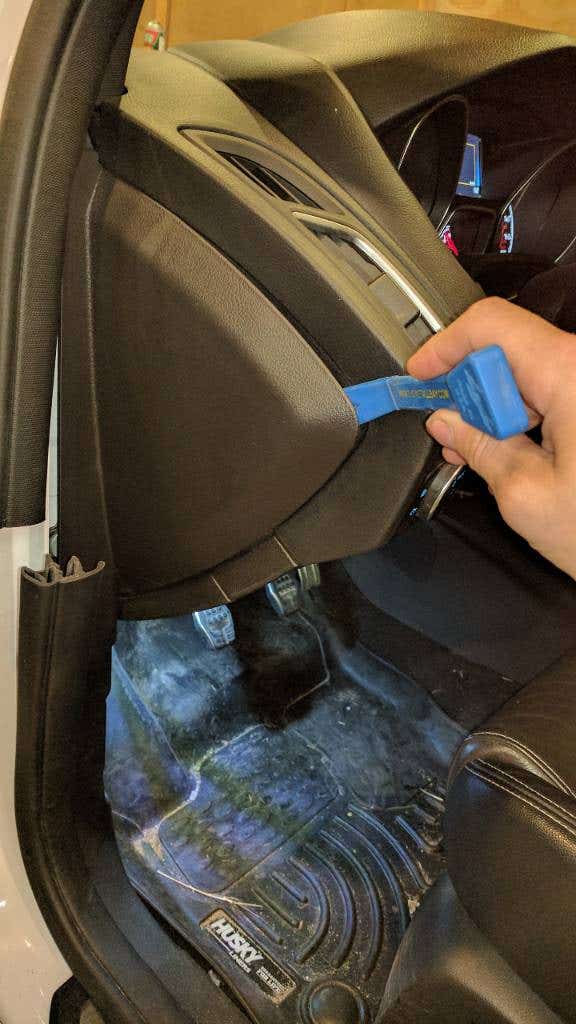
Credit: www.focusst.org
Frequently Asked Questions
How Do I Install A Dash Cam In A 2017 Ford Focus?
To install a dash cam, first choose a suitable mount near the rearview mirror. Connect the power cable to the fuse box or cigarette lighter. Route the cable discreetly along the headliner and A-pillar. Finally, secure the dash cam and test its functionality.
What Power Source Is Best For A Ford Focus Dash Cam?
The best power source is the vehicle’s fuse box using a hardwire kit. This method ensures continuous power and a clean installation. Alternatively, use the 12V cigarette lighter socket for easier setup but less neat wiring.
Can I Install A Dash Cam Without Professional Help?
Yes, installing a dash cam yourself is possible with basic tools and patience. Follow the user manual and route cables carefully. If unsure, consult online tutorials or seek professional assistance to avoid damage or incorrect installation.
Will Installing A Dash Cam Affect My Ford Focus Warranty?
Generally, installing a dash cam does not void your Ford Focus warranty. Ensure installation is done without modifying critical vehicle systems. Use recommended accessories and avoid permanent changes to vehicle wiring to maintain warranty coverage.
Conclusion
Installing a dash cam in your 2017 Ford Focus adds safety and peace of mind. It records your drives clearly and helps with insurance claims. The process is simple and does not take much time. Choose a good dash cam that fits your needs and budget.
Proper installation ensures it works well every time you drive. Protect yourself on the road with a dash cam today. It’s a smart step for any driver.







