
Your car battery is the heart of your vehicle’s electrical system. But did you know that dirty or corroded battery terminals can cause serious problems?
If your engine struggles to start or your electronics act up, the issue might be right at your battery. Cleaning your battery terminals is easier than you think—and it can save you from costly repairs down the road. Keep reading, and you’ll learn simple, step-by-step tips to get your terminals sparkling clean and your car running smoothly again.

Credit: urbsgarage.com
Signs Of Dirty Battery Terminals
Dirty battery terminals can cause problems with your car’s electrical system. It is important to recognize the signs early. This helps avoid bigger issues and keeps your car running smoothly.
Battery terminals collect dirt and corrosion over time. These deposits block the flow of electricity. Knowing what to look for can save you time and money on repairs.
Corrosion Symptoms
Corrosion looks like a white, green, or blue powdery build-up on the battery terminals. It can also appear as crusty deposits. These signs show that the terminals need cleaning.
- White or bluish powder on terminals
- Crusty or flaky residue around battery posts
- Foul smell near the battery area
- Loose or weak battery cable connections
Impact On Car Performance
Dirty terminals reduce the battery’s ability to deliver power. This leads to slow engine starts and dim headlights. Electrical components may also fail to work properly.
| Problem | Effect on Car |
| Corroded Terminals | Weak or no electrical connection |
| Reduced Power Flow | Engine cranks slowly or not at all |
| Poor Charging | Battery drains faster than normal |
| Electrical Failures | Lights, radio, or dashboard may malfunction |
Credit: baterihub.com
Tools And Materials Needed
Cleaning the terminals on your car battery is important to keep your vehicle running smoothly.
You need the right tools and materials to do the job safely and effectively.
Cleaning Supplies
Gather these cleaning supplies before starting to clean your battery terminals.
- Baking soda
- Water
- Old toothbrush or small wire brush
- Clean cloth or rag
- Wrench or pliers to disconnect terminals
- Petroleum jelly or terminal protectant spray
Safety Gear
Protect yourself by wearing proper safety gear during the cleaning process.
| Safety Item | Purpose |
| Gloves | Protect hands from acid and dirt |
| Safety goggles | Shield eyes from splashes |
| Old clothes | Protect skin and prevent damage to clothing |
| Face mask | Avoid inhaling dust and fumes |
Preparing For Cleaning
Cleaning car battery terminals is an important task. It helps keep your car running well.
Before starting, prepare properly. This keeps you safe and protects your car.
Safety Precautions
Wear gloves and safety glasses to protect your skin and eyes. Work in a well-ventilated area to avoid fumes.
- Remove all jewelry to avoid electric shock.
- Keep sparks, flames, and smoking materials away.
- Use tools with insulated handles.
- Have baking soda and water ready to neutralize acid spills.
Disconnecting The Battery
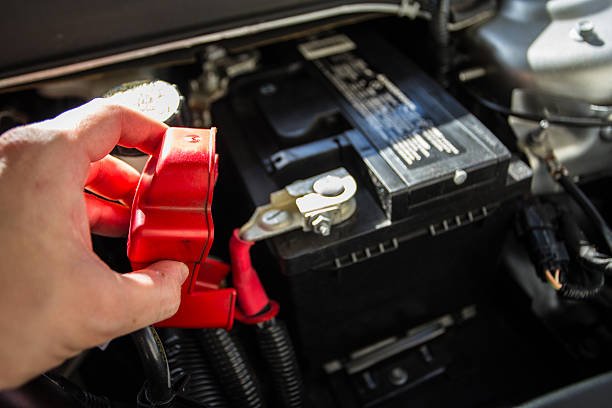
Always disconnect the negative terminal first to prevent short circuits. Then disconnect the positive terminal.
| Terminal | Order to Disconnect |
| Negative (-) | First |
| Positive (+) | Second |
Step-by-step Cleaning Process
Cleaning car battery terminals keeps your vehicle running well. Dirt and corrosion can stop power flow.
Follow these steps to clean your battery terminals safely and easily.
Removing Corrosion
Corrosion looks like white or blue powder on battery terminals. It blocks electricity flow.
Wear gloves to protect your hands. Use a brush or cloth to remove loose corrosion.
- Turn off the car and remove keys.
- Disconnect the negative terminal first.
- Disconnect the positive terminal next.
- Use a wire brush to clean off powdery corrosion.
Scrubbing Terminals
Scrub terminals with a baking soda paste to clear tough corrosion. Baking soda neutralizes acid.
Apply the paste and scrub with a toothbrush or wire brush. Clean all terminal parts well.
- Mix one tablespoon of baking soda with one cup of water.
- Dip brush into paste and scrub terminals and clamps.
- Focus on areas with heavy corrosion.
- Repeat until terminals look clean.
Rinsing And Drying
Rinse terminals with clean water to remove baking soda and loosened dirt. Avoid soaking the battery.
Dry terminals with a clean cloth or let air dry. Make sure they are completely dry before reconnecting.
- Use a damp cloth or spray water lightly.
- Wipe terminals and clamps dry with a soft cloth.
- Wait a few minutes for air drying if needed.
- Reconnect positive terminal first, then negative.
Reassembling And Testing
After cleaning the terminals on your car battery, it is important to put everything back correctly. This helps your car start and run well. Testing the battery ensures it works safely and efficiently.
Follow the right steps to reconnect the battery terminals and check the battery’s health. This will keep your car reliable and avoid future problems.
Reconnecting Battery Terminals
Start by attaching the positive terminal first. This reduces the risk of sparks. Then connect the negative terminal. Make sure both terminals are tight and secure. Loose connections can cause electrical issues or prevent your car from starting.
- Place the positive (+) terminal on the positive battery post
- Tighten the terminal clamp with a wrench
- Attach the negative (–) terminal to the negative post
- Tighten the negative clamp securely
- Check that both terminals do not move or wiggle
Checking Battery Performance
Once the terminals are reconnected, test the battery to make sure it is working well. Use a multimeter or a battery tester. A healthy battery shows a voltage between 12.4 and 12.7 volts when the car is off.
| Test Type | Normal Reading | Action Needed |
| Voltage Test (Engine Off) | 12.4 – 12.7 volts | Battery is good |
| Voltage Test (Engine Running) | 13.7 – 14.7 volts | Charging system works |
| Below 12.4 volts | Low voltage | Charge or replace battery |
| Below 13.7 volts (Engine Running) | Low charging voltage | Check alternator and cables |
Preventing Future Corrosion
Corrosion on car battery terminals can cause problems. It reduces battery life and performance. Regular cleaning and care prevent future issues.
Keeping terminals clean ensures your car starts smoothly. It also improves the battery’s overall efficiency. Here are some tips to prevent corrosion.
Applying Protective Coatings
Using protective coatings helps shield battery terminals. This stops moisture and prevents rust. Special sprays or pastes are available for this purpose.
Coatings should be applied after cleaning the terminals. Make sure the surface is dry before applying. Follow the product instructions carefully.
- Use a brush to apply the coating evenly.
- Ensure the entire terminal is covered.
- Reapply as needed for ongoing protection.
Regular Maintenance Tips
Regular maintenance keeps your battery in good shape. Inspect terminals for signs of corrosion. Clean them every few months.
Check the battery connections. Tighten any loose cables. Loose connections can lead to poor performance.
- Wear gloves to protect your hands.
- Use baking soda and water to clean corrosion.
- Rinse with water and dry thoroughly.

Credit: urbsgarage.com
Frequently Asked Questions
How Do I Clean Car Battery Terminals Safely?
To clean terminals safely, disconnect the negative cable first. Use gloves and eye protection. Apply a baking soda solution to neutralize corrosion. Scrub gently with a wire brush. Rinse with water and dry thoroughly before reconnecting.
What Household Items Clean Battery Terminals Effectively?
Baking soda mixed with water works well. It neutralizes battery acid and removes corrosion. Use a toothbrush or wire brush to scrub terminals after applying the mixture. Rinse with clean water and dry completely.
How Often Should Car Battery Terminals Be Cleaned?
Clean terminals every six months or when corrosion appears. Regular cleaning prevents electrical issues and extends battery life. Check terminals during routine vehicle maintenance for best results.
Can I Use Wd-40 To Clean Battery Terminals?
WD-40 is not recommended for cleaning terminals. It can leave a residue that attracts dirt. Use baking soda solution and a wire brush instead for effective cleaning.
Conclusion
Cleaning car battery terminals keeps your vehicle running smoothly. Dirt and corrosion can stop the battery from working well. Use simple tools like a brush, baking soda, and water. Regular cleaning helps avoid starting problems. Always wear gloves and be careful with battery acid.
This small step saves time and money on repairs. Keep terminals clean and check them often. Your car will thank you with better performance and longer battery life. Easy to do, worth the effort.







