
Is your car battery dead or showing signs of weakness? Knowing how to use a battery charger for your car can save you from unexpected troubles and keep you on the road longer.
Imagine never having to wait for roadside help or worry about your battery dying at the worst moment. You’ll discover simple, step-by-step instructions that anyone can follow to bring your car battery back to life safely and quickly. Keep reading, and you’ll gain the confidence to handle your car’s battery like a pro.
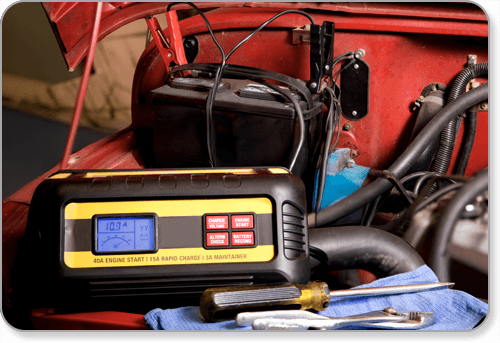
Credit: www.autobatteries.com
Choosing The Right Charger
Using the correct battery charger helps keep your car battery healthy. It also makes charging easier and safer.
This guide explains how to pick the best charger for your car battery type and needs.
Types Of Car Battery Chargers
There are several types of chargers. Each type works differently and suits different needs.
- Trickle Chargers: Charge batteries slowly to avoid damage.
- Smart Chargers: Automatically adjust charging speed and stop when full.
- Fast Chargers: Provide quick charging but need careful use.
- Solar Chargers: Use sunlight to charge batteries without power outlets.
Matching Charger To Battery Type
Car batteries come in different types. Choosing a charger that matches your battery is important.
| Battery Type | Recommended Charger Type |
| Lead-Acid | Trickle or Smart Charger |
| AGM (Absorbent Glass Mat) | Smart Charger with AGM mode |
| Gel Cell | Smart Charger with Gel mode |
| Lithium-Ion | Charger designed for lithium batteries |
Safety Features To Look For
Safety features protect you and your battery during charging. Look for these important features.
- Overcharge Protection: Stops charging when battery is full.
- Short Circuit Protection: Prevents damage from wrong connections.
- Reverse Polarity Protection: Avoids damage if cables are connected backwards.
- Temperature Control: Adjusts charging to avoid overheating.
- Automatic Shutoff: Turns off charger after charging completes.
Preparing Your Vehicle
Using a battery charger for your car needs some preparation. You must get your vehicle ready before starting.
This guide shows how to prepare your vehicle safely and correctly.
Locating The Battery
First, find your car battery. It is usually under the hood, near the engine.
Some cars have the battery in the trunk or under a seat. Check your owner’s manual if you cannot find it.
Checking Battery Condition
Look at the battery for any damage. Check for cracks, leaks, or corrosion on the terminals.
If the battery is damaged, do not charge it. A damaged battery can be dangerous.
- Clean battery terminals if they have white or green buildup.
- Use a wire brush or battery cleaner for cleaning.
- Wear gloves to protect your hands from acid.
Ensuring A Safe Environment
Safety is very important. Work in a well-ventilated area to avoid harmful gas buildup.
Turn off the engine and remove keys from the ignition. Avoid smoking or sparks near the battery.
- Wear safety glasses to protect your eyes.
- Keep children and pets away from the work area.
- Have baking soda or water nearby to neutralize acid spills.
Connecting The Charger
Connecting a battery charger correctly is important for safety and success. This guide explains how to connect the charger to your car battery.
Follow these steps carefully to avoid damage to your car or charger. Always check the charger instructions before starting.
Identifying Positive And Negative Terminals
The car battery has two terminals: positive and negative. The positive terminal is usually marked with a plus sign (+) or red cover. The negative terminal shows a minus sign (−) or black cover.
It is important to connect the charger cables to the correct terminals to prevent sparks or damage.
Proper Cable Attachment
Attach the charger cables in the right order for safety. Connect the positive cable first, then the negative cable. When disconnecting, remove the negative cable before the positive.
- Connect the red clamp to the positive terminal (+)
- Connect the black clamp to the negative terminal (−)
- Ensure clamps are secure and do not touch each other
- Keep cables away from moving parts in the engine
Avoiding Common Connection Mistakes
| Mistake | Problem | How to Avoid |
| Reversing cables | Sparks, battery damage | Match red to positive, black to negative |
| Clamps touching | Short circuit | Keep clamps apart |
| Loose connections | Poor charging | Attach clamps firmly |
| Connecting charger to wet battery | Electric shock risk | Dry battery terminals before connecting |
Charging Process
Charging a car battery correctly keeps your vehicle running well. It is important to follow the right steps. This guide explains how to use a battery charger safely and effectively.
Understanding the charging process helps you avoid damage and prolong battery life. Pay attention to the charger settings and battery status during the process.
Selecting The Charging Mode
Choose the right charging mode based on your battery type and condition. Most chargers have multiple modes like slow charge, fast charge, or maintenance charge.
- Slow charge is best for fully drained batteries.
- Fast charge saves time but may heat the battery.
- Maintenance mode keeps the battery topped up over time.
Monitoring Charge Levels
Check the battery’s charge level regularly during charging. Many chargers have indicators or displays that show the current charge percentage.
| Charge Level | Action |
| 0% – 25% | Use slow charging to protect battery |
| 26% – 75% | Normal charging mode is suitable |
| 76% – 99% | Switch to maintenance or slow charge |
| 100% | Charging complete, disconnect charger |
Recognizing When Charging Is Complete
Know the signs that show the battery is fully charged. This avoids overcharging, which can harm the battery and reduce its life.
- The charger indicator shows 100% or “Full”.
- The battery feels cool to the touch.
- There is no increase in voltage or current.
- The charger switches to a maintenance or float mode automatically.
Disconnecting And Finishing Up
After charging your car battery, it is important to disconnect the charger safely. Proper steps help prevent sparks and damage. Finishing up includes checking the battery and storing the charger correctly.
Safe Removal Of Charger Cables
Turn off the battery charger before removing cables. Always remove the negative cable first, then the positive. This reduces the risk of short circuits and sparks near the battery.
- Switch off the charger and unplug it from power.
- Disconnect the negative (black) cable from the battery.
- Disconnect the positive (red) cable from the battery.
- Handle cables carefully to avoid touching metal parts.
Inspecting The Battery After Charging
Look at the battery for any signs of damage or leaks. Check the battery terminals for corrosion or loose connections. Make sure the battery case is clean and dry before use.
| Inspection Item | What to Check | Action Needed |
|---|---|---|
| Battery Case | Cracks, swelling, or leaks | Replace battery if damaged |
| Terminals | Corrosion or buildup | Clean with a brush if dirty |
| Connections | Loose or tight cables | Tighten if loose |
Storing The Charger Properly
Keep your battery charger in a dry and cool place. Avoid storing it where moisture or dust can enter. Coil the cables loosely to prevent damage and tangling.
- Unplug the charger from the power source.
- Wrap cables without tight bends or knots.
- Store the charger in a protective bag or box.
- Keep it away from direct sunlight and heat.
Tips For Faster Charging
Using a battery charger for your car can be straightforward. With the right tips, you can achieve faster charging safely.
Let’s explore how to optimize your charger settings and maintain battery health to avoid overcharging.
Optimizing Charger Settings
Proper settings on your charger can enhance charging speed. Adjust the settings according to your battery type for efficient charging.
- Set the charger to the correct voltage.
- Use the fast charge mode if available.
- Check the manufacturer’s guidelines for specific settings.
Maintaining Battery Health
Maintaining the health of your car battery is crucial. Regular checks can prevent issues and prolong battery life.
Battery maintenance tips:
- Clean battery terminals regularly.
- Ensure the battery is securely mounted.
- Check electrolyte levels if applicable.
Avoiding Overcharging
Overcharging a battery can reduce its lifespan. It’s vital to monitor the charging process.
| Charger Type | Recommended Action |
| Smart Charger | Automatically stops when full |
| Manual Charger | Monitor and disconnect when charged |
Troubleshooting Common Issues
Car battery chargers are helpful tools when your car battery is low. Sometimes, they don’t work as expected. This guide will help you troubleshoot common issues.
Understanding these problems can save you time and effort. Let’s explore some common issues and their solutions.
Charger Not Powering On
If your charger doesn’t power on, check the power source first. Ensure it’s plugged into a working outlet. Inspect the cable for any visible damage.
- Check the wall socket for power
- Inspect the charger’s plug and cable
- Look for a blown fuse in the charger
Slow Charging Problems
Slow charging can be frustrating. It might be due to poor connections or a faulty charger. Make sure connections are tight and clean.
| Possible Cause | Solution |
| Loose connections | Tighten and clean terminals |
| Old battery | Consider replacing the battery |
| Faulty charger | Test with a different charger |
Battery Not Holding Charge
If the battery doesn’t hold a charge, it might be old or damaged. Check the battery’s age and condition. A new battery might be needed.
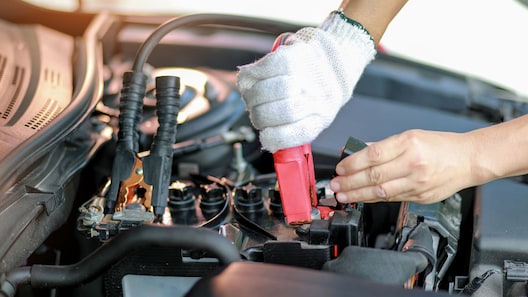
Credit: www.chase.com

Credit: www.ecoflow.com
Frequently Asked Questions
How Do I Safely Connect A Battery Charger To My Car?
First, turn off the charger and car ignition. Connect the red clamp to the positive terminal. Attach the black clamp to the negative terminal. Ensure clamps are secure and avoid touching them. Follow the charger’s instructions closely for safe use.
How Long Does It Take To Charge A Car Battery?
Charging time varies by battery size and charger type. Typically, it takes 4 to 24 hours. Fast chargers can reduce this time. Always monitor the charger to prevent overcharging or damage to the battery.
Can I Use Any Charger For All Car Batteries?
No, use a charger compatible with your battery type. Check voltage and amperage ratings. Using the wrong charger may harm the battery or vehicle electronics. Always consult your car manual or charger specifications.
What Should I Do If The Battery Doesn’t Charge?
Check all connections for corrosion or looseness. Ensure the charger is working properly. If the battery still won’t charge, it may be damaged or dead. Consider professional testing or battery replacement.
Conclusion
Using a battery charger for your car is simple and helpful. Always connect the charger correctly to avoid problems. Keep an eye on the charging process to stay safe. Regular charging can extend your battery’s life. Knowing these steps helps you stay prepared on the road.
Take your time and follow instructions carefully. This way, your car will start smoothly every time. Staying safe and informed makes battery charging easy.







