
Are you tired of guessing if your bolts are tightened just right? Using a digital torque adapter can change the way you handle every project, giving you precise control and confidence.
Imagine never overtightening or leaving things too loose again. You’ll discover exactly how to use a digital torque adapter step by step, making your work safer and more efficient. Keep reading to unlock the simple secrets that will save you time and hassle on your next job.

Credit: www.harborfreight.com
Choosing The Right Digital Torque Adapter
Digital torque adapters help measure the force applied to fasteners. Picking the right one makes your work easier and safer.
This guide covers types, tool compatibility, and features to look for in a digital torque adapter.
Types Of Digital Torque Adapters
There are several types of digital torque adapters. Each type fits different needs and tools.
- Click Type:Signals when set torque is reached with a click sound.
- Beam Type:Uses a strain gauge to measure torque and shows it digitally.
- Angle Type:Measures torque and the angle turned for precise tightening.
- Wireless Type:Connects to apps or devices to track torque data remotely.
Compatibility With Tools
Check if the digital torque adapter fits your existing tools. Size and connection type matter most.
| Adapter Type | Fits Drive Sizes | Tool Types |
| Click Type | 1/4″, 3/8″, 1/2″ | Ratchets, Wrenches |
| Beam Type | 1/4″, 3/8″ | Torque Wrenches |
| Angle Type | 3/8″, 1/2″ | Power Tools, Wrenches |
| Wireless Type | 1/4″, 3/8″, 1/2″ | Various Power Tools |
Key Features To Consider
Look for features that improve ease of use and accuracy. Some features also add safety and convenience.
- Measurement Range:Choose one that covers your torque needs.
- Accuracy:Higher accuracy means better results.
- Display:A clear, easy-to-read screen helps avoid mistakes.
- Battery Life:Long battery life reduces interruptions.
- Durability:Strong build resists drops and dust.
- Data Storage:Some adapters save readings for review later.
- Calibration:Easy calibration keeps the tool reliable.
Setting Up Your Digital Torque Adapter
Using a digital torque adapter can make measuring torque easier and more accurate. Setting it up properly ensures you get the best results every time.
This guide will help you install batteries, calibrate the device, and connect it to your torque tools.
Installing Batteries
Before using your digital torque adapter, make sure it has fresh batteries installed. This will power the device and keep it working properly.
Open the battery compartment usually located on the back of the adapter. Insert the correct battery type following the polarity marks.
- Use new batteries for best performance
- Match the positive and negative ends correctly
- Close the compartment securely to avoid damage
Calibrating The Device
Calibration ensures your digital torque adapter measures torque accurately. Do this before your first use and regularly afterward.
Follow the instructions in your device manual to perform calibration. Usually, it involves applying a known torque and adjusting the reading.
- Use a calibration tool or known torque value
- Adjust the device reading to match the known value
- Repeat calibration if measurements seem off
Connecting To Torque Tools
Your digital torque adapter can connect to various torque tools for better data tracking. This connection might be wireless or wired.
Turn on the adapter and your torque tool. Follow the pairing instructions to link both devices securely.
- Check if your adapter supports Bluetooth or other connections
- Enable pairing mode on both devices
- Confirm connection on both the adapter and torque tool
Operating The Digital Torque Adapter
The digital torque adapter helps measure torque accurately. It works with different tools to provide clear readings.
Understanding how to use it properly ensures safe and precise tightening of bolts and nuts.
Selecting Measurement Units
You can choose the unit of torque that fits your work. Common units include Newton-meters (Nm) and foot-pounds (ft-lb).
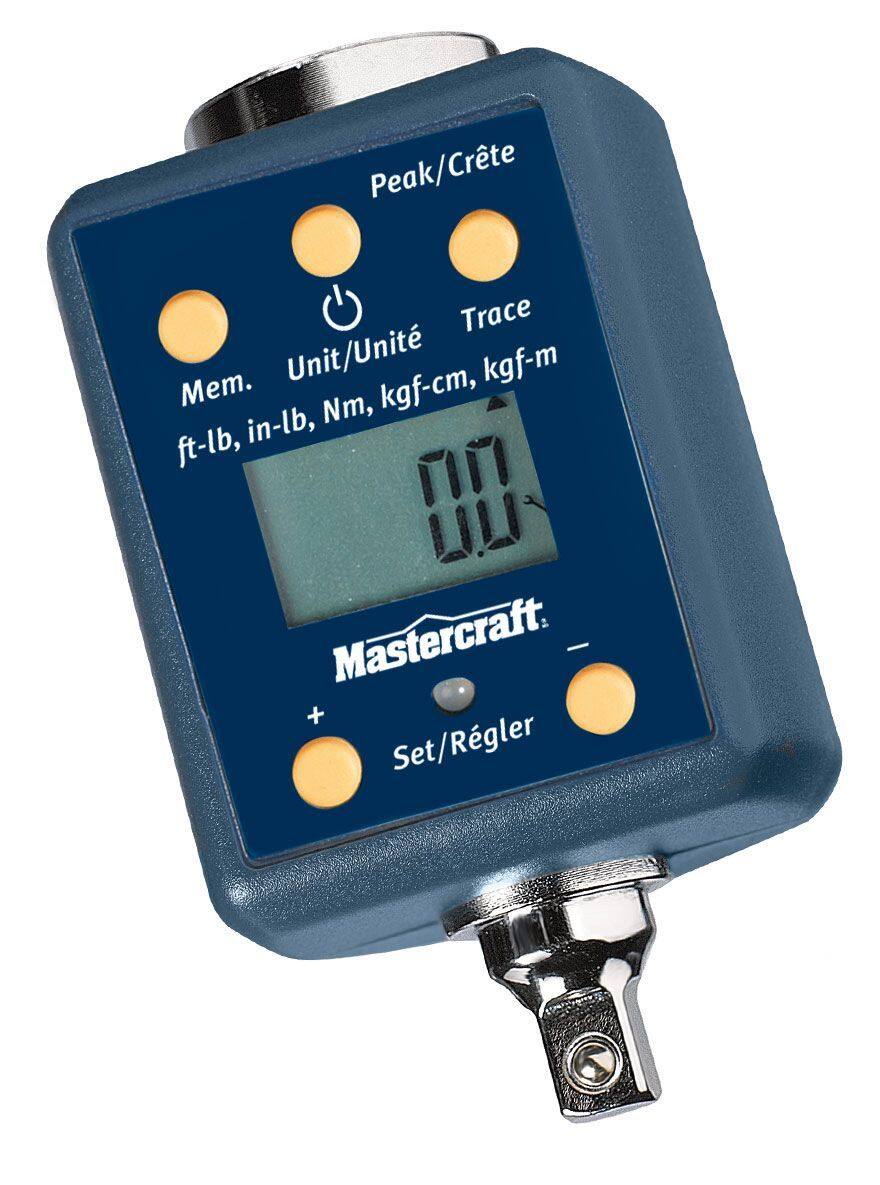
- Press the unit button on the adapter.
- Scroll through available units.
- Stop at the unit you need.
- Confirm your selection by pressing the button again.
Adjusting Torque Settings
Set the torque value before starting. This helps avoid over-tightening or under-tightening.
| Control | Function |
| Increase Button | Raises torque value |
| Decrease Button | Lowers torque value |
| Set Button | Confirms selected torque |
Reading The Display
The adapter screen shows real-time torque values. It also alerts you when the target torque is reached.
- Look at the main number for current torque.
- Check unit symbol to confirm measurement type.
- Watch for beep or light indicating target reached.
- Reset display before new measurement.

Credit: www.amazon.ca
Techniques For Accurate Torque Measurement
Using a digital torque adapter can ensure precise torque measurement. Accuracy is key when working with nuts and bolts.
Here are some techniques to help you measure torque accurately and consistently. Follow these guidelines to avoid mistakes.
Proper Tool Handling
Always handle the torque adapter with care. Ensure your hands are clean and dry when using the tool.
Position the adapter correctly on the bolt or nut. This helps in getting an accurate reading.
- Hold the tool steady
- Avoid sudden movements
- Check the alignment
Avoiding Common Errors
Common errors can lead to incorrect torque readings. Be aware of these mistakes to improve accuracy.
Check the calibration of the torque adapter regularly. Ensure the tool is not damaged or worn out.
- Do not exceed the tool’s limit
- Avoid using outdated adapters
- Read the instructions carefully
Maintaining Consistency
Consistency is crucial for accurate torque measurement. Use the same technique every time you measure.
Record your measurements for future reference. This helps in maintaining uniformity across tasks.
| Task | Torque Setting |
| Tightening bolts | 50 Nm |
| Loosening nuts | 30 Nm |
Enhancing Efficiency With Digital Torque Adapters
Digital torque adapters help measure torque more accurately. They improve work speed and reduce errors.
Using these adapters saves time and helps maintain consistent results in tightening bolts and screws.
Data Logging And Analysis
Digital torque adapters record torque values automatically. This data helps track tool performance and quality.
Workers can review the data to find patterns or problems. This makes fixing errors easier and faster.
- Stores torque measurements for each use
- Allows easy transfer of data to computers
- Supports quality control and reporting
Integration With Other Tools
Digital torque adapters can connect with other digital tools. This helps create a smoother work process.
They link with torque wrenches, software, and mobile apps to share real-time data and updates.
- Works with torque wrenches for quick readings
- Syncs data with mobile devices
- Integrates with quality and maintenance software
Streamlining Workflows
Using digital torque adapters reduces manual checks. This saves workers time and lowers mistakes.
They help keep consistent torque levels and speed up assembly or repair tasks.
- Speeds up torque measurement
- Reduces need for manual logging
- Ensures torque consistency across tasks
Maintaining And Troubleshooting
Using a digital torque adapter helps you tighten bolts accurately. Keeping it in good shape ensures it works well every time. Troubleshooting common issues can save you time and money.
Follow simple care steps and know when to ask for expert help. This guide covers maintenance tips, common problems, and support advice.
Routine Maintenance Tips
Regular care keeps your digital torque adapter accurate and reliable. Clean it after use and store it properly.
- Wipe the adapter with a soft, dry cloth.
- Avoid exposure to water or harsh chemicals.
- Store in a cool, dry place away from direct sunlight.
- Check the battery level before each use and replace if low.
- Calibrate the adapter annually or as recommended.
Common Issues And Fixes
Sometimes your adapter may show errors or inaccurate readings. Simple fixes often solve these problems.
| Issue | Cause | Fix |
| Inaccurate torque readings | Low battery or calibration needed | Replace battery or recalibrate the device |
| Adapter not turning on | Dead battery or internal fault | Replace battery; if issue persists, seek repair |
| Display is dim or flickering | Battery low or screen damage | Change battery; avoid screen impact |
| Unresponsive buttons | Dirt or moisture inside device | Clean buttons gently; dry thoroughly |
When To Seek Professional Support
Some problems need expert care to avoid damage or errors. Contact professionals if your adapter has serious issues.
- The adapter shows constant errors after resets.
- Calibration fails or cannot be performed.
- Physical damage affects the tool’s function.
- Battery replacement does not fix power issues.
- Device is still under warranty and malfunctioning.
Credit: www.canadiantire.ca
Frequently Asked Questions
What Is A Digital Torque Adapter Used For?
A digital torque adapter measures and displays torque applied to fasteners. It ensures precise tightening, improving safety and performance. This tool helps avoid over or under-tightening, crucial in mechanical, automotive, and industrial tasks.
How Do I Connect A Digital Torque Adapter?
Attach the digital torque adapter between your wrench and socket. Ensure a secure fit to get accurate torque readings. Power on the adapter and select the desired torque unit before use.
Can I Use Digital Torque Adapters For All Wrenches?
Most digital torque adapters fit standard wrenches and sockets. Check compatibility with your specific wrench size and type. Using the correct adapter ensures accurate torque measurement and reliable results.
How Accurate Are Digital Torque Adapters?
Digital torque adapters offer high accuracy, typically within ±2% to ±3%. Accuracy depends on the model and calibration. Regular calibration maintains precision and consistent torque application over time.
Conclusion
Using a digital torque adapter helps you tighten bolts with care. It shows the exact force you apply. This tool saves time and avoids damage. Always check the reading before you stop. Keep your tools clean and store them well.
Practice with the adapter to gain confidence. This small device makes big tasks easier. Try it on different projects to see the difference. Simple steps lead to better results every time.







