
Are your car’s battery terminals looking dirty or corroded? This simple problem can cause big issues, like trouble starting your engine or poor electrical performance.
But don’t worry—you don’t need to be a mechanic to fix it. In this DIY Battery Terminal Cleaning Guide, you’ll learn easy steps to clean your battery terminals safely and effectively. Keep reading to save time, avoid costly repairs, and get your car running smoothly again.
Your battery will thank you!
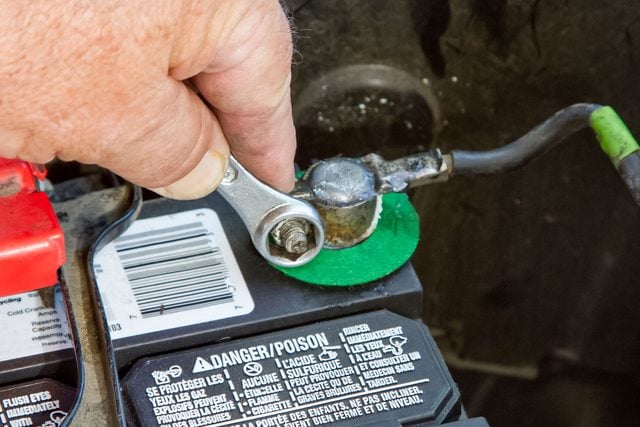
Credit: www.familyhandyman.com
Why Clean Battery Terminals
Battery terminals often collect dirt and corrosion over time. This buildup can stop your car from working well.
Cleaning battery terminals is an easy way to keep your vehicle running smoothly and avoid unexpected problems.
Impact On Vehicle Performance
Dirty or corroded battery terminals can block the flow of electricity. This slows down your car’s starting and affects other systems.
- Car may take longer to start
- Electrical parts might not work properly
- Battery can drain faster than normal
- Alternator has to work harder
- Overall engine performance may drop
Signs Of Corroded Terminals
It is important to spot corrosion early. This helps you clean the terminals before damage occurs.
| Sign | What to Look For |
| White or blue powder | Build up on battery posts and clamps |
| Car won’t start | Clicks or slow engine turn over |
| Dim lights | Headlights or dashboard lights look weak |
| Bad smell | Foul or rotten egg odor near the battery |
| Loose connections | Battery cables feel shaky or move easily |
Tools And Materials Needed
Cleaning your car battery terminals keeps your vehicle running smoothly. Dirt and corrosion can block power flow.
Use the right tools and safety gear to clean terminals safely and effectively. This guide shows what you need.
Essential Cleaning Supplies
You need a few basic supplies to clean battery terminals well. These help remove corrosion and dirt.
- Wire brush or battery terminal cleaner
- Baking soda and water solution
- Old toothbrush for scrubbing
- Clean rags or paper towels
- Wrench or pliers to loosen terminals
- Petroleum jelly or terminal protectant spray
Baking soda mixes with water to neutralize battery acid. A wire brush scrubs off corrosion.
Safety Gear To Use
Battery cleaning can expose you to acid and harmful fumes. Wear safety gear to protect yourself.
- Safety goggles to protect your eyes
- Rubber gloves to protect your hands
- Old clothes or apron to avoid stains
- Face mask to avoid breathing fumes
Always work in a well-ventilated area. Keep a bucket of water nearby in case of spills.
Preparation Before Cleaning
Cleaning battery terminals is an important task for car maintenance. Proper preparation helps you work safely and efficiently.
Before you start cleaning, it is important to prepare your workspace and disconnect the battery properly.
Disconnecting The Battery
Always disconnect the battery before cleaning the terminals. This prevents electrical shocks and damage.
- Turn off the vehicle and remove the keys.
- Locate the battery under the hood.
- Use a wrench to loosen the negative terminal first (usually marked with a minus sign).
- Remove the negative cable and keep it away from the battery.
- Then, loosen and remove the positive terminal (marked with a plus sign).
Ensuring Proper Workspace
Set up a clean and safe workspace before cleaning the battery terminals. This reduces risks and makes the task easier.
| Workspace Tip | Reason |
|---|---|
| Work in a well-ventilated area | Prevents buildup of harmful gases |
| Wear protective gloves and goggles | Protects skin and eyes from acid and debris |
| Keep baking soda and water nearby | Neutralizes battery acid spills |
| Use a sturdy surface to place tools | Keeps tools organized and within reach |
Step-by-step Cleaning Process
Cleaning your car’s battery terminals helps keep your vehicle running smoothly. Dirt and corrosion can block the flow of electricity.
This guide shows you how to clean battery terminals safely and easily at home.
Removing Corrosion
First, wear gloves and eye protection to stay safe. Disconnect the battery cables, starting with the negative terminal.
Use a wire brush or an old toothbrush to scrub off the white or blue-green corrosion from the terminals and cable ends.
- Wear gloves and goggles
- Remove battery cables (negative first)
- Scrub corrosion with wire brush or toothbrush
Cleaning The Terminals
Mix baking soda with water to make a cleaning paste. Apply the paste to the terminals and cable ends to neutralize acid.
Use the brush to scrub the terminals gently. Then rinse with clean water to wash away the paste and dirt.
- Make a paste with baking soda and water
- Apply paste to terminals and cable ends
- Scrub gently with a brush
- Rinse with clean water
Drying And Inspecting
Dry the terminals and cable ends with a clean cloth or paper towel. Make sure no moisture remains.
Check for any damage or cracks on the terminals. Replace parts if they look worn out before reconnecting the battery.
- Dry terminals and cable ends fully
- Inspect for damage or cracks
- Replace damaged parts if needed
- Reconnect battery cables (positive first)
Preventing Future Corrosion
Cleaning battery terminals stops corrosion but does not keep it away. You need to protect the terminals after cleaning. This guide helps you prevent future corrosion on your battery terminals.
Using protective coatings and regular care will extend the life of your battery connections. Follow these simple steps to keep your battery terminals clean and working well.
Applying Protective Coatings
After cleaning, apply a coating to protect the terminals from moisture and air. This stops rust and corrosion from forming again. Use safe and easy-to-find products for the best results.
- Apply petroleum jelly or dielectric grease to the terminals.
- Use a battery terminal protector spray for extra defense.
- Wrap the terminals with anti-corrosion felt pads if available.
- Make sure the coating covers all metal parts on the terminal.
Regular Maintenance Tips
Check your battery terminals often to catch corrosion early. Regular cleaning and care help keep your battery healthy and ready to use.
| Maintenance Task | Frequency | Notes |
| Visual inspection for corrosion | Every month | Look for white or green powder on terminals |
| Cleaning terminals | Every 3 months or if corrosion appears | Use baking soda and water solution |
| Reapply protective coating | After each cleaning | Ensures long-lasting protection |
| Check battery charge | Monthly | Keep battery fully charged to reduce corrosion |

Credit: autosparkzone.com
Troubleshooting Common Issues
Battery terminals can cause problems if they are dirty or damaged. Cleaning them helps your car battery work better.
This guide will help you fix common issues with battery terminals. Learn how to handle damaged terminals and a battery that won’t hold a charge.
When Terminals Are Severely Damaged
Severely damaged terminals can stop the battery from working. Look for corrosion or cracks on the terminals.
If the damage is bad, you might need to replace the terminals. This can ensure a proper connection with the battery cables.
- Check for white or green corrosion buildup
- Inspect for cracks or breaks in the metal
- Consider replacing if damage is extensive
Battery Not Holding Charge
If the battery is not holding a charge, it might be due to dirty terminals. Clean the terminals to improve the connection.
After cleaning, test the battery to see if it holds a charge better. If not, the battery may need to be replaced.
- Clean terminals with a baking soda solution
- Ensure all connections are tight
- Test battery voltage after cleaning

Credit: www.youtube.com
Frequently Asked Questions
How Do I Clean Battery Terminals Safely?
To clean battery terminals safely, disconnect the battery first. Wear gloves and eye protection. Use a mixture of baking soda and water to neutralize acid. Scrub terminals gently with a brush. Rinse with water and dry thoroughly before reconnecting.
What Tools Are Needed For Battery Terminal Cleaning?
You need gloves, safety glasses, a wire brush, baking soda, water, and a clean cloth. Optionally, use a terminal cleaner or a toothbrush. These tools help remove corrosion effectively and keep terminals clean.
How Often Should Battery Terminals Be Cleaned?
Clean battery terminals every 3 to 6 months. Regular cleaning prevents corrosion buildup and ensures good electrical contact. Check terminals more often in harsh weather or if you notice starting issues.
Can I Use Vinegar To Clean Battery Terminals?
Yes, vinegar can clean battery terminals. Its acidity helps dissolve corrosion. Apply vinegar, scrub with a brush, then rinse with water. Always wear safety gear to protect from acid and fumes.
Conclusion
Cleaning your battery terminals keeps your car running well. Dirt and corrosion can cause poor connections and starting problems. Regular cleaning helps avoid these issues. You only need a few tools and simple steps. Safety is important—wear gloves and protect your eyes.
A clean battery terminal improves power flow and battery life. Try this easy task yourself to save time and money. Keep your vehicle in good shape by checking terminals often. Small actions make a big difference in car care.







