
Have you ever wondered exactly where your car is at any given moment? Whether you want to keep your vehicle safe, track a loved one’s trip, or simply stay organized, knowing how to track your car GPS can give you peace of mind.
You’ll discover simple, effective ways to monitor your car’s location in real time. By the end, you’ll feel confident using GPS technology to stay connected with your vehicle like never before. Keep reading to unlock these easy steps and take control of your car’s safety today.
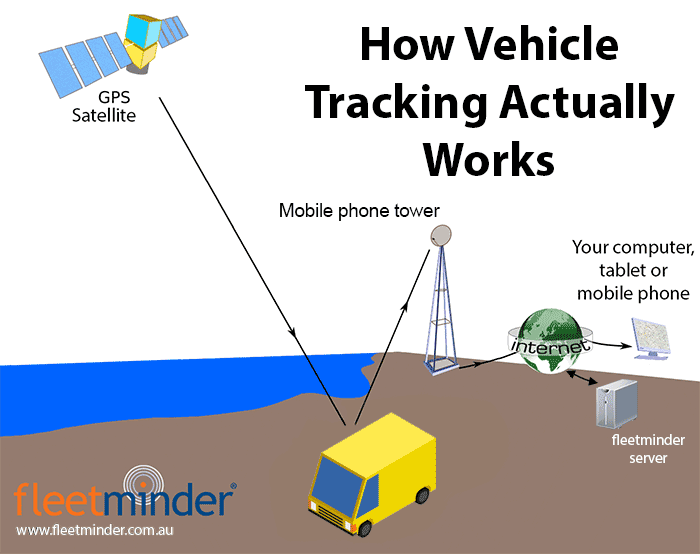
Credit: www.fleetminder.com.au
Choosing The Right Gps Tracker
Tracking your car with a GPS device helps keep it safe. Picking the right tracker is important for good results.
This guide explains different types of GPS trackers and what to think about before buying one.
Types Of Gps Trackers
There are several types of GPS trackers made for cars. Each works in a different way.
- Real-Time Trackers:Send live location updates to your phone or computer.
- Passive Trackers:Store location data to view later, no live updates.
- OBD Trackers:Plug into the car’s OBD port for power and tracking.
- Battery-Powered Trackers:Small and easy to hide but need charging.
Factors To Consider
Choose a GPS tracker that fits your needs and car type. Think about these points before buying.
| Factor | Why It Matters |
| Accuracy | Find your car’s exact location quickly. |
| Update Frequency | How often the tracker sends location data. |
| Installation | Easy to install or needs professional help. |
| Size | Small size helps hide the device from thieves. |
| Battery Life | Long battery means less charging and better use. |
| Alerts | Receive notifications for movement or tampering. |
Budget And Features
GPS trackers come in many price ranges. Your budget helps decide what features you get.
- Basic Trackers: Offer simple location tracking with limited updates.
- Mid-Range Trackers: Include live tracking and some alert options.
- High-End Trackers: Provide real-time updates, geofencing, and detailed reports.

Credit: alfred.camera
Installing Your Gps Tracker
Installing a GPS tracker in your car helps you monitor its location. It is important to place the device correctly for best results.
This guide will help you with easy installation tips and options for professional help. You will also learn where to place the tracker in your vehicle.
Diy Installation Tips
Installing a GPS tracker yourself can save money. Follow simple steps to do it safely and correctly.
Make sure to read the tracker’s manual before starting. Gather all tools needed like screwdrivers and wire strippers.
- Disconnect the car battery before installation
- Find a hidden spot to avoid damage or theft
- Secure wires to prevent loose connections
- Test the device before finalizing the installation
Professional Installation Options
Getting a professional to install your GPS tracker is a good choice if you want expert work. They know how to handle wiring and placement.
Professional installers often guarantee their work. This can give peace of mind that the tracker will work well.
- Visit an auto electronics shop
- Contact your GPS tracker provider for recommended installers
- Ask for installation warranty or support
- Check installer reviews before hiring
Common Installation Locations
Choosing the right location for your GPS tracker is key for accurate tracking. The device should be hidden but still able to send signals.
Here are some common spots where people install GPS trackers in their cars.
- Under the dashboard near the steering column
- Inside the glove box or center console
- Under the car seat secured to the frame
- In the trunk near the battery or rear lights
Setting Up Real-time Tracking
Tracking your car’s GPS in real-time helps you know its exact location. It keeps you informed and safe.
You can set up real-time tracking with a few simple steps. It involves connecting apps, setting alerts, and checking accuracy.
Connecting To Mobile Apps
Most GPS trackers link to mobile apps for easy access. Download the app that matches your GPS device.
Sign in or create an account in the app. Connect your car’s GPS device using the unique ID or QR code.
- Download the correct app for your GPS tracker
- Create or log in to your account
- Enter device ID or scan the QR code
- Allow app permissions for location access
- Check the app dashboard for your car’s location
Configuring Notifications
Notifications alert you about your car’s movements or issues. Set them up in the app to stay updated.
You can choose alerts for speed, location changes, or when the car enters or leaves an area.
- Open the notifications section in the app
- Choose alerts like speed or geofence alerts
- Set your preferred notification method (push, email, SMS)
- Save your settings to activate alerts
Ensuring Accurate Location Updates
Accurate updates depend on good GPS signals and device settings. Place the device where it gets clear signals.
Keep the GPS device charged and check for software updates regularly. This helps the device perform well.
- Install GPS device where it has a clear sky view
- Charge the device or connect it to car power
- Update device software and mobile app often
- Check signal strength in the app
Monitoring Your Car’s Location
Tracking your car’s GPS helps you know its exact location anytime. It adds safety and control over your vehicle.
You can track your car using different tools and methods. This guide explains the main ways to do it.
Using Smartphone Apps
Many GPS trackers connect to apps on your smartphone. These apps show your car’s location on a map in real time.
- Download the app recommended by your GPS device provider
- Log in with your account details
- View the live location and movement of your car
- Set alerts for speed, boundaries, or unauthorized use
Accessing Web Portals
Some GPS services offer web portals to check your car’s location from any browser. You just need your login information.
| Feature | Smartphone Apps | Web Portals |
| Access Method | Mobile device | Desktop or mobile browser |
| Real-Time Tracking | Yes | Yes |
| Alerts and Notifications | Yes | Sometimes |
| Ease of Use | High | Medium |
Interpreting Gps Data
GPS data includes coordinates, speed, and travel routes. Understanding this data helps you monitor your car better.
- Latitude and longitude show the exact position on the map
- Speed data helps track how fast the car moves
- Travel history shows past routes and stops
- Geofencing alerts notify if the car leaves a set area
Troubleshooting Gps Issues
Tracking your car GPS can sometimes be tricky. Problems like signal loss or app errors can stop it from working right.
This guide helps you fix common GPS problems. You will learn how to solve signal loss, power issues, and software troubles.
Signal Loss Solutions
GPS needs a clear view of the sky to work well. Signal loss happens if the device is blocked or indoors.
Keep your GPS tracker away from tall buildings and trees. Try moving the car to an open area to get better signals.
- Place the GPS device on the dashboard or near a window
- Check for any metal covers blocking the GPS antenna
- Restart the GPS device to reset the signal connection
- Avoid underground parking or tunnels when tracking
Battery And Power Concerns
A dead or weak battery can stop your GPS from working. Some GPS trackers rely on the car’s battery or their own power.
Check if the GPS device’s battery is charged. Also, make sure the power cable is connected well if the device uses the car’s power.
- Charge the GPS device regularly if it has a built-in battery
- Inspect power cables for damage or loose connections
- Replace batteries if they no longer hold a charge
- Use a power source that matches the GPS device’s requirements
Software And App Problems
Sometimes the app or software that tracks your GPS has bugs. This can cause wrong location data or no updates.
Keep your tracking app updated to the latest version. Restart the app or your phone to clear temporary errors.
- Update the GPS tracking app regularly
- Clear the app’s cache to remove old data
- Reinstall the app if problems continue
- Check your phone’s internet connection for stability
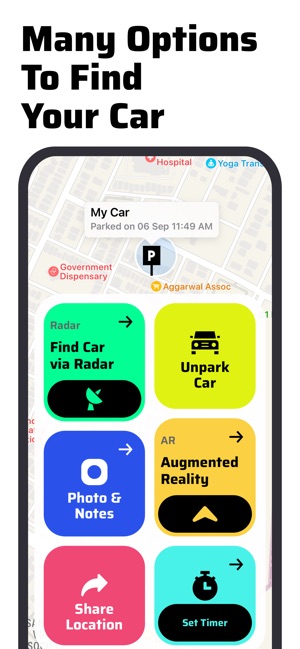
Credit: apps.apple.com
Enhancing Security With Gps Tracking
GPS tracking helps keep your car safe. It shows where your car is at all times.
With GPS, you can track your car if it is stolen. This makes it easier for police to find it.
Theft Prevention Tips
Use GPS to stop car theft before it happens. Here are some tips to keep your car safe.
- Park in well-lit areas
- Install a visible GPS sticker
- Keep valuables hidden
- Lock your car doors
Emergency Response Features
GPS tracking helps during emergencies. It sends your car’s location to emergency services.
Some GPS systems also have panic buttons. Press the button to alert the police quickly.
Sharing Location With Trusted Contacts
Share your car’s location with trusted friends or family. This can help them find you if needed.
Use your GPS app to send your location. Make sure only trusted people get this information.
Frequently Asked Questions
How Can I Track My Car Gps In Real-time?
You can track your car GPS in real-time using a GPS tracking app or device. These apps provide live location updates and route history. Ensure your GPS tracker is activated and connected to a cellular network for accurate real-time tracking.
What Devices Are Best For Car Gps Tracking?
The best devices for car GPS tracking include standalone GPS trackers and smartphone apps with GPS features. Standalone devices offer better accuracy and battery life. Choose a device with real-time tracking, geofencing, and alerts for optimal performance.
Is It Legal To Track A Car Using Gps?
Tracking a car with GPS is legal if you own the vehicle or have the owner’s permission. Unauthorized tracking may violate privacy laws. Always inform drivers or get consent before installing a GPS tracker to avoid legal issues.
Can I Track My Car Gps Without Internet?
Basic GPS devices can record location data without internet, but real-time tracking requires internet or cellular access. Offline tracking stores data for later retrieval. For live updates, your GPS tracker must be connected to a network.
Conclusion
Tracking your car GPS helps you stay safe and aware. It shows your vehicle’s location in real time. You can use apps or devices for easy tracking. This helps find your car if it gets lost or stolen. Always choose a reliable GPS tracker that fits your needs.
Remember to check the battery and signal regularly. Tracking your car gives peace of mind every day. Start using GPS tracking to protect your vehicle now. Simple steps lead to better car security.







