
Are you worried about someone secretly tracking your car’s location? You’re not alone.
Many people want to protect their privacy and take control of their own vehicles. Knowing how to disable a GPS tracking device in your car can give you peace of mind and keep your movements private. You’ll discover simple, effective ways to find and disable those hidden trackers.
Keep reading to learn exactly what you need to do to protect your privacy right now.

Credit: www.amazon.com
Locate The Gps Device
To disable a GPS tracking device in a car, you first need to find where it is placed. These devices are often small and hidden well.
Knowing where to look helps you remove or disable the tracker safely. Let’s explore common spots and tools to find the device.
Common Installation Spots
GPS trackers are usually placed where they are hard to see but can still get a clear signal from satellites. Check these spots carefully.
- Under the dashboard near the steering wheel
- Inside the glove compartment
- Under the car, near the frame or bumper
- Inside the trunk, behind panels or under the carpet
- Under or inside the seats
- Near the OBD-II port under the dashboard
Look for small boxes or devices with wires connected to the car’s battery or wiring system. Use a flashlight and gloves for safety.
Using A Gps Detector
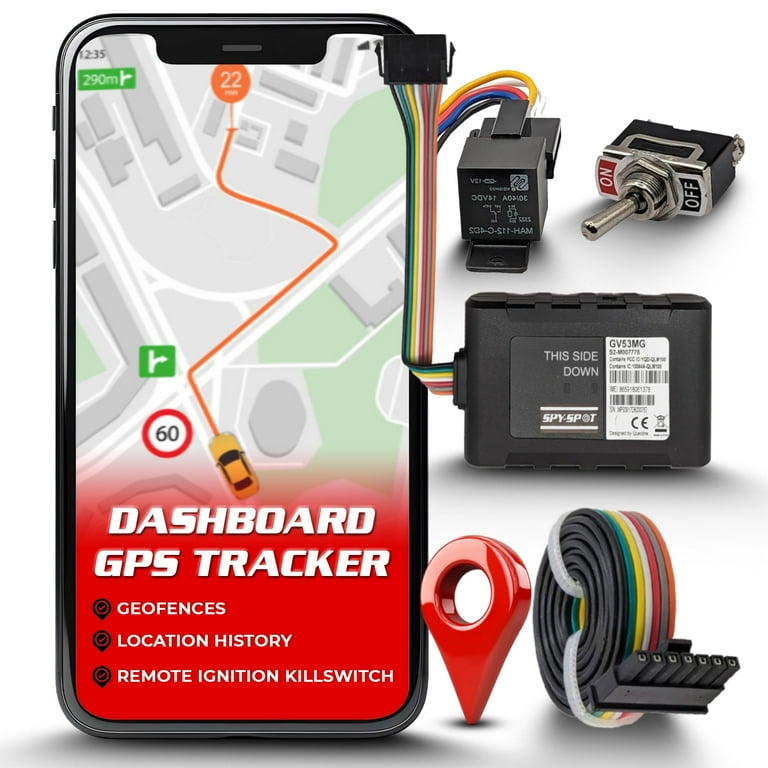
A GPS detector is a tool that helps find hidden GPS devices by sensing their signals. It can save time and effort in searching.
Turn off all other electronic devices in the car to avoid interference. Slowly move the detector around the car, especially near common spots.
- Scan under the dashboard and seats
- Check the engine bay and wheel wells
- Inspect the trunk area carefully
- Pay attention to any beeping or light signals from the detector
When the detector signals a strong GPS signal, pause and inspect the area closely for the device.
Credit: www.walmart.com
Disconnect The Power Source
Disabling a GPS tracking device in your car requires cutting off its power. The device usually draws power from the vehicle’s electrical system. Disconnecting this power stops the device from working.
Before you start, make sure you have the right tools. Also, take safety precautions to avoid damage or injury.
Identify Power Connections
GPS devices connect to your car’s battery or wiring. They may use a direct battery wire or tap into wires under the dashboard. Finding the right wires is key to cutting power.
- Look for wires running from the device to the car battery.
- Check for connections near the fuse box.
- Use a multimeter to test wires for voltage.
- Trace wires to see if they connect to constant or switched power.
Safely Unplugging The Device
After identifying power wires, you can safely disconnect the device. This prevents damage to your car’s electrical system and the GPS tracker.
| Action | Details |
| Turn off ignition | Ensure the car is off before unplugging. |
| Disconnect battery | Remove the negative terminal to cut power safely. |
| Unplug wires | Carefully detach the GPS wires from connectors. |
| Secure wires | Cover exposed wires with electrical tape. |
| Test | Start the car and check if the device is off. |
Remove The Gps Device
Removing a GPS tracking device from your car can help protect your privacy. It is important to do it carefully to avoid damage. This guide shows the tools and steps for removal.
Before you start, make sure you understand where the device is located. Most GPS trackers are small and hidden in different parts of the vehicle.
Tools Needed For Removal
You need some basic tools to safely remove the GPS device. Having these ready will make the process easier and faster.
- Flathead screwdriver
- Phillips screwdriver
- Plastic pry tool
- Flashlight or headlamp
- Gloves to protect your hands
- Multimeter (optional, for checking wiring)
Step-by-step Removal Process
Follow these steps to find and remove the GPS tracking device from your car safely.
- Turn off your car and disconnect the battery to avoid electrical shock.
- Use the flashlight to inspect common hiding spots under the dashboard, behind panels, or near the fuse box.
- Once you find the device, use the plastic pry tool or screwdriver to carefully open any covers or mounts holding it.
- Disconnect the wiring or power source attached to the device. Use the multimeter if needed to identify the wires.
- Remove the device gently without pulling on wires forcefully.
- Secure any loose wires or covers back in place to avoid issues while driving.
| Location | What to Do |
| Under Dashboard | Look behind panels and pry open carefully |
| Fuse Box Area | Check for extra wiring or small boxes attached |
| Near OBD-II Port | Inspect cables plugged into the port |
| Under Seats | Lift seats and scan for hidden devices |

Credit: www.jammermfg.com
Use Gps Jammers
Some people want to stop GPS tracking devices in their cars. One way is by using GPS jammers. These devices block signals from GPS satellites.
GPS jammers can make the tracking device lose its location. This method can help keep your car’s position private.
How Jammers Work
GPS jammers send radio signals on the same frequency as GPS trackers. This causes interference. The tracker cannot get a clear signal.
- They emit signals that confuse GPS receivers.
- The jammer range varies from a few meters to several hundred meters.
- When in range, the GPS device shows wrong or no location.
- They work best in open areas without obstacles.
Legal Considerations
Using GPS jammers is illegal in many places. Laws exist to protect GPS signals. Breaking these laws can cause fines or jail time.
| Country | Legality of GPS Jammers | Penalties |
| United States | Illegal | Fines up to $112,500 and seizure of device |
| United Kingdom | Illegal | Imprisonment or fines |
| Canada | Illegal | Fines and criminal charges |
| Australia | Illegal | Fines and possible jail |
Disable Gps Via Software
Disabling the GPS tracking device in your car through software is an effective method to stop location monitoring. This process involves using the device’s software interface to turn off tracking features.
Understanding how to access and control the device software is key to disabling GPS tracking safely and correctly.
Accessing Device Software
Most GPS tracking devices connect to a mobile app or web portal. You need to log in to these platforms to manage settings.
- Use the username and password provided by the device manufacturer.
- Open the app or website connected to the GPS device.
- Navigate to the settings or device management section.
- Ensure your device is online and connected to the platform.
Turning Off Tracking Features
Once inside the device software, you can disable tracking by changing the settings. The options may vary depending on the device model.
| Setting | Action to Disable GPS |
| Real-time Tracking | Toggle off or disable the live location feature |
| Location History | Clear stored data and turn off history logging |
| Geofencing Alerts | Deactivate alerts to stop location notifications |
| Device Status | Set device to inactive or sleep mode if available |
Always save your changes before exiting the software. Check that tracking is off by verifying no location updates appear in the app or portal.
Check For Hidden Devices
Disabling a GPS tracking device in your car can protect your privacy. Start by checking for any hidden devices that might be tracking you.
Many tracking devices are small and easy to hide. Knowing where to look is important to find them.
Physical Inspection Tips
Check under your car for hidden devices. Use a flashlight to look in dark areas.
Inspect the wheel wells and bumpers. These are common places to hide a tracking device.
- Look for unusual wires or boxes
- Check under seats and dashboards
- Examine the engine compartment
Professional Detection Services
If you cannot find a device, consider hiring professionals. They have the tools to detect hidden trackers.
Professionals use advanced equipment to locate hidden devices. This can give you peace of mind.
- Experts use electronic sweepers
- They check for unusual signals
- Professional services ensure thorough checks
Frequently Asked Questions
How Can I Find A Gps Tracking Device In My Car?
To find a GPS tracker, inspect your car’s exterior and interior carefully. Look under the dashboard, seats, and wheel wells. Use a GPS detector device or smartphone app to locate signals. Checking these areas helps ensure you don’t miss hidden trackers.
Is It Legal To Disable A Car Gps Tracking Device?
Disabling your car’s GPS tracker is legal if you own the vehicle. It may be illegal if the car is leased or financed. Always check local laws and contract terms before disabling any tracking device to avoid legal issues.
What Tools Do I Need To Disable A Gps Tracker?
Basic tools like screwdrivers, pliers, and wire cutters help remove or disconnect GPS devices. A signal jammer can block GPS signals temporarily but might be illegal. Always handle devices carefully to avoid damage or triggering alerts.
Will Disabling Gps Affect My Car’s Warranty Or Insurance?
Disabling GPS can void warranties if the tracker is manufacturer-installed. Insurance companies may reduce coverage or deny claims without tracking data. Always consult your warranty and insurance policies before disabling any tracking device.
Conclusion
Disabling a GPS tracking device in your car takes care and attention. Start by finding the device’s location carefully. Use basic tools to disconnect it safely. Always check your car’s manual for guidance. Remember, some tracking devices may be hidden well.
Stay patient and work step by step. Taking these simple steps helps protect your privacy. Drive with peace of mind knowing you control your car’s tracking. Small actions can make a big difference. Keep your vehicle secure and your information private.







