
Imagine having eyes all around your car, helping you avoid blind spots and park with ease. A 360 camera car installation can do just that, giving you a complete view of your vehicle’s surroundings.
If you want to drive safer, reduce stress, and protect your investment, this guide is exactly what you need. Keep reading to discover how this simple upgrade can transform your driving experience and why it’s worth every minute and dollar you invest.
Credit: www.amazon.com
Choosing The Right 360 Camera
Installing a 360 camera in your car helps you see all around. This makes parking and driving safer. Picking the right camera is important.
There are many 360 cameras. Each has different features and prices. This guide will help you find the best one for your needs.
Types Of 360 Cameras
There are mainly two types of 360 cameras for cars. The first type uses one lens to capture all views. The second uses multiple lenses around the car.
Single-lens cameras are easy to install and cheaper. Multi-lens cameras give a full view without blind spots. Choose based on your car size and needs.
- Single-lens 360 cameras: simpler, less expensive
- Multi-lens 360 cameras: full coverage, no blind spots
Key Features To Consider
Look for good image quality to see clearly. Night vision is important for driving in the dark. Check if the camera connects easily to your car’s screen.
Some cameras have parking assist lines. These help judge distance. Also, consider if the camera is waterproof and dustproof for durability.
- High resolution for clear images
- Night vision for low light conditions
- Easy connection to car display
- Parking assist guidelines
- Waterproof and dustproof design
Budget Vs Quality
Cheaper cameras may miss some features. Expensive models offer better image and more functions. Decide what features you need most.
Buying a mid-range camera is good for most users. It balances price and quality. Avoid the cheapest models if you want reliable performance.
- Low budget: basic features, less clear images
- Mid budget: good image and useful features
- High budget: best quality and full features
Preparing Your Vehicle
Installing a 360 camera in your car starts with proper preparation. Taking time to ready your vehicle helps ensure a smooth setup.
This guide covers cleaning, inspection, tools, and safety tips to get your car ready for the installation.
Cleaning And Inspection
Start by cleaning the areas where the cameras will mount. Dirt or dust can affect camera performance.
- Wash and dry the vehicle exterior thoroughly
- Inspect mounting spots for damage or rust
- Check windshield and mirrors for cracks or chips
- Ensure no loose parts or debris around sensor areas
Tools And Materials Needed
| Tool or Material | Purpose |
| Microfiber cloth | Clean camera lenses and mounting areas |
| Screwdrivers | Secure camera mounts and covers |
| Wire strippers | Prepare wiring for connections |
| Electrical tape | Insulate wire connections |
| Multimeter | Test electrical circuits and connections |
| Zip ties | Organize and secure wires |
Safety Precautions
Follow these safety tips to avoid injury and damage during installation.
- Disconnect the vehicle battery before starting work
- Wear gloves to protect your hands
- Use eye protection when handling wires or tools
- Work in a well-lit, ventilated area
- Keep tools organized to prevent accidents
Camera Placement Tips
Installing a 360 camera on your car needs care. Good placement helps capture all angles clearly. It also avoids blind spots and protects the camera from bad weather.
Use these tips to find the best spots to mount your camera. They will help you get clear views and keep your device safe.
Optimal Mounting Locations
Place your 360 camera where it can see all around your car. The most common spots are near the front grille, rear bumper, and under side mirrors.
- Front center of the grille for a wide forward view
- Back center of the bumper to cover the rear area
- Under each side mirror to capture side views
- High on the windshield inside for all-around coverage
Avoiding Blind Spots
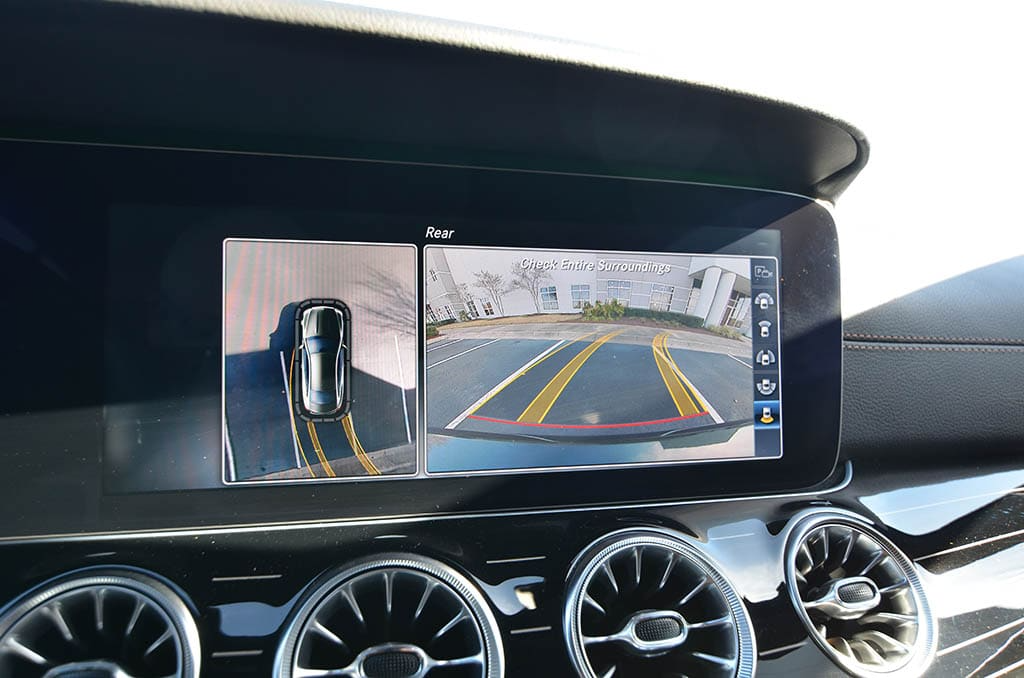
Blind spots reduce safety and make parking hard. Place cameras to cover these hidden areas. Adjust angles to minimize blind spots on all sides.
| Blind Spot Area | Camera Position | Tip |
| Front corners | Front grille edges | Angle outward slightly |
| Rear corners | Rear bumper edges | Keep low and wide |
| Sides | Under side mirrors | Point slightly down and back |
Ensuring Weather Resistance
Protect the camera from rain, dust, and sun. Use waterproof mounts and avoid spots where water pools. Check that cables have good seals.
- Use silicone sealant on cable joints
- Mount cameras under small overhangs if possible
- Keep lens clean and free from debris
- Test camera after rain to check for leaks
Credit: www.motorist.co.th
Wiring And Connections
Installing a 360 camera in your car requires careful wiring and connections. Proper setup ensures the camera works well and stays safe.
Good wiring helps avoid problems like signal loss or damage to your car’s electrical system.
Power Supply Options
A 360 camera needs power to work. You can choose from different power sources in your car. The right choice depends on your car model and camera type.
Common power sources include the car battery, fuse box, or cigarette lighter socket.
- Car Battery: Provides constant power but needs a fuse for safety.
- Fuse Box: Offers a clean connection and can use switched power.
- Cigarette Lighter Socket: Easy to connect but may not work when the car is off.
Connecting To The Car’s System
Connect the camera wires to the car’s system carefully. This includes power, ground, and video signal cables.
Use connectors made for automotive use to ensure a strong and safe link. Avoid loose connections that can cause faults.
- Ground wire must connect to a metal part of the car frame.
- Power wire should connect to switched power for proper operation.
- Video cables connect to the display unit or control box.
Cable Management
Good cable management keeps wires safe and tidy. It also prevents interference and damage from moving parts.
Use clips, ties, or channels to secure cables along the car’s frame or panels.
- Avoid sharp edges that can cut wires.
- Keep cables away from heat sources like the engine.
- Leave some slack to prevent tension on connectors.
Camera Calibration And Alignment
Installing a 360 camera on your car needs careful calibration. Proper alignment helps capture clear and accurate views.
Calibrating the camera ensures the images from all sides connect smoothly. It prevents blind spots and distorted views.
Adjusting Camera Angles
Start by setting each camera at the right angle. The angle affects how much area the camera covers.
Make small angle changes and check the view. Aim for wide coverage without too much floor or sky.
- Use a level tool to keep cameras straight
- Avoid pointing cameras too far up or down
- Balance the side cameras for even coverage
Using Calibration Tools
Use special tools to calibrate the 360 camera system. These tools help align images from all cameras.
Calibration tools guide you through adjusting camera settings and stitching images together.
- Calibration software checks image overlap
- Grid patterns help align camera views
- Follow software prompts to adjust settings
Testing The View
After calibration, test the camera view inside the car. Look for blind spots and image errors.
Drive slowly and watch the 360 view. Check all angles for smooth image transitions.
- Check corners for missing areas
- Look for image misalignment or blurriness
- Repeat calibration if you find problems
Software Setup And Configuration
Setting up a 360 camera in your car involves several steps. Proper software configuration ensures optimal performance.
Follow these guidelines to install necessary apps, update firmware, and customize settings for your 360 camera.
Installing Required Apps
To start, you need to install specific applications. These apps connect your 360 camera to your smartphone or tablet.
- Download the app from your device’s app store.
- Ensure compatibility with your camera model.
- Install and open the app on your device.
Updating Firmware
Firmware updates improve camera functionality. It is important to keep your camera’s firmware up-to-date.
| Step | Action |
| 1 | Open the camera app on your device. |
| 2 | Navigate to the settings menu. |
| 3 | Check for firmware updates. |
| 4 | Download and install any available updates. |
Customizing Settings
Customizing camera settings lets you tailor the device to your needs. Adjust settings for optimal performance.
Consider these settings:
- Resolution and frame rate
- Field of view
- Image stabilization
Troubleshooting Common Issues
Installing a 360 camera in your car can be helpful. It provides a full view around your vehicle. Sometimes, issues can occur after installation. Knowing how to fix these problems is important.
This guide covers common troubleshooting tips. You will learn about image quality, connectivity errors, and power faults. Let’s dive into each issue and find simple solutions.
Image Quality Problems
Image quality issues can make your 360 camera less useful. Blurry or distorted images are common problems. Cleaning the camera lenses is a simple first step.
Check if the camera settings are correct. Adjust the resolution and brightness. Ensure the camera angle is right for capturing clear images.
Connectivity Errors
Connectivity errors can stop the camera from working. First, check the cables. Make sure they are securely connected. Loose cables can cause problems.
If the camera connects wirelessly, check the signal strength. A weak signal can interrupt the connection. Move closer to the receiver or remove obstacles between them.
Power And Wiring Faults
Power faults can prevent the camera from turning on. Check the power source. Ensure the camera is properly plugged in and the power outlet works.
Inspect the wiring for any damage. Damaged wires can stop the power flow. Replace any broken wires to restore power to the camera.
- Check power connections and outlets
- Inspect and replace damaged wires
- Secure all cable connections
Maintenance And Care
Proper maintenance keeps your 360 camera car installation working well. Care helps avoid problems and ensures clear video recording.
Follow simple steps to clean, update, and store your camera for the best performance every day.
Regular Cleaning
Clean the camera lens often to remove dust and dirt. Use a soft cloth to avoid scratches. Avoid harsh chemicals that may damage the lens surface.
- Wipe the lens gently with a microfiber cloth
- Use lens cleaning solution if needed
- Clean the camera housing to remove grime
- Avoid water entering the camera case
Firmware Updates
Keep your camera’s software up to date. Updates improve features and fix bugs. Check the manufacturer’s website or app regularly for new versions.
| Update Frequency | Check Every |
| Firmware Version | Monthly |
| App Version | Weekly |
| Security Patches | As Released |
Storage Tips
Proper storage protects your camera when not in use. Store it in a dry, cool place away from direct sunlight. Keep the camera safe from impact and dust.
- Remove the camera from the car if unused for long
- Store in a padded case or box
- Keep memory cards separate and safe
- Check battery health before storage

Credit: www.youtube.com
Frequently Asked Questions
What Is A 360 Camera Car Installation?
A 360 camera car installation involves mounting multiple cameras around a vehicle. These cameras provide a complete bird’s-eye view. This installation enhances parking safety and helps avoid blind spots. It requires professional setup for optimal camera placement and wiring.
How Long Does 360 Camera Installation Take?
Typically, 360 camera installation takes between 2 to 4 hours. The time varies based on vehicle type and camera system complexity. Proper wiring and calibration are essential. Professional installers ensure accurate alignment for a seamless 360-degree view.
Can I Install A 360 Camera Myself?
DIY installation is possible but not recommended for beginners. It requires technical skills in wiring and camera calibration. Improper setup can cause system errors or poor image quality. Professional installation guarantees optimal performance and safety.
Will A 360 Camera Affect My Car Warranty?
Most manufacturers allow 360 camera installation without voiding warranty. However, unauthorized modifications can risk warranty coverage. It’s best to consult your dealer or professional installer before proceeding. Using approved parts and services is crucial for warranty safety.
Conclusion
Installing a 360 camera in your car boosts safety and ease. It helps you see all around clearly. Parking and driving in tight spots become simpler. Choose a good system that fits your car well. Professional help can ensure the camera works right.
Regular checks keep the camera in top shape. Enjoy better views and safer trips every day. A 360 camera is a smart step for any driver.







