
Are you tired of struggling to see what’s behind your car when parking or reversing? Installing a reverse camera can make your life so much easier and safer.
Imagine backing up with complete confidence, avoiding obstacles, and protecting your vehicle from unexpected bumps. In this guide, you’ll learn exactly how to install a reverse camera on your car step by step—no confusing jargon, just simple instructions you can follow.
Keep reading, and you’ll soon enjoy the clear view and peace of mind that comes with having a reverse camera.
Choosing The Right Camera
Installing a reverse camera improves safety while backing up your car. Picking the right camera is important for clear views and easy use.
This guide helps you find the best reverse camera for your car by explaining types, important factors, and budget options.
Types Of Reverse Cameras
There are different types of reverse cameras to fit various needs and car models. Each type has its own benefits.
- Wired Cameras:Connect directly to the car display. They usually offer a stable connection and clear picture.
- Wireless Cameras:Use Wi-Fi or Bluetooth. Easier to install but may have signal interference.
- Flush Mount Cameras:Installed inside the car’s bumper for a clean look.
- Surface Mount Cameras:Attach to the outside of the bumper or license plate area.
Factors To Consider
Choosing a reverse camera means thinking about the picture quality, camera size, and night vision ability.
- Resolution:Higher resolution means a clearer image.
- Field of View:A wide angle helps see more behind the car.
- Night Vision:Infrared or LED lights help in the dark.
- Waterproof Rating:Cameras should resist rain and dust.
- Installation:Check if the camera fits your car and is easy to mount.
Budget And Features
Reverse cameras come in many price ranges. Decide what features you need and how much you want to spend.
- Basic cameras are affordable but may lack night vision or wide views.
- Mid-range cameras offer better image quality and some extra features like parking lines.
- High-end cameras include features like wireless connection, HD resolution, and full waterproofing.

Credit: www.youtube.com
Gathering Tools And Materials
Installing a reverse camera on your car needs some tools and materials. Getting these ready helps the job go smoothly.
This guide lists what you need before starting the installation.
Essential Tools
You need some basic tools to install the camera correctly. These tools help you mount the camera and connect wires safely.
- Screwdrivers (flathead and Phillips)
- Wire stripper and cutter
- Drill with drill bits
- Multimeter for testing electrical connections
- Electrical tape
- Panel removal tool
Additional Supplies
Besides tools, you will need some supplies to complete the installation. These help protect wires and keep the setup neat.
- Reverse camera kit with mounting hardware
- Extension wires if the cable is short
- Zip ties to secure cables
- Fuse tap for safe power connection
- Silicone sealant to waterproof the camera
Preparing Your Vehicle
Installing a reverse camera improves safety while backing up. Before you start, prepare your vehicle carefully. This helps the installation go smoothly and safely.
Preparing includes finding the right mounting spot and accessing the car’s wiring. Follow the instructions below to get ready.
Locating The Mounting Spot
Choose a clear, stable place at the rear of your vehicle for the camera. The spot must have a good view of the area behind the car.
- Look near the license plate or above the rear bumper.
- Avoid areas blocked by the trunk or spare tire.
- Pick a spot with enough space to attach the camera securely.
- Ensure the camera lens will not get dirty easily.
- Check that the camera cable can reach inside the car.
Accessing The Wiring
Locate the vehicle’s reverse light wiring to connect the camera power. You will also need to find the video input wire for the display unit.
| Wire Type | Location | Purpose |
| Reverse Light Wire | Rear light cluster | Power for camera when reversing |
| Video Input Wire | Dashboard or head unit | Transmits video signal |
| Ground Wire | Chassis or metal frame | Completes electrical circuit |

Credit: www.youtube.com
Mounting The Camera
Mounting a reverse camera correctly is key to get a clear view behind your car. This guide covers cleaning the surface, attaching the camera, and securing the wiring safely.
Follow the steps carefully to ensure the camera stays in place and works well every time you reverse.
Cleaning The Surface
Start by cleaning the area where you will mount the camera. Dirt and grease can stop the camera from sticking properly.
- Use a clean cloth to wipe the surface.
- Apply rubbing alcohol to remove any grease.
- Let the surface dry completely before mounting.
Attaching The Camera
Attach the camera firmly to the cleaned surface. Use the mounting bracket or adhesive tape that came with your camera.
| Mounting Method | Instructions |
| Adhesive Tape | Peel off backing, press camera firmly for 30 seconds |
| Mounting Bracket | Fix bracket with screws, slide camera into place |
| Suction Cup | Press suction cup onto surface, lock lever if available |
Securing The Wiring
Secure the wiring to avoid loose cables that can get damaged or cause problems.
Follow these tips to secure the wiring:
- Use cable ties to bundle wires neatly.
- Route cables along existing car wiring paths.
- Avoid sharp edges or moving parts that can cut wires.
- Check connections are tight and protected from water.
Wiring The Camera
Wiring a reverse camera is key to its function. You need to connect power and video cables carefully. This guide helps you wire the camera correctly.
Follow safety tips like disconnecting the battery before starting. Use the right tools to avoid damage to your car’s electrical system.
Connecting To Reverse Light
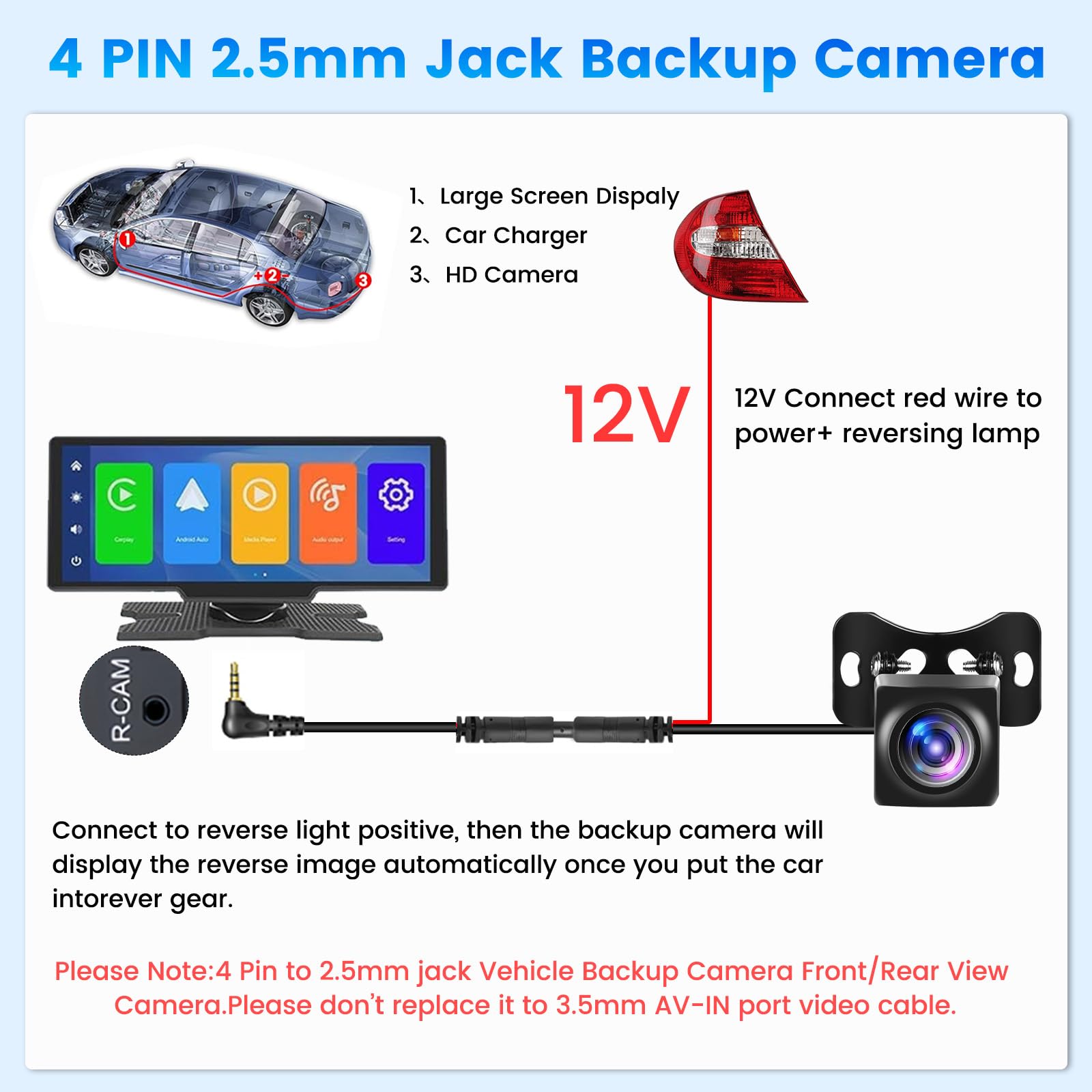
Find the reverse light wire at the back of your car. This wire powers the camera when you shift into reverse gear. Use a multimeter to identify the correct wire.
- Strip a small section of the reverse light wire insulation.
- Connect the camera’s power wire to the reverse light wire.
- Secure the connection with electrical tape or a wire connector.
- Check the connection by turning the ignition and shifting to reverse.
Routing The Cable
Route the camera cable from the rear of your car to the dashboard. Avoid sharp edges and moving parts to prevent cable damage. Use zip ties to keep the cable neat and secure.
| Area | Tips |
| Trunk | Run cables along existing wire channels |
| Door seals | Use rubber grommets to avoid cuts |
| Under the carpet | Lift carpet carefully to hide cables |
| Dashboard | Keep cables away from airbags and controls |
Connecting To Display Unit
Most display units have a video input for the reverse camera. Connect the camera’s video cable to this input. Then connect the camera power ground wire to the car’s metal chassis.
Use the following checklist to connect the display unit:
- Plug the RCA video cable into the display unit’s reverse camera input.
- Connect the camera’s power wire to the reverse light power source.
- Attach the camera’s ground wire to a clean metal surface.
- Test the system by shifting into reverse gear and viewing the display.
Testing The System
After installing a reverse camera on your car, testing the system is vital. This ensures everything works correctly and safely.
Follow these steps to make sure your reverse camera is ready for use. Check every part carefully to avoid future issues.
Powering On
Start by powering on your reverse camera system. Turn on your car’s ignition and shift the gear to reverse. The camera should automatically activate.
Adjusting Camera Angle
Adjust the camera angle to get a clear view of the area behind your car. This helps in avoiding obstacles while reversing.
- Loosen the camera mount slightly.
- Tilt the camera up or down as needed.
- Tighten the mount to fix the angle.
- Ensure the view is centered and aligned.
Troubleshooting Common Issues
If the camera doesn’t work properly, troubleshoot common issues. This helps in identifying and fixing minor problems.
| Issue | Solution |
| No Image | Check wiring and connections |
| Blurry Image | Clean camera lens |
| Flickering Screen | Check power supply |
Final Adjustments
After installing the reverse camera, final adjustments are necessary. These steps ensure optimal performance and safety.
Check camera alignment and secure any loose parts. This prevents future issues and improves camera efficiency.
Securing Loose Wires
Loose wires can cause problems in the future. It’s important to secure them properly.
Use zip ties or clips to hold wires in place. Avoid any contact with moving parts.
- Inspect all wires for looseness
- Use zip ties for neat arrangement
- Ensure wires do not touch hot surfaces
Cleaning Up Installation Area
After securing the wires, clean the installation area. A tidy area prevents future mishaps.
Remove any leftover materials and tools. This keeps the car interior neat and organized.
- Dispose of all packaging and waste
- Store tools back in their place
- Check for any overlooked debris
Maintenance Tips
Keeping your reverse camera working well means regular care. Proper maintenance helps you avoid problems and keeps the camera clear and reliable.
This guide shares easy tips to maintain your car’s reverse camera in good shape for a long time.
Regular Cleaning
Dirt and water spots can blur the camera’s view. Clean the camera lens gently to keep the image clear.
- Use a soft cloth or microfiber towel
- Apply mild soap with water if needed
- Avoid harsh chemicals that can damage the lens
- Clean the lens after driving in rain or mud
- Check for scratches and clean regularly
Checking Connections
Loose or damaged wires can stop the camera from working. Check the cable connections to ensure they are secure and free from damage.
| Check Point | What to Look For | How Often |
| Power Cable | Firm and no cuts or breaks | Monthly |
| Video Cable | Secure and clean connectors | Monthly |
| Camera Mount | Stable and no loose screws | Every 3 months |
Software Updates
Some reverse cameras work with software or apps. Keep the software updated to fix bugs and improve performance.
Follow these tips for software updates:
- Check the car or camera manual for update instructions
- Visit the manufacturer’s website regularly
- Use Wi-Fi or USB to download updates safely
- Restart the system after updates
Credit: www.amazon.ca
Frequently Asked Questions
What Tools Are Needed To Install A Reverse Camera?
You need a screwdriver, wire strippers, electrical tape, and a drill. Also, have the reverse camera kit and a multimeter for testing connections.
How Do I Connect The Reverse Camera To My Car’s Power?
Connect the camera’s power wires to the reverse light wires. This ensures the camera powers on only when the car is in reverse gear.
Can I Install A Reverse Camera Without Professional Help?
Yes, with basic tools and a step-by-step guide, you can install it yourself. Follow safety precautions and double-check connections for a successful installation.
Where Is The Best Place To Mount A Reverse Camera?
Mount the camera near the license plate or rear bumper center. This location offers the best rear view and minimal obstruction while reversing.
Conclusion
Installing a reverse camera on your car improves safety and parking ease. The process is simple when you follow clear steps. Make sure to connect the camera to the power and display correctly. Test the camera to see if the view is clear and accurate.
Taking time to install it right saves future problems. Enjoy safer driving and better rear visibility every time you reverse. A reverse camera adds value and confidence to your daily rides. Give your car this helpful upgrade today.







