
Are you wondering how to put a GPS on your car but don’t know where to start? Adding a GPS device can give you peace of mind, help track your vehicle, and even improve your driving experience.
Whether you want to keep your car safe or just stay on the right route, this guide will walk you through everything you need to know. By the end, you’ll feel confident about choosing and installing the right GPS for your car—no confusing tech talk or complicated steps.
Let’s get started and make your car smarter today!

Credit: spytec.com
Choosing The Right Gps Device
Adding a GPS to your car helps you track its location easily. Picking the right device is important for your needs. Learn what types of GPS trackers exist and what features to look for.
This guide also covers budget options and trusted brands. It will help you make a smart choice without spending too much.
Types Of Gps Trackers
There are several kinds of GPS trackers. Each works in a different way and fits different uses. Choose one that matches your goals for tracking your car.
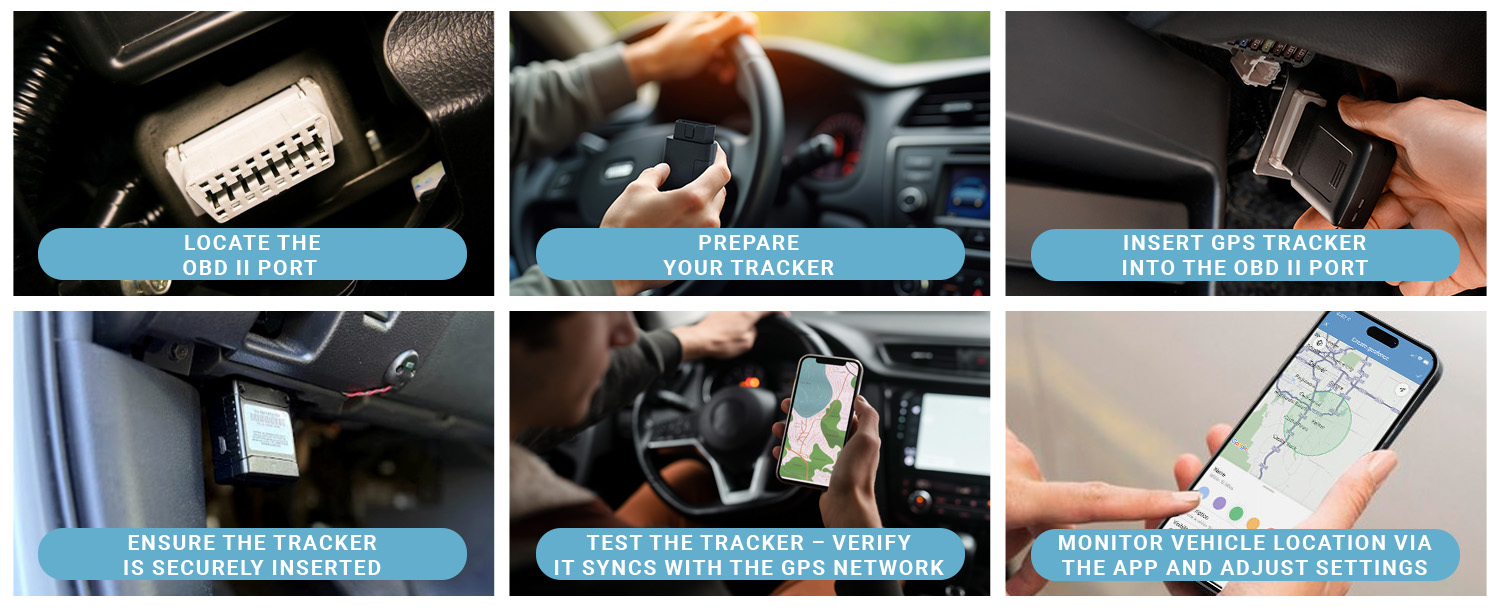
- Plug-in Trackers:Easy to install, connect to the car’s OBD-II port.
- Hardwired Trackers:Wired into the car’s electrical system for constant power.
- Battery-powered Trackers:Portable and can be hidden anywhere in the car.
- Magnetic Trackers:Attach to metal parts outside or inside the car.
Features To Consider
GPS devices offer different features. Knowing these helps you pick one that fits your needs and budget.
| Feature | Description | Why It Matters |
| Real-time Tracking | See the car’s location live on your phone or computer. | Good for immediate updates and safety. |
| Geo-fencing | Set boundaries and get alerts if the car leaves them. | Helps monitor where your car goes. |
| Battery Life | How long the tracker lasts without charging. | Long life means less frequent charging or replacement. |
| Size and Design | Small and hidden devices are harder to detect. | Better for discreet tracking. |
| Data Plans | Some trackers require monthly fees for data service. | Check costs before buying. |
Budget And Brand Options
GPS devices come at many price points. Look for brands known for quality and support. Balance cost with features for the best value.
- Low-cost options:Basic tracking, limited features, may lack support.
- Mid-range devices:Good features and reliability for most users.
- Premium brands:Advanced features, better build, and strong customer service.
Preparing For Installation
Installing a GPS on your car needs some preparation. This helps make sure the device works well.
Before starting, you must gather tools, find power sources, and check your car’s compatibility.
Gathering Necessary Tools
You need the right tools to install a GPS device safely and quickly. Having these ready saves time.
- GPS tracking device kit
- Screwdrivers (Phillips and flathead)
- Wire strippers and cutters
- Electrical tape or heat shrink tubing
- Multimeter for testing power sources
- Zip ties for securing wires
- Car manual for reference
Locating Power Sources
GPS devices need a constant power supply. Find the right power source before installation.
| Power Source | Description | Usefulness |
| Battery (Constant 12V) | Direct from car battery | Provides power even when car is off |
| Ignition Wire | Power only when car is on | Turns GPS on/off with ignition |
| OBD-II Port | Diagnostic port under dashboard | Easy access for power and data |
Checking Vehicle Compatibility
Not all cars support every GPS device. Check if your vehicle works with the GPS model you have.
Check these points for compatibility:
- Car make and model match GPS requirements
- Supports connection to your car’s power system
- Has space to mount the GPS device safely
- GPS device supports your local satellite signals
Step-by-step Installation Guide
Installing a GPS tracker on your car can help you keep track of its location. This guide will show you how to install it easily.
Follow these steps carefully to mount, connect, and secure your GPS device in your vehicle.
Mounting The Gps Tracker
Find a hidden spot inside your car to place the GPS tracker. Good places include under the dashboard or behind panels.
Make sure the location has a clear signal to receive GPS satellites.
- Clean the mounting area to remove dust and dirt
- Use double-sided tape or brackets to fix the tracker
- Avoid metal parts that block the GPS signal
Connecting To Power
Connect the GPS tracker to your car’s power source so it can work continuously. Most trackers use the car battery.
Use the wiring near the fuse box or cigarette lighter for power connection.
- Turn off the car before connecting wires
- Connect the red wire to the positive terminal
- Connect the black wire to the negative terminal or ground
- Secure the wires to avoid loose connections
Securing The Device
After mounting and wiring, make sure the GPS tracker is secure. It should not move or fall during driving.
Use zip ties or additional tape to hold wires and the device firmly in place.
- Check that the device does not block airbags or controls
- Test the tracker to confirm it works before closing panels
- Keep the tracker hidden to prevent tampering
Setting Up Tracking Software
After installing a GPS device in your car, you need tracking software to see its location. This software helps you watch your car in real time.
Setting up the software is simple. It usually involves downloading an app and connecting it to your device.
Downloading The App
First, find the app that works with your GPS device. Most brands have their own apps for phones and computers.
Go to the app store on your phone. Search for the app by name and download it. Make sure it is the official app from your device maker.
Pairing The Device
Open the app and turn on your GPS device. The app will guide you to connect the device to your phone.
Usually, pairing means entering a code or scanning a QR code on the device. Follow the app instructions carefully to link them.
- Turn on your GPS device
- Open the app and select “Add Device”
- Enter the code or scan the QR code
- Wait for confirmation of pairing
Configuring Alerts And Notifications
You can set alerts to get notifications about your car. Alerts can tell you if the car moves or leaves a set area.
Use the app settings to choose what alerts you want. Turn notifications on to get updates on your phone or email.
- Set speed alerts to know if the car goes too fast
- Enable geofence alerts to track if the car leaves an area
- Choose how you get alerts, like text or email
- Test alerts to make sure they work
Testing And Troubleshooting
Testing and troubleshooting your car’s GPS is important. It ensures that your GPS works well and gives accurate directions.
This guide helps you check signal strength, fix common problems, and maintain the device’s performance.
Verifying Signal Strength
Signal strength affects how your GPS performs. Check it regularly to avoid navigation issues.
- Ensure the GPS has a clear view of the sky
- Avoid parking in underground garages
- Check for obstructions like tall buildings
Common Issues And Fixes
Sometimes, the GPS may not work as expected. Here are some common issues and how to fix them.
- If the GPS signal is weak, restart the device
- If maps are outdated, update the software
- If the device freezes, perform a reset
Maintaining Device Performance
Keeping your GPS in good condition helps it last longer. Follow these tips to maintain its performance.
- Clean the device screen regularly
- Store the GPS in a safe place when not in use
- Check for software updates monthly
Credit: spy-spot.com
Legal And Privacy Considerations
Installing a GPS on your car can be useful. It helps with navigation and safety. But, it’s important to know about legal and privacy rules.
You must follow the laws in your area. Understanding privacy rights is also important. Informing others can prevent issues.
Understanding Local Laws
Each place has its own rules about GPS devices. Some areas require permission before installing a GPS. Knowing the laws can keep you out of trouble.
Check with local authorities. They can give you the correct information. You might need to fill out forms or get approvals.
Respecting Privacy Rights
Privacy is important when using GPS. You should not track someone without their knowledge. This can lead to legal problems.
Respecting privacy means keeping data safe. Use secure systems to protect personal information. Be aware of what data your GPS collects.
Informing Relevant Parties
Let others know if you install a GPS in shared vehicles. This shows respect and keeps everyone informed. It can also prevent misunderstandings.
Inform family members and regular users of the car. Make sure they understand how the GPS works and why it is used.
- Explain the benefits of using a GPS
- Show how to operate the device
- Discuss who can access the data
Tips For Effective Gps Tracking
Putting a GPS on your car helps you know its location at all times. Using the GPS well makes tracking easy and useful.
These tips will help you get the best results from your GPS device. They focus on keeping the device updated, managing power, and using data smartly.
Regular Device Updates
GPS devices need updates to work well. Updates fix bugs and add new features that improve tracking accuracy.
Check for updates often. Most devices update through a phone app or computer software.
- Set reminders to update your GPS device monthly
- Install updates when you get a notification
- Keep your tracking app updated too
Battery Management
GPS devices need power to work. Some use the car’s battery, others have their own battery.
Keep the battery charged or connected. A dead battery means no tracking.
- Charge GPS devices regularly if they use internal batteries
- Check wiring if your GPS connects to the car battery
- Turn off the device when not needed to save power
Using Tracking Data Wisely
GPS data gives useful information about your car’s location and movement. Use this data to stay informed and safe.
Review your tracking data regularly. It helps you spot unusual activity and plan your routes better.
- Set alerts for unexpected stops or routes
- Use data to improve driving habits
- Share location with trusted people if needed
Credit: www.brickhousesecurity.com
Frequently Asked Questions
How Do I Install A Gps Device In My Car?
To install a GPS, first choose a compatible device. Connect it to your car’s power source, usually the OBD-II port or 12V socket. Secure the device where it has a clear view of the sky for better signal. Follow the manufacturer’s setup instructions carefully.
Can I Use My Smartphone As A Gps Tracker?
Yes, smartphones can serve as GPS trackers using apps. Install a reliable tracking app, enable location services, and share your location. This method is cost-effective but depends on phone battery life and network availability for real-time tracking.
What Are The Benefits Of A Car Gps Tracker?
A car GPS tracker helps monitor location, improve security, and recover stolen vehicles. It offers real-time tracking, route history, and alerts for unauthorized movement. This technology enhances safety and provides peace of mind for car owners.
Is Professional Installation Necessary For Car Gps Devices?
Professional installation is not always necessary but recommended for complex systems. DIY installation is possible with plug-and-play devices. Professional setup ensures proper wiring, optimal placement, and reliable performance, especially for advanced or hardwired GPS trackers.
Conclusion
Adding a GPS to your car helps you find places fast. It also improves safety by showing your location clearly. Choose the right device for your needs and budget. Follow the steps carefully for easy installation. Check the system works before driving.
Enjoy peace of mind on every trip. A small effort can make a big difference. Stay connected, stay safe, and drive with confidence.







