
If you want to save money on car repairs and understand what’s really going on under your hood, an OBD2 scanner is your best friend. The Craftsman OBD2 Scanner puts powerful diagnostic tools right in your hands, helping you quickly find out what’s wrong with your vehicle.
Imagine skipping the guesswork and fixing problems before they get worse. You’ll discover how the Craftsman scanner can make your life easier, whether you’re a seasoned mechanic or just starting out. Keep reading to learn how this handy device can give you control over your car’s health and keep you on the road longer.

Credit: www.ebay.com
Craftsman Obd2 Scanner Features
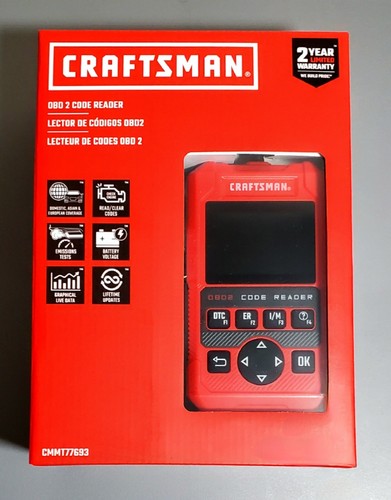
The Craftsman OBD2 Scanner is a tool that helps you check your vehicle’s health. It reads error codes and shows what needs fixing.
This scanner is easy to use and works with many cars. It gives clear information to help you understand your vehicle better.
Compatibility With Vehicle Models
The Craftsman OBD2 Scanner works with most cars made after 1996. It supports many brands and types of vehicles.
This scanner can read codes from gasoline and diesel engines. It also supports cars, trucks, and SUVs.
- Works with all OBD2 compliant vehicles
- Supports gasoline and diesel engines
- Compatible with cars, trucks, and SUVs
- Works on most brands worldwide
User Interface And Display
The scanner has a simple screen that shows codes and messages clearly. It uses easy words and symbols to explain problems.
Buttons on the device are large and easy to press. The menu is simple to navigate, so you find information fast.
- Clear LCD screen with backlight
- Simple menu for easy use
- Large buttons for quick control
- Displays error codes and their meanings
Connectivity Options
The Craftsman OBD2 Scanner connects to your vehicle using a standard OBD2 port. It does not need extra cables or adapters.
Some models offer Bluetooth to link with smartphones. This helps you use apps for more detailed vehicle info.
- Plugs into vehicle’s OBD2 port
- No extra cables needed
- Bluetooth available on select models
- Works with mobile apps for extra data
Setting Up The Scanner
Setting up your Obd2 Scanner Craftsman is easy and fast. Follow simple steps to connect and prepare it for use.
This guide helps you install the device, calibrate it, and fix common setup problems.
Installation Steps
First, find your vehicle’s OBD2 port. It is usually under the dashboard.
- Turn off your car engine before connecting the scanner.
- Plug the scanner into the OBD2 port firmly.
- Turn on the car ignition but do not start the engine.
- Wait for the scanner to power up and display the main menu.
- Follow on-screen instructions to pair the scanner with your phone or tablet if needed.
Initial Calibration
Calibration ensures the scanner reads accurate data from your vehicle.
| Calibration Task | Details |
| Connect to Vehicle | Plug in and power on the scanner |
| Run Auto-Scan | Use the menu option to scan all systems |
| Save Baseline | Store initial readings for comparison |
| Confirm Data | Check if the values match vehicle specs |
Troubleshooting Setup Issues
If the scanner does not connect, check the power and port connection. Restart the car ignition if needed.
- Scanner won’t turn on: Check the fuse and power source.
- No data shown: Re-seat the scanner in the port and try again.
- Bluetooth connection fails: Restart your phone and scanner.
- Errors during calibration: Reset the device and repeat calibration.
Performing Accurate Diagnostics
Using an OBD2 scanner from Craftsman helps find car problems fast. It gives exact information about your vehicle’s health.
Accurate diagnostics save time and money by fixing the right issues. Understanding the scanner’s features improves repair work.
Reading And Clearing Codes
The Craftsman OBD2 scanner reads error codes from the car’s computer. These codes tell what part or system has a problem.
After repairs, you can clear the codes to turn off the warning lights. This helps check if the problem is fixed.
- Connect the scanner to the car’s OBD2 port
- Read diagnostic trouble codes (DTCs)
- Understand code meanings from the scanner display
- Clear codes to reset the system
Live Data Monitoring
Live data shows real-time information from the car’s sensors. It helps see how parts work while the engine runs.
Craftsman scanners display data like engine speed, temperature, and oxygen levels. Watching this data helps find hidden problems.
- Monitor engine RPM and temperature
- Check fuel system status
- View oxygen sensor readings
- Analyze data to spot irregular values
Freeze Frame Data Analysis
Freeze frame data captures car conditions when a problem occurs. It shows a snapshot of sensor readings at that time.
This data helps mechanics understand what caused the issue. Craftsman scanners let users view and analyze freeze frame details easily.
| Parameter | Example Value | Purpose |
|---|---|---|
| Engine RPM | 3000 | Shows engine speed during fault |
| Vehicle Speed | 45 mph | Speed when error happened |
| Coolant Temperature | 190°F | Engine temperature at fault time |
Advanced Functions
The Craftsman OBD2 Scanner offers many advanced tools. These tools help you check your car deeply.
These functions go beyond basic code reading. They help diagnose specific systems and update software.
Emissions Testing
The scanner checks your vehicle’s emissions system. It reads data to see if pollution controls work well.
You can see if your car passes state emissions rules. It helps find problems before official tests.
Abs And Srs Diagnostics
This scanner reads codes from ABS and SRS systems. These systems control brakes and airbags for safety.
If a light is on, you can find the exact issue. This helps fix problems with your brakes or airbags quickly.
- Read ABS warning codes
- Check SRS airbag faults
- Clear error codes after repair
Software Updates
The Craftsman scanner supports software updates. This keeps the tool current with new car models and functions.
Updating the software improves scanning accuracy. It also adds new diagnostic features over time.
Tips For Effective Use
Using an OBD2 scanner from Craftsman helps find car problems fast. To get the best results, you should know how to use the tool correctly.
This guide gives simple tips for keeping your scanner accurate, reading results right, and avoiding common errors.
Maintaining Scanner Accuracy
Keep your OBD2 scanner working well by following these tips. Clean the scanner ports before use. Store the device in a dry, cool place. Check for software updates regularly to fix bugs and add features.
- Clean the connector pins gently with a dry cloth.
- Do not expose the scanner to extreme heat or moisture.
- Update the scanner software as soon as updates are available.
- Test the scanner on a known working vehicle to confirm accuracy.
Interpreting Diagnostic Results
Reading codes from your scanner needs care. Each code means a specific problem or status. Use the scanner’s manual or app to understand the codes. Some codes show serious issues; others are warnings or info.
| Code Type | Description | Action |
| P0xxx | Powertrain Codes | Check engine and transmission |
| B0xxx | Body Codes | Check body systems like airbags |
| C0xxx | Chassis Codes | Check brakes and suspension |
| U0xxx | Network Codes | Check communication between modules |
Common Mistakes To Avoid
Many users make errors that cause wrong readings or damage. Avoid turning off the car while scanning. Do not unplug the scanner during data transfer. Avoid guessing code meanings without checking reliable sources.
- Do not disconnect the scanner before the scan finishes.
- Never use the scanner on incompatible vehicle models.
- Do not ignore error codes; look them up carefully.
- Always turn the ignition on, but keep the engine off unless instructions say otherwise.
Credit: www.ebay.com
Comparing Craftsman With Other Scanners
Choosing the right OBD2 scanner can be challenging. Craftsman offers a range of features. Let’s compare it with other popular scanners.
This comparison will help you understand the differences in price, features, and user feedback.
Price And Value
Price is a major factor when choosing a scanner. Craftsman offers competitive pricing in the market.
| Scanner | Price | Value |
| Craftsman | $100 | Great for basic diagnostics |
| Brand X | $150 | Advanced features included |
| Brand Y | $80 | Limited functionalities |
Feature Set Comparison
Different scanners offer various features. Craftsman includes essential diagnostic tools.
- Real-time data streaming
- Code reading and clearing
- Emission readiness check
- Live sensor data
User Reviews And Feedback
User feedback helps in evaluating a product. Craftsman scanners receive positive reviews for ease of use.
Users appreciate the clear display and simple interface. Some mention the lack of advanced features in lower-priced models.

Credit: www.amazon.com
Frequently Asked Questions
What Is An Obd2 Scanner Craftsman Used For?
An OBD2 Scanner Craftsman helps diagnose vehicle issues by reading error codes. It identifies engine problems quickly, saving repair time and costs. The scanner works with most cars manufactured after 1996, making it a valuable tool for DIY mechanics and professionals.
How Does Obd2 Scanner Craftsman Improve Car Maintenance?
This scanner allows early detection of engine faults, preventing serious damage. It offers live data on vehicle performance, helping users track maintenance needs. Regular scans ensure better fuel efficiency and lower emissions, enhancing overall vehicle health and safety.
Is Craftsman Obd2 Scanner Compatible With All Vehicles?
The Craftsman OBD2 Scanner is compatible with most OBD2-compliant vehicles. It works with cars and light trucks from 1996 onward. However, it may not support some heavy-duty or non-OBD2 vehicles, so checking your vehicle’s compatibility before purchase is recommended.
Can Beginners Use The Craftsman Obd2 Scanner Easily?
Yes, the Craftsman OBD2 Scanner features a user-friendly interface ideal for beginners. It provides clear error codes and simple instructions. This scanner allows easy troubleshooting without advanced technical knowledge, making it perfect for first-time users and car enthusiasts.
Conclusion
The OBD2 Scanner Craftsman helps you check car problems fast. It saves time and money by finding issues early. Easy to use, it suits both beginners and pros. Knowing your car’s health is important for safety. This tool gives clear results you can trust.
Keep your vehicle running smooth with regular scans. A simple device that makes car care easier. Don’t wait for big repairs—act smart today.







