
Have you ever seen that annoying check engine light on your dashboard and wondered what it really means? If you want to take control of your car’s health without spending a fortune at the mechanic, an OBD2 scanner can be your best friend.
But knowing how to clear those trouble codes yourself is even better. Imagine fixing small issues quickly and feeling confident behind the wheel. You’ll discover simple steps to use an OBD2 scanner to clear codes and get your car running smoothly again.
Ready to save time and money? Let’s dive in!
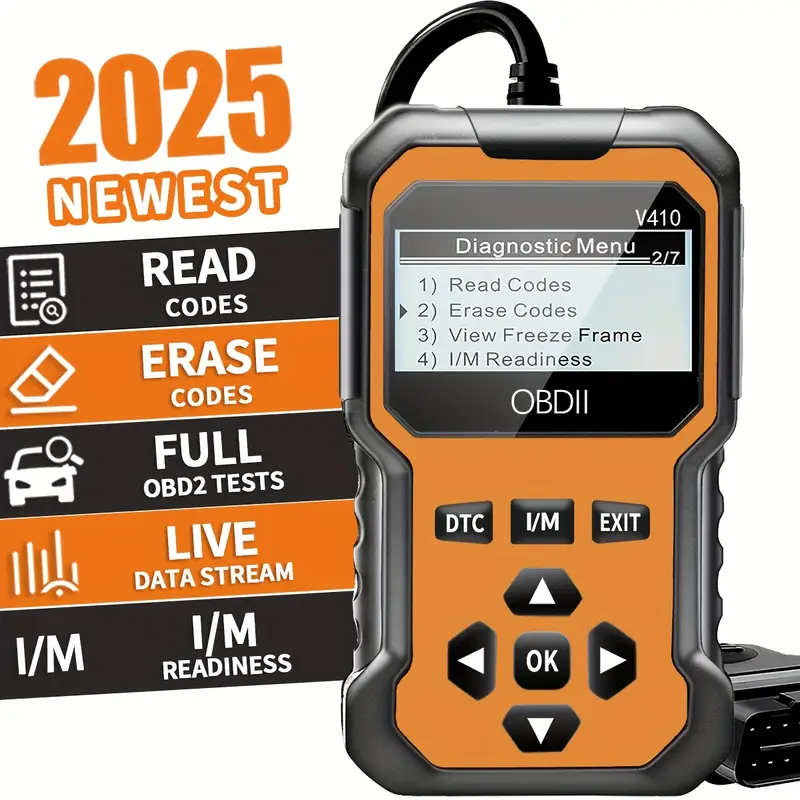
Credit: www.temu.com
What Is An Obd2 Scanner
An OBD2 scanner is a device that connects to a car’s computer system. It helps read data and find problems in the vehicle.
OBD2 stands for On-Board Diagnostics, second generation. This system is in most cars made after 1996.
How An Obd2 Scanner Works
The scanner plugs into a special port in the car. It reads error codes stored by the car’s computer.
These codes show what parts or systems may have issues. The scanner then displays the codes for the user.
- Basic code readers that show error codes only
- Advanced scanners with live data and freeze frame
- Wireless scanners that connect to smartphones
- Professional tools used by mechanics
Benefits Of Using An Obd2 Scanner
| Benefit | Description |
| Save Money | Find problems early before costly repairs |
| Easy Diagnosis | Quickly identify which part is faulty |
| Better Maintenance | Track car health and performance |
| Clear Codes | Reset error lights after fixing issues |
Common Obd2 Codes And Their Meaning
Here are some common OBD2 trouble codes and what they mean:
- P0171: System too lean (bank 1)
- P0300: Random/multiple cylinder misfire detected
- P0420: Catalyst system efficiency below threshold
- P0455: Evaporative emission system leak detected
Why Clear Codes Matters
When your car shows a check engine light, it stores trouble codes. These codes help find the problem. Clearing these codes is important after fixing the issue.
Clearing codes resets the car’s system. This lets you know if the problem is really gone or if it comes back.
Improves Vehicle Performance
Old codes can keep the engine in a safe mode. This mode lowers power and speed. Clearing the codes can restore full engine power.
Prevents False Alarms
Sometimes the check engine light stays on even after repair. Clearing codes removes old alerts. This stops confusion and worry about problems that do not exist.
Helps With Accurate Diagnosis
Clearing codes after a fix helps track new issues. It gives clear data for mechanics. This leads to faster and better repairs.
Saves Time And Money
- Clear codes to confirm the fix worked.
- Drive the car to see if the light returns.
- If the light stays off, avoid unnecessary repairs.
- If the light returns, check for new problems.
Ensures Emissions Compliance
| Benefit | Why It Matters |
| Clear Codes | Resets emission system readiness |
| Check Engine Light Off | Passes emission tests |
| Accurate Data | Shows true vehicle condition |
Types Of Obd2 Scanners
OBD2 scanners help you find problems in your car’s engine and systems. They read error codes from your vehicle’s computer.
There are different types of scanners. Each type offers various features for car diagnostics.
Basic Code Readers
Basic code readers are simple devices. They only show error codes and clear them from the car’s computer.
These scanners are easy to use and affordable. They are good for quick checks and simple fixes.
Advanced Diagnostic Tools
Advanced diagnostic tools offer more features than basic readers. They provide live data and detailed information about car systems.
| Feature | Basic Code Reader | Advanced Diagnostic Tool |
| Read Error Codes | Yes | Yes |
| Clear Codes | Yes | Yes |
| Live Data | No | Yes |
| Freeze Frame Data | No | Yes |
| System Tests | No | Yes |
Bluetooth And App-based Scanners
Bluetooth scanners connect to your phone or tablet. They use apps to show codes and live data.
- Work with many car models
- Show detailed reports on your device
- Easy to update with new features
- Allow sharing data with mechanics
Preparing To Clear Codes
Clearing codes from your vehicle’s system requires some preparation. It is important to know where to connect your scanner and ensure your vehicle is ready.
Taking these steps will help you use the OBD2 scanner correctly and avoid mistakes.
Locate The Obd2 Port
The OBD2 port is where you plug in your scanner. It is usually under the dashboard near the steering wheel.
- Look below the driver’s side dashboard.
- Check near the pedals or center console.
- Use your vehicle manual if you cannot find it.
Check Vehicle Compatibility
Not all vehicles support every OBD2 scanner. You must verify if your car works with the scanner model.
| Vehicle Type | OBD2 Support |
| Gasoline cars (1996 and newer) | Yes |
| Diesel trucks (2008 and newer) | Yes |
| Older vehicles | Check manual |
| Electric cars | Varies by model |
Turn Off The Engine
Before you connect the scanner, make sure the engine is off. This prevents any errors during the connection process.
- Remove the key from the ignition.
- Ensure all electrical accessories are off.
- Keep the engine cool for safety.
Step-by-step Code Clearing
Using an OBD2 scanner to clear trouble codes is a simple process. It helps reset your car’s computer after fixing issues.
This guide shows you how to clear codes safely and quickly with your scanner.
Connect The Scanner
Locate your car’s OBD2 port. It is usually under the dashboard near the steering wheel.
Plug the scanner’s connector into the port firmly to ensure a good connection.
Power On And Read Codes
Turn on your car’s ignition but do not start the engine. This powers the scanner.
Use the scanner’s menu to find the option to read trouble codes. The scanner will display any stored codes.
- Turn ignition to ON position
- Navigate scanner menu to “Read Codes”
- Wait for scanner to show codes
Erase Trouble Codes
After reading the codes, select the option to erase or clear them. This resets the car’s computer.
Confirm your choice if the scanner asks. Wait a few seconds while it clears the codes.
- Choose “Erase Codes” from the scanner menu
- Confirm to start clearing process
- Wait until the scanner confirms codes are erased
Restart The Vehicle
Turn off the ignition and disconnect the scanner from the OBD2 port. This avoids errors.
Start the engine and check if the warning lights are off. The car should run smoothly now.

Credit: www.amazon.com
Common Issues After Clearing Codes
Using an OBD2 scanner to clear codes can be helpful. But some issues might pop up after you clear them.
It is crucial to know what to expect. This helps you deal with these problems easily.
Check Engine Light Returns
The check engine light might come back on after clearing codes. This can be due to unresolved issues.
- Faulty oxygen sensor
- Loose gas cap
- Emissions issues
Persistent Problems
Some problems may not disappear after clearing codes. This can cause the same codes to reappear.
| Issue | Possible Cause |
| Rough idle | Dirty air filter |
| Poor fuel economy | Faulty spark plugs |
| Stalling | Fuel pump problems |
When To Seek Professional Help
If problems persist, consider getting professional help. Experts can diagnose complex issues better.
Tips For Maintaining Your Vehicle
Keeping your vehicle in good condition is important. An OBD2 scanner can help with this. It can read and clear error codes from your car’s computer.
Regular use of an OBD2 scanner ensures your vehicle runs smoothly. It helps you identify issues early.
Regular Diagnostics
Scanning your car regularly keeps track of its health. It helps spot problems before they become serious.
Use the scanner once a month. This routine checks for any hidden issues.
- Connect the scanner to the OBD2 port
- Follow the instructions to run a diagnostic
- Review the codes and take action if needed
Routine Maintenance
Routine maintenance keeps your vehicle in top shape. An OBD2 scanner helps monitor necessary services.
It alerts you to maintenance needs like oil changes. This keeps your car running efficiently.
- Check engine oil levels
- Inspect brake pads regularly
- Ensure tire pressure is correct
Using The Scanner Effectively
To use the scanner effectively, learn to interpret codes. Each code corresponds to a specific issue.
Consult the manual to understand the codes. This helps you decide what repairs are necessary.
- Research common codes for your car model
- Use online resources for code explanations
- Consult a professional if unsure

Credit: www.amazon.ca
Frequently Asked Questions
What Is An Obd2 Scanner And How Does It Clear Codes?
An OBD2 scanner reads your vehicle’s diagnostic trouble codes (DTCs). It identifies issues and can clear stored error codes, turning off the check engine light after repairs.
Can I Clear Obd2 Codes Without Fixing The Problem?
Yes, you can clear codes, but the issue may return. Clearing codes without repair only resets the system temporarily and doesn’t fix the underlying problem.
How Do I Use An Obd2 Scanner To Clear Codes?
Plug the scanner into your car’s OBD2 port, usually under the dashboard. Turn on the ignition, read the codes, then select the option to clear or erase them.
Will Clearing Obd2 Codes Improve Vehicle Performance?
Clearing codes alone doesn’t improve performance. It resets the warning lights but the root cause must be fixed to enhance vehicle function and prevent damage.
Conclusion
Clearing codes with an OBD2 scanner saves time and money. It helps you understand car issues clearly. You can fix small problems before they grow. The scanner makes car care simple and smart. Always read the code details to know what to do next.
Regular checks keep your vehicle running smooth. Using an OBD2 scanner puts control in your hands. A few minutes can prevent bigger repairs later. Keep your car healthy and safe with this tool.







