
Are you worried about your car’s GPS tracking? You might want to keep your location private or avoid constant monitoring.
Whatever your reason, knowing how to disable GPS tracking on your car is important. You’ll discover simple steps that anyone can follow to take control of your vehicle’s privacy. Keep reading to learn how to protect your car from unwanted tracking and regain your peace of mind.
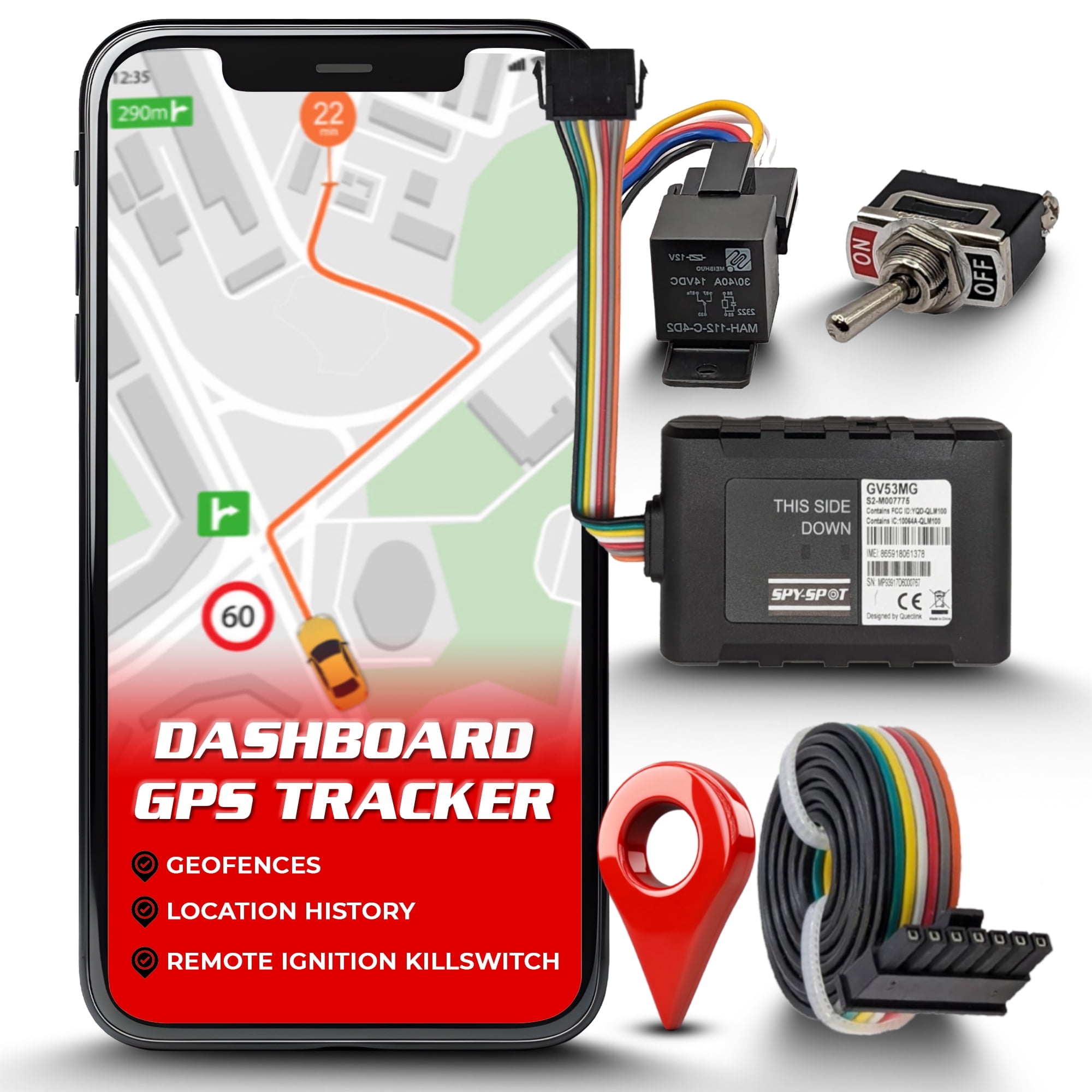
Credit: www.walmart.com
Why Disable Gps Tracking
GPS tracking in cars can help with navigation and safety. Still, some people want to turn it off.
Disabling GPS can protect your privacy and stop unwanted tracking or data use.
Privacy Concerns
GPS tracking reveals your car’s location all the time. This can feel like an invasion of privacy.
People may not want others to know where they go or when they travel.
Prevent Unauthorized Tracking
Sometimes, GPS data is accessed without your permission. This can be done by strangers or even companies.
Turning off GPS stops people from tracking your car without your knowledge.
Avoid Data Misuse
GPS data can be collected and sold to others. This may lead to unwanted ads or other risks.
Disabling GPS helps keep your travel data safe and private.

Credit: www.jammermfg.com
Common Gps Tracking Methods
Many cars have GPS trackers to find their location. These trackers help owners and authorities track the vehicle.
There are different ways cars get tracked. Knowing these can help you disable GPS tracking if needed.
Factory-installed Trackers
Some cars come with GPS trackers built by the manufacturer. These trackers are part of the car’s system.
They send location data to the car company or service providers. This helps with theft recovery and vehicle diagnostics.
- Usually hidden inside the car’s body
- Hard to find without special tools
- Connected to the car’s power supply
Aftermarket Devices
Aftermarket GPS devices are added after buying the car. People use them to track vehicles for various reasons.
These devices are easy to install and remove. They often use magnets or plugs to connect to the car.
- Can be hidden under the car or inside
- Work with apps or websites to show location
- Require their own power or use the car’s battery
Smartphone Apps
Smartphone apps can track a car’s location if the phone is inside the vehicle. They use GPS from the phone.
These apps share location data with others. They need permission to access GPS and run in the background.
- Track location through the phone’s GPS
- Send updates via internet or cellular networks
- Can be turned off by disabling app or GPS
Preparing To Disable Gps Tracking
Disabling GPS tracking on your car starts with careful preparation. You need to know what to look for and how to get ready.
Taking time to prepare helps you remove the device safely and effectively without causing damage.
Identifying Tracking Devices
Tracking devices come in many shapes and sizes. They are often small and hidden in your car.
Common places to check include under the dashboard, inside the glove box, and under the car.
- Under the dashboard or near the steering column
- Inside or behind the glove box
- Underneath the car or near the wheel wells
- Inside the center console or under seats
Gathering Necessary Tools
You will need some basic tools to find and disable the GPS tracker. Prepare these before starting.
- Flashlight to see in dark areas
- Screwdrivers for opening panels
- Wire cutters to cut wires if needed
- Gloves to protect your hands
- Magnifying glass to check small devices
Safety Precautions
Safety is important when disabling GPS devices. Take steps to protect yourself and your car.
Turn off your car and remove the key before you start. Avoid cutting wires unless you know what they do.
- Work in a well-lit area
- Disconnect the car battery if possible
- Wear gloves to avoid injury
- Do not damage car parts
- If unsure, ask a professional for help
Steps To Disable Factory Gps Trackers
Many cars come with built-in GPS trackers. These trackers help with navigation and security. Some people want to disable these trackers for privacy reasons.
Disabling a factory GPS tracker requires care. You need to follow safe steps to avoid harming your car’s system.
Accessing The Vehicle’s System
Start by accessing your car’s main control system. This is often done through the dashboard screen or an onboard menu. You may need the car key or remote to unlock this system.
Look for the settings or system menu. Some cars require a security code to enter advanced settings. Check your vehicle manual for details.
Disabling Through Settings
Once inside the system, find the GPS or tracking options. These options might be under privacy, security, or connected services. Select the option to turn off GPS tracking.
Save the changes before exiting the menu. Your car may ask for confirmation or a PIN to disable tracking. Follow the prompts to complete the process.
- Open the system menu
- Find GPS or tracking settings
- Select disable or turn off
- Confirm changes with PIN if needed
- Save and exit the menu
Physical Disconnection
Another way to disable GPS tracking is to disconnect the hardware. This usually means finding the GPS module or antenna in your car. The location varies by make and model.
You may need to remove panels or covers to reach the GPS device. Disconnect the power or antenna cable carefully. Avoid cutting wires unless you are sure it is safe.
- Locate the GPS module or antenna
- Remove necessary panels or covers
- Disconnect power or antenna cables
- Do not cut wires unless you know the risks
- Test the car system after disconnection
Removing Aftermarket Gps Devices
Aftermarket GPS devices can track your car’s location. Removing them helps maintain privacy. This guide shows how to find and disable these trackers.
Follow these steps to locate, disconnect, and permanently remove your GPS tracking device.
Locating The Tracker
Finding the GPS tracker is the first step. These devices are often hidden in obscure locations.
- Check under the dashboard for any unusual devices.
- Inspect the underside of the car near the wheels.
- Look inside the trunk and glove compartment.
- Use a GPS detector to scan for signals.
Disconnecting Power Source
After finding the tracker, disconnect its power source to disable it. Most devices connect to the car’s battery.
- Turn off the car ignition.
- Locate the power wires attached to the GPS device.
- Carefully unplug the wires from the device.
Permanent Removal Tips
Once the power is disconnected, you can remove the device permanently. Ensure no parts are left behind.
| Action | Details |
| Remove device | Detach the GPS unit from its location |
| Check wires | Ensure no wires are still connected |
| Dispose properly | Follow electronic waste disposal guidelines |
Managing Gps Tracking Via Smartphone
Many cars use GPS tracking for safety and convenience. You can control this tracking using your smartphone.
Smartphones let you adjust settings to stop or limit GPS tracking on your car. This guide shows easy steps.
Adjusting App Permissions
Apps on your phone may track your car’s GPS location. You can change their permissions to stop this.
Go to your phone’s settings. Find the app that tracks GPS and change its permissions to deny location access.
- Open Settings on your smartphone
- Tap Apps or App Manager
- Select the GPS tracking app
- Choose Permissions
- Turn off Location permission
Disabling Location Services
Turning off location services stops all apps from using your phone’s GPS. This can stop car tracking.
Disabling location services is simple but affects all apps. Only use it if you want to stop all GPS tracking.
- Open your phone’s Settings
- Find Location or Location Services
- Toggle the switch to Off
Uninstalling Tracking Apps
Some apps track your car without needing location permission. Removing these apps stops tracking completely.
Uninstall apps that you do not recognize or no longer use. This removes their ability to track your car.
- Find the tracking app on your phone
- Press and hold the app icon
- Select Uninstall or Remove
- Confirm the uninstallation
Legal And Safety Considerations
Turning off GPS tracking on your car can affect your safety and legal standing. It is important to understand the rules and risks before you disable it.
This guide explains local laws, vehicle warranty issues, and why emergency tracking matters.
Understanding Local Laws
Many places have laws about GPS tracking in vehicles. These laws protect privacy and ensure safety. Disabling GPS may be illegal in some areas.
- Check if your state or country allows you to turn off GPS tracking.
- Know that some companies must keep tracking active by law.
- Illegal disabling can lead to fines or other penalties.
- Always read your local traffic and privacy laws before making changes.
Impact On Vehicle Warranty
Disabling GPS tracking might affect your car’s warranty. Some manufacturers use GPS for security and service features.
| Warranty Aspect | Effect of Disabling GPS |
| Security Features | May void warranty if GPS is part of theft prevention |
| Maintenance Alerts | Could stop alerts based on GPS data |
| Remote Diagnostics | May lose remote help from dealer |
Emergency Tracking Importance
GPS tracking can save lives in emergencies. It helps responders find your location quickly after crashes or breakdowns.
Disabling GPS tracking removes these safety benefits:
- Faster emergency response times
- Accurate location sharing with emergency services
- Automatic crash notifications
- Peace of mind for drivers and families
Alternative Privacy Measures
Many cars have GPS tracking for navigation and security. Some people worry about privacy. They might want to disable GPS tracking.
There are ways to protect your privacy without removing GPS. Here are some options to consider.
Using Gps Jammers
GPS jammers can block signals from satellites. This makes it hard for GPS to track your car. You can use them when you do not want to be tracked.
Be careful, GPS jammers are illegal in some places. Check local laws before using one.
Signal Blocking Devices
Signal blocking devices stop GPS signals too. They can be placed in your car. They work by creating a shield around the car.
These devices are sometimes called Faraday cages. They are legal in more areas than jammers.
Regular Privacy Audits
Check your car’s privacy settings often. This helps you know what data is being shared. You can adjust settings to limit tracking.
Ask a professional to review your car’s technology. They can help ensure your privacy is protected.

Credit: spacehawkgps.com
Frequently Asked Questions
How Do I Turn Off Gps Tracking In My Car?
To disable GPS tracking, locate your car’s GPS device or app settings. Disconnect or turn off the GPS module. Consult your vehicle’s manual for specific instructions.
Can I Disable Gps Tracking Without Professional Help?
Yes, many cars allow you to disable GPS tracking manually via the infotainment system or by disconnecting the tracking device. Always ensure safety and legal compliance.
Does Disabling Gps Affect My Car’s Other Functions?
Disabling GPS tracking may impact navigation, emergency response, and vehicle tracking features. Check your vehicle’s system to understand any limitations before turning it off.
Is It Legal To Disable Gps Tracking In My Car?
Legality varies by region and vehicle type. Disabling GPS may violate lease or insurance agreements. Always verify local laws and contract terms before proceeding.
Conclusion
Disabling GPS tracking on your car helps protect your privacy and control. It can stop others from knowing your location all the time. Always check your car’s manual or ask a professional before making changes. Keep in mind that some features may need GPS to work properly.
Stay safe and make sure your choices fit your needs. Taking small steps can give you peace of mind while driving.







