
Are you tired of spending money every time your car’s check engine light comes on? Imagine having a tool right in your pocket that can instantly read your car’s health without any cost.
A free OBD2 scanner app lets you do just that—giving you the power to understand what’s going on under your hood in seconds. Keep reading to discover how this simple app can save you time, money, and stress every time your car acts up.
What Is An Obd2 Scanner App
An OBD2 scanner app is a tool for car diagnostics. It connects to your vehicle’s OBD2 system. The app shows data and error codes on your phone.
These apps help you understand your car’s health. They are useful for basic checks and troubleshooting.
Basics Of Obd2 Technology
OBD2 stands for On-Board Diagnostics version 2. It is a standard system in cars made after 1996. The system monitors engine and vehicle performance.
- OBD2 uses a port under the dashboard to connect devices.
- It tracks engine problems and emissions data.
- The system produces codes to identify issues.
- Codes help mechanics diagnose car problems.
- OBD2 supports real-time data and freeze frame data.
How Scanner Apps Work
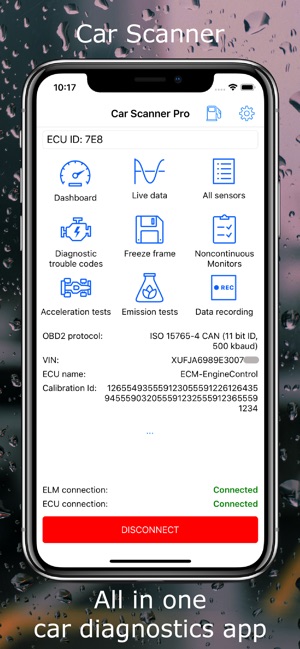
The app connects to the OBD2 port using Bluetooth or Wi-Fi. It reads data from the car’s computer system. The app then shows this data clearly on your phone.
| Function | Description |
| Connect | Link your phone to the car’s OBD2 port |
| Read Codes | Get error codes from the car’s system |
| Clear Codes | Reset error messages after fixing issues |
| Display Data | Show live engine and sensor information |
| Report | Provide detailed diagnostics and tips |
Benefits Of Using Free Obd2 Apps
Free OBD2 scanner apps connect to your car’s system to read diagnostic data. They help you understand your vehicle’s health without visiting a mechanic first.
These apps give you easy access to important information. They save time and can prevent costly repairs by catching problems early.
Cost Savings On Diagnostics
Using a free OBD2 app reduces the need for paid diagnostic tests. You can check your car’s issues at home before deciding on repairs.
- Eliminates initial mechanic fees
- Helps spot minor issues early
- Supports DIY troubleshooting
- Reduces surprise repair costs
Real-time Vehicle Monitoring
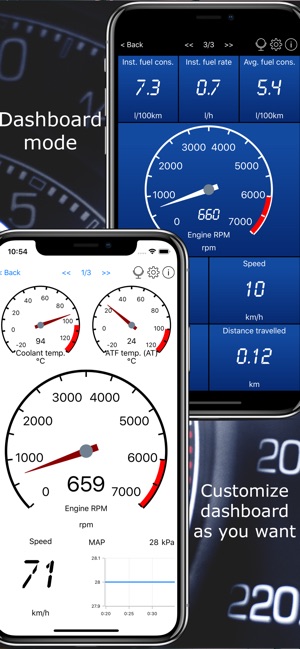
OBD2 apps show live data from your vehicle’s sensors. This helps track engine performance and fuel efficiency while driving.
| Feature | Benefit |
| Engine RPM | Monitor engine speed instantly |
| Fuel Consumption | Track fuel use to save money |
| Temperature | Prevent overheating by early warning |
| Speed | Check speed accuracy |
User-friendly Features
Free OBD2 apps are made for easy use. They offer simple menus and clear codes to help all drivers understand their car’s status.
- Easy code lookup with simple explanations
- Clear alerts for urgent issues
- Customizable dashboard views
- Data export for sharing with mechanics
Top Free Obd2 Scanner Apps
OBD2 scanner apps help you check your car’s engine and systems. They connect to your car’s OBD2 port and show data on your phone.
Many free apps offer useful features for both beginners and experts. Below are some popular apps for Android and iOS, plus a feature comparison.
Popular Apps For Android
Android users have many free OBD2 scanner apps. These apps offer real-time data, error code reading, and vehicle info.
- Torque Lite – Shows engine data and error codes.
- OBDLink – Easy to use and connects to many devices.
- Car Scanner ELM OBD2 – Provides detailed diagnostics and customizable dashboards.
- DashCommand – Displays live data and supports many car models.
- OBD Auto Doctor – Reads and clears trouble codes with simple interface.
Popular Apps For Ios
iOS users can also find great free OBD2 apps. These apps focus on ease of use and clear data display.
- OBD Fusion – Reads codes and shows live sensor data.
- Car Scanner ELM OBD2 – Offers customizable dashboards and detailed reports.
- Engine Link – Good for monitoring engine parameters.
- BlueDriver – Provides verified fixes for trouble codes.
- DashCommand – Works well with many OBD2 adapters.
Comparison Of Features
| Feature | Torque Lite (Android) | OBD Fusion (iOS) | Car Scanner (Both) | BlueDriver (iOS) |
|---|---|---|---|---|
| Read Trouble Codes | Yes | Yes | Yes | Yes |
| Clear Trouble Codes | Yes | Yes | Yes | Yes |
| Live Data | Yes | Yes | Yes | Yes |
| Custom Dashboards | Limited | Yes | Yes | Limited |
| Verified Fixes | No | No | No | Yes |
| Device Compatibility | Wide | Wide | Wide | Limited |
Credit: apps.apple.com
Setting Up Your Obd2 Scanner App
Using an OBD2 scanner app helps you check your vehicle’s health. The setup is easy if you follow the right steps.
This guide covers picking the right adapter, connecting it to your car, and setting up the app correctly.
Choosing The Right Obd2 Adapter
OBD2 adapters come in different types, like Bluetooth, Wi-Fi, and USB. Choose one that works with your phone and car.
- Bluetooth adapters are good for mobile devices and easy to use.
- Wi-Fi adapters can connect to tablets and laptops with stable signals.
- USB adapters usually need a cable and work best with laptops.
- Check your vehicle’s OBD2 port type before buying.
Connecting To Your Vehicle
Locate the OBD2 port under your car’s dashboard. It is usually near the steering wheel.
| Step | Action |
| 1 | Turn off your vehicle’s engine |
| 2 | Plug the adapter into the OBD2 port |
| 3 | Turn on your vehicle’s ignition without starting the engine |
| 4 | Pair the adapter with your phone or tablet |
| 5 | Open the OBD2 scanner app to confirm connection |
App Configuration Tips
After connecting, customize the app settings to match your needs. This improves your experience.
- Set your preferred units for speed and temperature.
- Enable real-time data streaming for live vehicle stats.
- Check for app updates to get the latest features.
- Save your vehicle’s profile for quick future access.
- Review error codes and use the app’s help section for explanations.
Common Vehicle Issues Detected
Understanding common vehicle issues can help maintain your car better. A Free Obd2 Scanner App can identify these issues quickly.
These apps can detect problems related to the engine, emissions, and transmission. Let’s explore some common issues you might encounter.
Engine Trouble Codes
Engine trouble codes are signals from your car’s diagnostic system. They indicate problems that need your attention.
- Misfiring cylinders
- Faulty oxygen sensors
- Problems with the catalytic converter
Emission System Alerts
The emission system reduces harmful gases from your vehicle. Alerts signal when this system is not working properly.
Common causes for emission alerts:
- Loose gas cap
- Faulty exhaust gas recirculation valve
- Malfunctioning air injection system
Transmission Problems
Transmission issues affect how your car changes gears. Early detection can prevent major damage.
| Issue | Warning Sign |
| Slipping gears | Sudden jerks or jumps |
| Delayed shifting | Lag when changing gears |
| Fluid leaks | Oil spots under the car |

Credit: apps.apple.com
Tips For Accurate Diagnostics
Using a free OBD2 scanner app can help you diagnose car problems. It is important to follow some tips for accurate results.
Proper connection, understanding results, and knowing when to seek help are key. Let’s explore these aspects for effective diagnostics.
Ensuring Proper Connection
Make sure the OBD2 scanner is correctly connected to the car. A good connection ensures the app reads data accurately.
Turn off the engine before connecting. Attach the scanner to the OBD2 port, usually under the dashboard.
- Check the connector for damage
- Ensure the app is updated
- Use a stable Bluetooth or Wi-Fi connection
Interpreting Scan Results
Once the scan is complete, review the codes. The app will show error codes that help identify issues.
Each code has a specific meaning. Look up codes in the app’s library or online for explanations.
- Research the meaning of each code
- Cross-check with the car manual
- Note any recurring codes
When To Consult A Professional
Sometimes, a scan may show complex issues. If you’re unsure about the codes, consult a professional mechanic.
Professional help is vital for serious problems. They can confirm the diagnosis and suggest repairs.
- Unusual noises or smells in the car
- Repeated check engine light warnings
- Issues affecting car performance
Future Trends In Vehicle Diagnostics
Vehicle diagnostics is changing fast with new technology. Apps that scan vehicles help drivers find problems quickly. These tools will get smarter and easier to use.
Understanding future trends helps users get ready for better vehicle care. The focus is on smart connections and improved app functions.
Integration With Smart Devices
OBD2 scanner apps will connect more with smart devices like phones and watches. This helps users get real-time updates about their vehicle’s health. Notifications can appear on any device instantly.
- Syncing data with smartphones and tablets
- Using smartwatches for quick alerts
- Voice control through smart assistants
- Connecting with home automation systems
Advancements In App Capabilities
Apps will offer more detailed data and easy-to-understand reports. New features will help users fix simple issues without a mechanic.
| Feature | Description |
| Real-time Fault Detection | Alerts users immediately about vehicle problems |
| Repair Guidance | Step-by-step fixes for common issues |
| Performance Tracking | Monitors fuel use and engine health |
| Cloud Data Storage | Keeps vehicle history safe and accessible |
Credit: apps.apple.com
Frequently Asked Questions
What Is A Free Obd2 Scanner App?
A free OBD2 scanner app connects to your car’s OBD2 port. It reads diagnostic codes and displays vehicle data on your phone. It helps identify engine issues without costly visits to mechanics. Most apps support Bluetooth OBD2 adapters for easy use.
How Does An Obd2 Scanner App Work?
The app pairs with a Bluetooth OBD2 adapter plugged into your car’s port. It reads real-time data and error codes from the vehicle’s computer. The app then translates codes into understandable terms, helping you diagnose problems quickly and accurately.
Which Cars Support Free Obd2 Scanner Apps?
Most cars manufactured after 1996 support OBD2 protocols. This includes gasoline and diesel vehicles in the US and many international models. Check your vehicle’s manual to confirm OBD2 compatibility before using an app.
Are Free Obd2 Scanner Apps Accurate?
Yes, free OBD2 apps provide accurate diagnostic codes from your car’s computer. However, accuracy depends on the quality of your Bluetooth adapter and app. Paid versions often offer advanced features and more detailed diagnostics.
Conclusion
Free OBD2 scanner apps help you check car problems quickly. They save time and money by showing error codes clearly. Using these apps is simple, even for beginners. Just connect the app to your car’s OBD2 port. Stay informed about your vehicle’s health anytime, anywhere.
Choose a reliable app for accurate results. Keep your car running smoothly with easy diagnostics. Small steps like this improve your driving experience. Try a free OBD2 scanner app today and see the difference.







